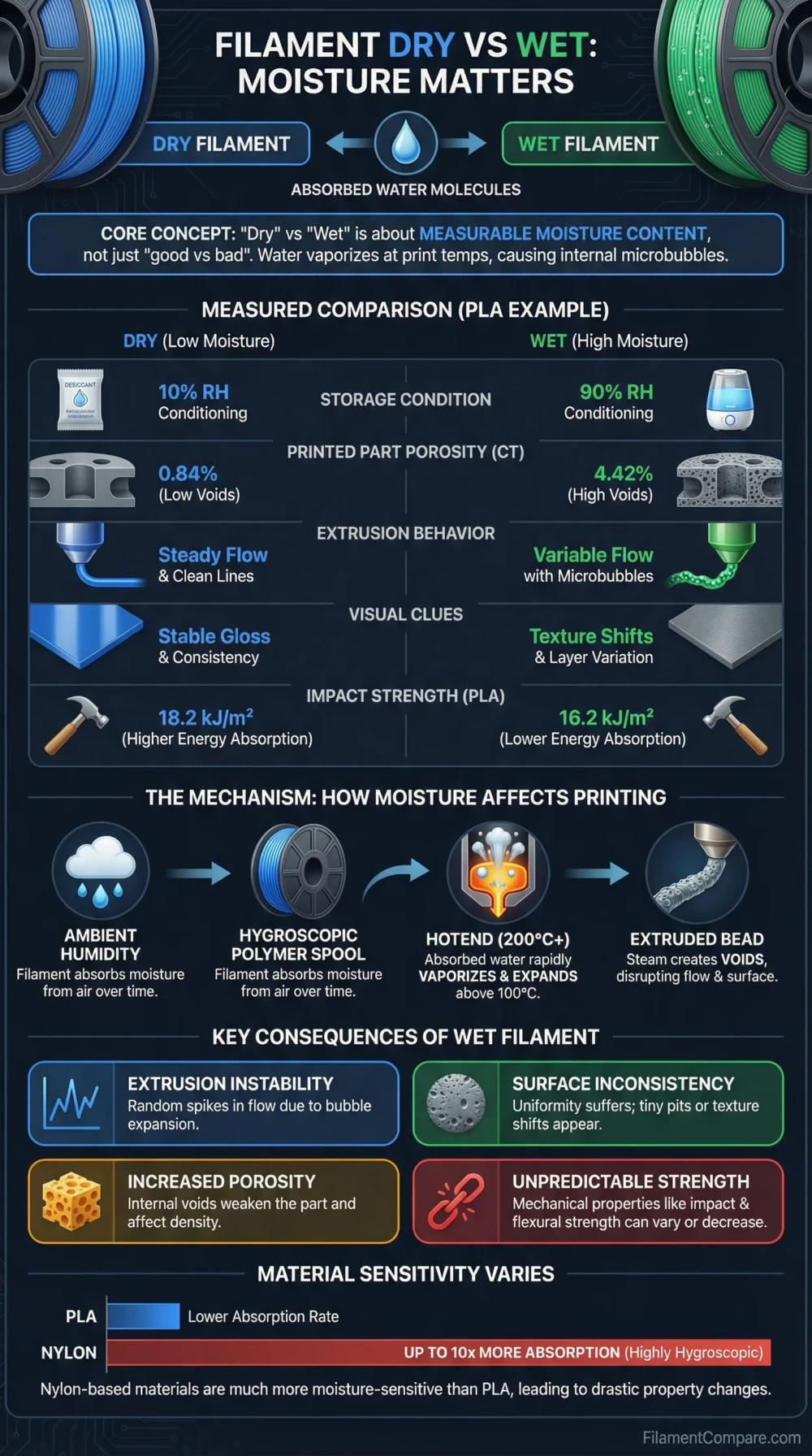
Dry filament prints more consistently, while wet filament can cause popping, stringing, rough surfaces, weaker layer bonding, and unstable extrusion. The difference is not the filament type itself, but the moisture condition of the same spool. A dry spool gives the slicer settings a fair chance to work; a moisture-loaded spool can make good settings look wrong.
Choose dry filament when you need clean surfaces, predictable extrusion, stronger layer adhesion, tight tolerances, transparent parts, or engineering-grade results.
Wet filament is not a separate material choice. It is a print-risk condition. It may still print basic draft parts, especially with less moisture-sensitive materials, but it is less suitable when part strength, surface quality, and repeatability matter.
Best for Clean Surface Finish
Dry filament produces smoother walls, fewer bubbles, and more even gloss or matte texture.
Better for Strong Parts
Dry filament is the safer choice when layer adhesion and part toughness matter.
Better for Nylon, TPU, PVA, and PC
Dry filament is strongly preferred because these materials are more moisture-sensitive than basic PLA.
Better for Fast Printing
Dry filament gives the hotend a steadier melt flow, which matters more at high speed.
Better for Transparent Prints
Dry filament helps reduce cloudy, foamy, or rough extrusion in clear PETG, PC, and Nylon grades.
Acceptable for Rough Drafts
Slightly wet filament may be usable for non-critical prototypes, but it should not be trusted for final parts.
| Category | Dry Filament | Wet Filament | Better Choice |
|---|---|---|---|
| Material Condition | Stored or dried to reduce absorbed moisture | Has absorbed water from humid air or poor storage | Dry filament |
| Extrusion Sound | Usually smooth and quiet | May pop, hiss, crackle, or release tiny steam bubbles | Dry filament |
| Surface Finish | Smoother, more consistent texture | Rough, fuzzy, bubbly, satin-like, or uneven finish | Dry filament |
| Stringing and Oozing | Easier to tune with retraction and temperature | Often increases stringing even when slicer settings are reasonable | Dry filament |
| Layer Adhesion | More predictable bonding between layers | Can reduce interlayer strength, especially in PETG, Nylon, TPU, and PC | Dry filament |
| Dimensional Stability | More consistent extrusion width and part size | Can create random blobs, voids, and inconsistent flow | Dry filament |
| Print Tuning | Settings changes are easier to judge | Can make temperature, retraction, and flow tuning misleading | Dry filament |
| Storage Need | Needs sealed storage after drying | Needs active drying before reliable use | Dry filament |
| Most Sensitive Materials | Nylon, PVA, BVOH, TPU, PC, PETG, and some filled blends benefit strongly from drying | These materials can show defects faster after exposure | Dry filament |
| Main Limitation | Requires storage discipline and drying time | Unreliable for final parts, detail, and strength | Dry filament |
Material Condition Profiles
Dry Filament Profile
- Condition: Low absorbed moisture before printing
- Extrusion behavior: Smoother melt flow with fewer bubbles
- Best suited for: Functional parts, cosmetic prints, transparent parts, flexible prints, and engineering materials
- Storage need: Airtight container, dry box, vacuum bag, or sealed bag with desiccant
- Drying need: Material-dependent; PLA is usually less urgent than Nylon, PVA, TPU, PC, or PETG
- Main advantage: More predictable print quality and more reliable layer bonding
Wet Filament Profile
- Condition: Moisture absorbed into or onto the filament over time
- Extrusion behavior: Popping, hissing, foaming, bubbles, blobs, and inconsistent flow can appear
- Best suited for: Only rough testing when quality and strength are not important
- Storage issue: Open-air storage, humid rooms, weak spool bags, or exhausted desiccant
- Drying need: Active drying is needed once the spool is moisture-loaded; desiccant alone mostly helps storage
- Main limitation: Print defects may look like slicer problems even when moisture is the real cause
Printing Performance Indicators
Why Wet Filament Prints Differently
Most FDM filaments can interact with moisture, but they do not all do it at the same speed or with the same damage pattern. PLA is often more forgiving, while Polyamide, PVA, TPU, PETG, PC, and some support materials are more sensitive to storage humidity. Prusa notes that highly hygroscopic materials should be kept dry or dried before printing, and that moisture can cause surface defects, blobs, low layer adhesion, bubbling, and smoke during extrusion[a].
The hotend makes the problem more visible. Moisture trapped in the filament is heated rapidly as the polymer melts. That can create small bubbles, inconsistent pressure, and audible popping. On the printed part, the result may look like random stringing, rough walls, weak seams, cloudy transparent prints, or tiny voids between lines.
This is why wet filament often leads to wrong troubleshooting. A user may lower temperature, increase retraction, reduce flow, or change fan speed, yet the issue returns because the spool itself is not in a printable condition.
Signs Your Filament Is Wet
Nozzle Symptoms
- Popping or crackling during extrusion
- Tiny bubbles in the extruded strand
- Steam-like wisps near the nozzle
- Uneven flow even at stable temperature
Print Surface Symptoms
- Rough or sandy-looking walls
- Unexpected satin texture on glossy materials
- Cloudiness in transparent filament
- Random blobs and tiny gaps
Mechanical Symptoms
- Lower layer bonding
- Parts breaking more easily along layer lines
- Weak snap-fit features
- Less reliable flexible hinges or clips
MatterHackers describes common wet-filament signs as bubbles, hissing, popping, cracking, and visible steam during extrusion. Their PETG example also shows how moisture can change surface texture and reduce interlayer adhesion[b].
Moisture Sensitivity by Filament Type
| Filament Type | Moisture Sensitivity | What Wet Printing Usually Looks Like | Drying Priority |
|---|---|---|---|
| PLA | Lower than Nylon or PVA, but not immune | Stringing, brittle behavior in older spools, rougher finish | Dry when symptoms appear or after poor storage |
| PETG | Moderate | Stringing, bubbles, rough surface, weaker layer bonding | Dry before important prints, especially after open-air storage |
| TPU / TPE | Moderate to high | Foaming, stringing, rough texture, inconsistent flexible walls | Dry before final flexible parts |
| Nylon / Polyamide | High | Popping, cloudy extrusion, weak layers, poor surface quality | Dry before printing and print from a dry box when possible |
| PVA / BVOH | High | Soft, sticky, bubbly, weak, or unreliable support structures | Keep sealed and dry before use |
| PC | Moderate to high | Bubbles, weak layers, surface haze, unstable extrusion | Dry before engineering prints |
| ABS / ASA | Usually lower than Nylon, TPU, or PVA | Can still show surface defects after poor storage | Dry when symptoms appear |
| Filled Filaments | Varies by base polymer and filler | Moisture behavior follows the base resin, but print defects can be harder to diagnose | Check manufacturer guidance |
UltiMaker’s storage guidance separates materials by moisture sensitivity and recommends airtight storage, desiccant, humidity monitoring, and dry boxes for moisture-sensitive filaments. It also notes that filaments affected by moisture can show popping sounds, visible defects, texture changes, or changed appearance in materials such as Nylon and PVA[c].
Drying Temperature and Time Ranges
Drying temperature should follow the filament manufacturer’s recommendation. Do not use a single temperature for every spool. PLA can soften or deform if overheated, while Nylon, PC, ASA, and other higher-temperature materials often need more heat to release moisture effectively.
| Material | Typical Drying Range | Typical Time Range | Notes |
|---|---|---|---|
| PLA | About 40–50°C | 4–8 hours | Use lower heat to reduce risk of softening or spool deformation |
| PETG | About 50–60°C | 4–8 hours | Often benefits from drying before cosmetic or functional prints |
| TPU | About 50–60°C | 4–8 hours | Drying can reduce foaming and stringing in flexible prints |
| Nylon | About 70–90°C | 6–12 hours | Highly grade-dependent; many users print from a dry box |
| ASA | About 70–85°C | 4–6 hours | Check spool heat tolerance before drying |
| PC | About 80–90°C | 4–8 hours | Needs stable temperature control for reliable engineering results |
| PVA / BVOH | Usually low to moderate heat, brand-dependent | Several hours or more | Keep sealed; prolonged open-air exposure can make support material unreliable |
Prusa lists example drying settings such as PLA/rPLA at 45°C for 6 hours, PETG at 55°C for 6 hours, TPU at 60°C for 4–6 hours, ASA at 80°C for 4 hours, and PC Blend at 85°C for 5 hours for its own Prusament materials[d]. Treat these as material-specific guidance, not universal values for every brand.
Dry Box vs Dryer vs Desiccant
Keeping Filament Dry
Airtight storage with desiccant is mainly a prevention method. It helps stop a good spool from absorbing more moisture after opening.
- Sealed storage box
- Vacuum bag with desiccant
- Reusable silica gel
- Humidity indicator or hygrometer
- Dry box feeding directly to the printer
Removing Moisture
Once a spool has absorbed enough moisture to show defects, passive desiccant is usually not enough. Active drying uses controlled heat and airflow to remove water from the filament.
- Dedicated filament dryer
- Food dehydrator with stable temperature
- Professional drying oven
- Heated dry box for printing and storage
- Manufacturer-approved printer drying mode
A dry box is not always the same as a dryer. Some boxes only store filament in a low-humidity space. Others actively heat and ventilate the spool. For Nylon, TPU, PVA, BVOH, and some PC or PETG prints, the best workflow is often: dry the spool first, then print from a sealed or heated dry box.
Use Case Recommendations
| Use Case | Better Condition | Reason |
|---|---|---|
| Beginner calibration cube | Dry filament | It removes moisture as a hidden variable during tuning. |
| Visual models | Dry filament | Surfaces are cleaner and less likely to show bubbles or random texture. |
| Functional brackets | Dry filament | Layer bonding and extrusion consistency matter for load-bearing parts. |
| Transparent PETG or PC parts | Dry filament | Moisture can increase cloudiness, bubbles, and roughness. |
| Nylon gears or fixtures | Dry filament | Nylon is moisture-sensitive and can lose print quality quickly after exposure. |
| Flexible TPU parts | Dry filament | Drying helps reduce foaming, stringing, and uneven walls. |
| Support material printing | Dry filament | PVA and BVOH can become unreliable when moisture-loaded. |
| Large multi-hour prints | Dry filament plus dry feeding | The filament may absorb moisture during long prints in humid rooms. |
| Rough draft prototype | Dry preferred, slightly wet may be acceptable | Minor defects may be tolerable if strength and finish are not important. |
| Production repeatability | Dry filament | Repeatable extrusion is needed across multiple copies. |
Choose Dry Filament When
Dry Filament Is the Right Condition When
- You hear popping, hissing, or crackling from the nozzle.
- The part surface looks rough even with a tuned profile.
- You are printing PETG, TPU, Nylon, PVA, BVOH, PC, or filled blends.
- The part needs reliable layer adhesion.
- You are printing transparent or cosmetic parts.
- The spool has been open in a humid room.
- You want to compare slicer settings fairly.
Wet Filament Is Less Suitable When
- The print is structural or load-bearing.
- The surface finish must be clean.
- The material is known to absorb moisture quickly.
- The print is long enough for exposed filament to keep absorbing moisture.
- The part uses thin walls, snap fits, living hinges, or small details.
- You are trying to diagnose stringing, blobs, or weak layers.
Practical Recommendation
Choose dry filament for final parts, clean surfaces, transparent prints, flexible parts, support materials, Nylon, PETG, TPU, PC, PVA, BVOH, and any print where repeatability matters.
Use moisture-suspect filament only for rough tests when strength, finish, and dimensional accuracy are not important. If the spool pops at the nozzle, strings unusually, or creates bubbly surfaces, dry it before changing slicer settings.
For the most reliable workflow, dry sensitive materials before printing, then store them sealed with fresh desiccant. In humid rooms, print directly from a dry box for moisture-sensitive spools.
Common Dry and Wet Filament Questions
Can wet filament ruin a print?
Yes. It can create surface defects, bubbles, stringing, weak layer bonding, and inconsistent extrusion. The risk is higher with Nylon, PVA, TPU, PC, and PETG than with a freshly opened PLA spool.
Can desiccant dry wet filament?
Desiccant is better for storage than recovery. It helps keep dry filament dry, but a moisture-loaded spool usually needs active drying with controlled heat and airflow.
Does PLA need to be dried?
PLA is usually less moisture-sensitive than Nylon or PVA, but it can still benefit from drying if it has been stored poorly or shows popping, stringing, brittleness, or rough surfaces.
Should PETG be dried before printing?
For important PETG prints, drying is a good practice. Wet PETG often shows stringing, bubbles, rough texture, and weaker layer bonding.
Can I use a kitchen oven for drying filament?
It is possible, but it is riskier than a filament dryer or dehydrator because many home ovens overshoot or fluctuate at low temperatures. Overheating can soften the filament or deform the spool.
Should filament be dried before every print?
Not always. PLA and ABS may not need drying before every print if stored well. Nylon, PVA, BVOH, TPU, PC, and some PETG spools are better candidates for regular drying or dry-box printing.
Resources Used
- [a] Drying filament – Prusa Knowledge Base (Used for hygroscopic filament behavior, moisture symptoms, storage priority, and general drying workflow.)
- [b] Beat Moisture Before It Kills Your 3D Printing Filament – MatterHackers (Used for practical wet-filament symptoms such as popping, bubbles, steam, PETG surface changes, and reduced interlayer adhesion.)
- [c] 3D Printer Filament Storage Tips and Tricks – UltiMaker (Used for storage methods, moisture-sensitive material notes, desiccant use, humidity monitoring, and visible signs of moisture exposure.)
- [d] Drying filament – Prusa Knowledge Base (Used for Prusament-specific example drying temperatures and times; values should be checked against each filament brand’s own guidance.)
