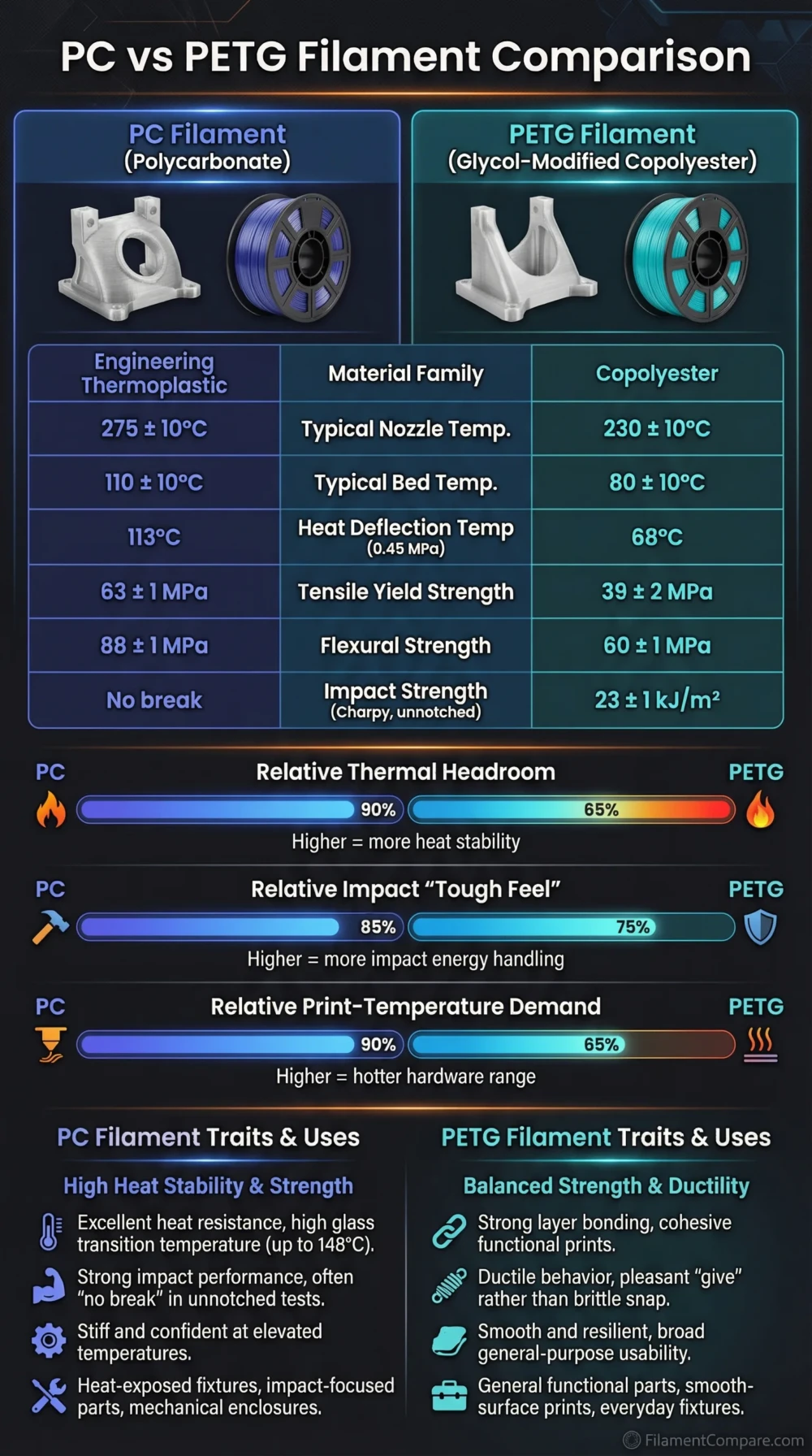
PC is the better choice for heat-loaded and mechanically demanding parts, while PETG is easier to print and more practical for everyday functional prints. PC asks more from the printer: higher nozzle temperature, a hot bed, dry filament, and usually an enclosure. PETG gives up some heat resistance but is easier to tune, less warp-prone, and more forgiving on open-frame printers.
Choose PC when the part needs higher heat resistance, better rigidity under load, improved creep resistance, and stronger engineering performance than standard PETG can usually provide.
Choose PETG when you want a durable, semi-flexible, low-warp material for brackets, holders, covers, containers, printer parts, and general workshop prints without the tuning demands of PC.
Best for Heat Resistance
PC holds shape better near heat sources. It is the safer pick for fan shrouds, warm mechanical housings, and parts exposed to moderate elevated temperatures.
Best for Easy Printing
PETG needs lower temperatures, usually prints without an enclosure, and has lower shrinkage. It is easier to use on common desktop FDM printers.
Better for Large Flat Parts
PETG is usually less warp-sensitive. PC can work well, but large flat PC prints need stronger bed adhesion, chamber control, and slower cooling.
Better for Rigid Functional Parts
PC is usually better when stiffness, load resistance, and shape retention matter more than print convenience.
Better for Everyday Brackets
PETG is a practical default for brackets, cable guides, light-duty mounts, storage parts, and printer accessories.
Better for Advanced Printers
PC fits enclosed printers with high-temperature hotends and reliable bed surfaces. It is less suitable for entry-level open-frame setups.
Better for Transparent Prints
PETG is usually easier to print in translucent colors. Clear PC exists, but FDM clarity depends heavily on tuning, wall thickness, layer lines, and drying.
Better for Low-Warp Printing
PETG has lower shrinkage behavior in typical desktop printing. PC can warp or crack if the thermal environment is not controlled.
| Property | PC | PETG | Better Choice |
|---|---|---|---|
| Material Family | Polycarbonate or PC blend | Glycol-modified PET copolyester | Use-case based |
| Print Difficulty | High; advanced tuning is often needed | Low to medium; beginner-friendly for a technical filament | PETG |
| Typical Nozzle Temperature | Usually around 270–295 °C depending on grade; Prusament PC Blend lists 275±10 °C[a] | Usually around 230–260 °C depending on formulation; PETG HF lists 230–260 °C[b] | PETG is easier on hardware |
| Typical Bed Temperature | Usually around 100–120 °C; PC Blend lists 110±10 °C | Usually around 65–90 °C depending on brand and speed profile | PETG |
| Enclosure Requirement | Recommended for many PC grades, especially larger parts | Usually not required | PETG |
| Heat Resistance | High; Prusament PC Blend is listed up to 113 °C heat resistance[c] | Moderate; PETG HF lists HDT values around 62–69 °C depending on load[d] | PC |
| Toughness | High, especially in well-dried and well-bonded prints | Good for everyday functional parts; more forgiving than brittle materials | PC |
| Stiffness | Usually higher | Moderate; has a slight flex before failure | PC |
| Layer Adhesion | Can be strong, but depends heavily on chamber heat and moisture control | Usually very good and easier to achieve | PETG |
| Moisture Sensitivity | Often moisture-sensitive; many PC grades need careful drying | Moisture-sensitive, but usually easier to manage than PC | PETG |
| Warping | Higher risk, especially on large parts and sharp corners | Low to moderate | PETG |
| Surface Finish | Satin to glossy depending on grade; moisture can make finish rough | Glossy, translucent, or matte depending on grade; can string if wet or too hot | Use-case based |
| Outdoor Suitability | Grade-dependent; some PC blends handle outdoor use better than basic PETG | Acceptable for mild outdoor use, but UV-stabilized grades are safer for long exposure | Grade-dependent |
| Typical Uses | Heat-loaded brackets, fan shrouds, machine parts, fixtures, rigid housings | Holders, covers, containers, printer parts, jigs, light-duty functional parts | Use-case based |
| Main Limitation | Printer requirements, warping, drying, bed adhesion control | Lower heat resistance, stringing, softer feel under load | Different limits |
The PC and PETG comparisons here are based on manufacturer material pages, technical sheets, and common FDM printing behavior; real results still change with brand, color, additives, drying, print orientation, chamber temperature, and slicer settings.
PC Material Profile
- Polymer type: Polycarbonate or modified PC blend for FDM printing.
- Print difficulty: Advanced; thermal control matters.
- Nozzle range: Usually high, often around 270–295 °C depending on grade.
- Bed range: Usually around 100–120 °C.
- Enclosure: Recommended for many parts, especially medium and large prints.
- Drying need: High for many PC filaments; wet PC can lose strength and surface quality.
- Typical behavior: Strong, rigid, heat-resistant, but tuning-sensitive.
- Best use cases: Heat-loaded parts, machine fixtures, rigid brackets, demanding housings, and parts where PETG may soften too early.
PETG Material Profile
- Polymer type: Polyethylene terephthalate glycol-modified copolyester.
- Print difficulty: Easy to medium; easier than PC on most printers.
- Nozzle range: Usually around 230–260 °C depending on grade and speed profile.
- Bed range: Usually around 65–90 °C.
- Enclosure: Usually not needed.
- Drying need: Helpful; wet PETG can string, pop, and lose surface consistency.
- Typical behavior: Tough, slightly flexible, low-warp, and adhesive to many build plates.
- Best use cases: Everyday functional prints, covers, organizers, brackets, mounts, jigs, containers, and printer parts.
These scores are relative print-use indicators, not lab ratings. Brand, filler content, colorant, moisture level, wall count, print direction, chamber temperature, and slicer profile can move the result noticeably.
Printability and Printer Requirements
PETG is the more practical material for most desktop printers. It prints at lower nozzle temperatures, uses a lower bed temperature, and usually does not need an enclosure. It can still string or over-adhere to smooth PEI, but those problems are easier to manage than PC warping.
PC is more demanding because the whole print environment matters. A high-temperature hotend, a hot bed, controlled cooling, a suitable build surface, and dry filament all influence the final part. On an open printer, small PC parts may work, but larger parts can lift, crack, or curl at corners.
Build plate note: PC and PETG can both grip strongly to some surfaces. For smooth PEI, a glue-stick separation layer is often used to reduce the chance of damaging the sheet. Check the filament maker’s surface guidance before printing.
Heat Resistance and Shape Retention
Heat resistance is the clearest reason to choose PC. Standard PETG is useful for many indoor functional parts, but it can soften or creep earlier when the part is under load near warmth. PC usually keeps its shape better in warm housings, near motors, around printers, or in fixtures that see moderate heat.
This does not mean every PC print is safe for every hot environment. Part geometry, load, wall thickness, annealing, grade, and continuous exposure time matter. A thin PC clip can still deform if it is loaded near its comfort limit. PETG is also not a safe default for hot car interiors, heater-adjacent parts, or enclosed electronics unless the expected temperature stays inside the material’s usable range.
Practical Heat Rule
Use PETG for normal indoor functional prints and mild warmth. Use PC when the part must resist higher temperature while also carrying load or holding geometry.
Mechanical Behavior: Toughness, Stiffness, and Creep
PC usually has the stronger engineering profile. It is better when a part must stay rigid, resist impact, and hold shape under stress. Well-printed PC can work for fixtures, brackets, hinges, structural covers, and machine-side parts that would be too warm or too loaded for PETG.
PETG is not weak. It is often a better everyday functional material than PLA because it has better ductility and layer adhesion in many print setups. PETG can bend before breaking, which helps clips, covers, and holders survive handling. Its limit is that it is softer and more creep-prone than PC when the part is loaded for a long time.
For snap-fit parts, the answer is not automatic. PETG can work well when the snap is not too thin and does not sit under constant strain. PC can be better for heat and stiffness, but it needs the right geometry and print orientation to avoid brittle layer failure. For repeated flexing, neither material replaces TPU or nylon.
Moisture Sensitivity and Drying
Both materials should be kept dry, but PC is less forgiving. Moisture in PC can cause bubbling, rough surface texture, weaker layer bonding, and inconsistent extrusion. Many PC filaments need drying before serious functional prints, even if the spool looks fine.
PETG also absorbs enough moisture to affect print quality. Wet PETG often shows more stringing, popping, cloudy extrusion, and rougher top surfaces. The difference is practical: PETG usually remains printable for casual parts, while PC is more likely to lose the properties that made it worth choosing in the first place.
PC Storage Priority
- Use a dry box for long prints.
- Dry before critical mechanical parts.
- Keep the spool sealed with desiccant after use.
- Watch for popping, steam marks, and rough walls.
PETG Storage Priority
- Dry when stringing increases.
- Store sealed after opening.
- Use lower humidity storage for translucent and high-speed grades.
- Retune temperature after drying because flow can change.
Surface Finish, Stringing, and Detail
PETG often prints with a glossy surface and good layer fusion. It can look clean on functional parts, but it is more prone to fine strings than PLA. Lowering nozzle temperature, drying the filament, tuning retraction, and controlling fan speed usually help.
PC can produce strong, clean parts, but moisture and cooling control decide much of the finish. If the filament is wet, the surface can look rough and the part may lose strength. If cooling is too aggressive, layer bonding and warping can suffer. PC is usually chosen for performance first, not for tiny cosmetic detail.
Outdoor and Chemical Exposure
Neither standard PC nor standard PETG should be treated as a universal outdoor material. PETG is often used for mild outdoor parts, but long UV exposure can still discolor or reduce performance unless the grade is UV-stabilized. PC can offer better toughness and heat resistance, and some PC blends have better UV fit, but grade selection matters.
For long-term outdoor use, ASA or a UV-stabilized engineering grade may be a better match. For occasional outdoor brackets, covers, or garden fixtures, PETG can be enough if the part is not safety-critical and not exposed to high heat. PC is the better pick when outdoor warmth and mechanical load combine, provided the chosen grade is suitable.
Build Plate and Adhesion Behavior
PETG usually sticks very well to textured or satin PEI. On smooth PEI, it can bond too strongly, so a release layer may be needed. PC also needs serious bed adhesion, but the risk is two-sided: too little adhesion causes warping, while too much adhesion can damage the sheet.
For PC, a heated chamber or enclosure helps more than simply raising bed temperature. A brim, rounded corners, lower fan, slower first layers, and a controlled ambient temperature can reduce edge lift. For PETG, the main tuning issue is usually balancing adhesion, stringing, and cooling rather than fighting heavy shrinkage.
| Use Case | More Suitable Material | Reason |
|---|---|---|
| Beginner functional prints | PETG | Lower temperature needs, less warping, and easier tuning. |
| Heat-loaded printer fan shroud | PC | Better heat resistance and shape retention near warm components. |
| General brackets and holders | PETG | Good toughness with simpler printing and lower failure risk. |
| Rigid machine fixture | PC | Better stiffness and creep resistance under load. |
| Large organizer tray | PETG | Lower shrinkage and easier large-format printing. |
| Warm electronics housing | PC | More suitable when the enclosure may see elevated temperatures. |
| Transparent or translucent display part | PETG | Usually easier to print cleanly in translucent colors. |
| Outdoor garden clip | Depends on grade | PETG can work for mild use; UV-stabilized PC or ASA may be better for long exposure. |
| Snap-fit cover | Depends on geometry | PETG is forgiving; PC is stronger but needs careful orientation and tuning. |
| High-detail miniature | Neither is ideal | PLA or resin usually gives sharper detail with less tuning. |
| Car interior accessory | PC | PC is more suitable than PETG for moderate heat, but hot interiors can still exceed material limits. |
| Fast workshop prototype | PETG | Lower setup time and fewer printer requirements. |
Choose PC When
- The part must keep its shape under higher heat.
- You need better rigidity than PETG can usually offer.
- The part will sit under load for a long time.
- You have an enclosed printer or can control chamber conditions.
- You can dry the filament and tune bed adhesion properly.
- The print is a functional engineering part, not mainly a decorative model.
PC Is Less Suitable When
- Your printer cannot reach the required nozzle and bed temperatures.
- The printer is open-frame and the part is large or flat.
- You need a fast, low-risk print with little setup.
- You cannot dry or store the filament properly.
- The part needs repeated flexible bending.
Choose PETG When
- You want a practical technical filament for daily use.
- The part needs good toughness but not high heat resistance.
- You are printing brackets, holders, covers, trays, mounts, or jigs.
- Your printer is open-frame or not built for high-temperature materials.
- You need lower warping risk on larger parts.
- You want a wide color range and easier translucent options.
PETG Is Less Suitable When
- The part will sit near sustained heat.
- The design must stay rigid under constant load.
- Fine stringing would be hard to clean from the model.
- You need very sharp miniature detail.
- The part is safety-related and material performance has not been tested.
Choose PC if heat resistance, stiffness, and long-term shape retention matter more than print convenience. It is the better engineering pick when your printer and workflow can support it.
Choose PETG if you need a dependable functional material that prints with less tuning. It is the better default for most hobby, workshop, and general-purpose parts.
Neither material replaces the other. PETG is the easier all-rounder; PC is the higher-temperature engineering option. The right choice depends on the load, heat exposure, printer capability, and how much tuning the part justifies.
Common PC and PETG Questions
Is PC stronger than PETG?
Usually yes for stiffness, heat resistance, and load-bearing engineering use, but print quality matters. A wet or poorly bonded PC print can perform worse than a well-printed PETG part.
Is PETG easier to print than PC?
Yes. PETG uses lower temperatures, has lower warping risk, and usually works on open-frame printers. PC normally needs more heat, better drying, and tighter thermal control.
Can PETG replace PC for functional parts?
PETG can replace PC for many everyday functional prints, especially brackets, covers, and light-duty mounts. It is not a direct replacement when the part must resist higher heat or sustained load.
Does PC need an enclosure?
For many PC prints, especially larger parts, an enclosure is strongly recommended. Small parts may print without one on some machines, but chamber control improves layer bonding and lowers warping risk.
Does PETG need drying?
Drying is not always required for casual prints, but it helps when PETG strings, pops, or leaves rough surfaces. For clean functional parts, dry storage is still a good habit.
Which one is better for car interior parts?
PC is more suitable than PETG for moderate heat exposure, but car interiors can become very hot. The safest approach is to check the expected temperature, use a suitable grade, and test the printed part under real conditions before relying on it.
Resources Used
- [a] Polycarbonate (PC) – Prusa Knowledge Base (Used for PC print temperature, bed temperature, enclosure guidance, warping behavior, and moisture notes.)
- [b] Bambu Filament Technical Data Sheet V1.0 PETG HF (Used for PETG HF nozzle range, bed range, drying settings, speed profile, and mechanical/thermal reference values.)
- [c] Prusament PC Blend Urban Grey 900g (NFC) (Used for PC Blend heat resistance, print setup, basic material attributes, and user-level printer requirements.)
- [d] Technical datasheet Prusament PETG V0 by Prusa Polymers (Used as a PETG technical reference for HDT, density, moisture absorption, interlayer adhesion, and recommended print settings.)
- PETG – Prusa Knowledge Base (Used for general PETG printability, low-warp behavior, layer adhesion, and beginner suitability.)
