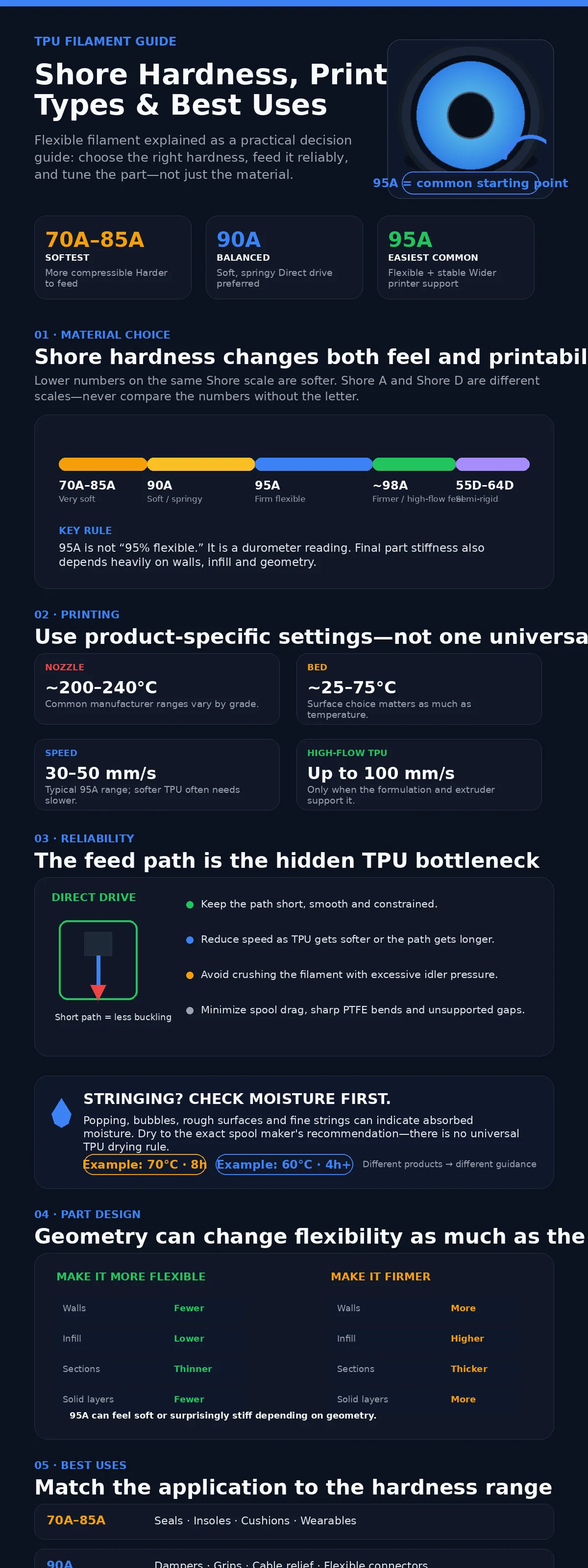
TPU filament is a thermoplastic polyurethane used for 3D printed parts that need to bend, stretch, compress, absorb impact, or grip a surface instead of behaving like a rigid plastic. The most familiar grade is 95A, but TPU ranges from very soft Shore A materials to much firmer Shore D formulations. Hardness changes far more than the feel of the finished part: it affects feeding, print speed, retraction, shape retention, and which applications make sense. The Shore rating should be one of the first specifications checked when choosing TPU.
| TPU Hardness | Relative Feel | Printability | Typical Uses | Main Printing Consideration |
|---|---|---|---|---|
| 70A–80A | Very soft and highly compressible | Demanding | Soft seals, flexible joints, cushioning parts, specialty wearables | Filament can buckle or compress easily in the feed path |
| 85A | Soft and rubber-like | Moderate to demanding | Insoles, wristbands, soft seals, shock-absorbing parts | Short, well-constrained filament path strongly preferred |
| 90A | Soft but springy | Moderate | Cable protectors, dampers, flexible connectors, grips, straps | Direct drive is preferable; slower feeding improves reliability |
| 95A | Firm flexible material | Easiest common flexible grade | Phone cases, bumpers, feet, gaskets, protective covers, flexible fixtures | Works on a wider range of extruders than softer TPU |
| About 98A | Firm, limited compression | Easier than softer TPU | Fast-printed flexible parts, rollers, tougher elastic components | Some high-flow TPU formulations fall near this feel even when sold under a 95A family name |
| 55D–64D and Harder Shore D TPU | Semi-rigid to near-rigid elastomer | Relatively easy | Wear-resistant housings, mechanical buffers, firm rollers, limited-flex parts | Shore D is a different scale and should not be numerically compared with Shore A |
The hardness categories above describe practical trends rather than universal recipes. Flashforge currently lists TPU grades from soft Shore A materials through 64D, while Polymaker’s current flexible range includes 90A, 95A, and a high-flow TPU sold as 95A but described as feeling closer to 98A.[a]
What Is TPU Filament?
TPU stands for thermoplastic polyurethane. It is an elastomer that can be softened by heat, extruded through an FDM hotend, and solidified again while retaining rubber-like mechanical behavior. TPU belongs to the wider TPE family (thermoplastic elastomers), but TPU and TPE are not interchangeable material names. TPE is the broader category; TPU is one chemistry within it.
Unlike PLA, ABS, or PETG, a TPU part can deform substantially and then recover much of its original shape. That behavior makes it useful for grips, seals, protective cases, cable strain relief, soft feet, vibration isolation, flexible hinges, rollers, and impact-absorbing components. Some firmer TPU grades sit much closer to engineering plastics in feel, while very soft grades behave more like rubber.
TPU is not one material specification. Two filaments labeled “TPU” can differ in Shore hardness, polyurethane chemistry, flow rate, rebound, elongation, abrasion behavior, UV stabilization, moisture response, and print speed. Product-specific technical data should take priority over generic TPU settings.
Understanding TPU Shore Hardness
Shore hardness measures resistance to indentation using a durometer. A higher reading on the same Shore scale means a harder material. Current ISO 48-4 covers Shore durometer testing for thermoplastic and vulcanized rubbers and defines Shore A for normal-hardness rubbers and Shore D for harder materials.[b]
That last detail matters. 95A and 64D are not points on one continuous numerical scale. A 64D TPU is much firmer than 95A even though the number 64 is lower. The letter is part of the measurement.
- Shore A
- Used for softer and medium-hard elastomers. Most familiar flexible TPU filaments are sold somewhere around 85A–95A, although softer and firmer formulations exist.
- Shore D
- Used for harder elastomers and plastics. TPU measured on this scale can feel semi-rigid compared with ordinary 90A or 95A filament.
- Lower Number on the Same Scale
- Generally means a softer material that deforms more easily.
- Higher Number on the Same Scale
- Generally means greater resistance to indentation and a firmer feel.
85A vs 90A vs 95A TPU
85A TPU is noticeably softer than 95A and is better suited to parts that must compress easily, conform to another surface, or feel rubber-like. Current Flashforge guidance lists 85A for applications such as wristbands, insoles, and soft seals.[c] The flexibility comes with a printing cost: soft filament is easier to bend inside the extruder before it reaches the melt zone.
90A TPU sits between soft 85A and firm 95A. Polymaker’s current TPU90 data reports 90A hardness and about 592% X-Y elongation at break, with a recommended 210–230 °C nozzle range and 30–70 mm/s printing speed.[d] It suits dampers, straps, flexible connectors, soft grips, and parts that need more compliance than 95A.
95A TPU is the common all-purpose range because it balances flexibility with much easier feeding. Polymaker TPU95 lists a 95A hardness, more than 550% X-Y elongation at break, and a 210–230 °C nozzle range.[e] It still bends easily in thin sections, but the raw filament is firm enough to pass through many extruders more reliably than 85A or 90A.
Shore Hardness Does Not Fully Determine Part Flexibility
A 95A label describes the material test, not the bending stiffness of every possible printed object. A thin 95A phone case can bend easily. A thick solid block made from the same spool may barely flex by hand. Geometry changes the result.
Polymaker specifically notes that walls, infill, top and bottom layers, and layer height affect how flexible a printed TPU part feels.[e] That means a designer can change compliance without changing filament.
- Reduce wall count when the shell needs to bend more easily.
- Reduce infill density when compression or cushioning is required.
- Use thinner sections where controlled flex is part of the design.
- Increase walls or solid sections when a soft TPU must still hold its shape.
- Change the Shore grade when geometry alone cannot produce the required softness or firmness.
Types of TPU Filament
| TPU Type | Main Characteristic | Typical Applications | Printing Note |
|---|---|---|---|
| Soft TPU | Usually around 70A–85A | Soft seals, cushions, wearables, highly flexible joints | Short filament path and very controlled feeding become more important |
| General Flexible TPU | About 90A | Dampers, grips, cable protection, flexible connectors | Direct drive strongly preferred |
| General-Purpose TPU | About 95A | Cases, feet, gaskets, bumpers, sleeves, flexible fixtures | Easiest flexible range for many desktop printers |
| High-Flow TPU | Higher melt flow for faster extrusion | Production parts, fast flexible prototypes, elastic manufacturing aids | Can print much faster than traditional TPU when the extruder can feed it reliably |
| Hard TPU | High Shore A or Shore D hardness | Firm rollers, wear-resistant housings, mechanical buffers | Feeds more like a rigid filament but produces less flexible parts |
| Foaming / Aero TPU | Controlled foaming reduces density and changes softness | Lightweight flexible components, RC parts, cushioning structures | Flow and temperature affect expansion, density, and final stiffness |
| UV-Stabilized TPU | Additives improve resistance to sunlight | Outdoor flexible parts where the manufacturer provides suitable weathering guidance | Do not assume all TPU is naturally UV-stable |
High-Flow and High-Speed TPU
Traditional TPU is associated with slow printing because the filament compresses and buckles more easily than a rigid plastic. High-flow formulations change that limit. PolyFlex TPU95-HF, for example, is formulated for increased flow and currently lists a 200–220 °C nozzle range, 25–50 °C bed, and 40–100 mm/s printing speed on Polymaker’s product page.[f]
The manufacturer also notes that the material feels somewhat harder than ordinary 95A, closer to approximately 98A. High-flow TPU therefore should not be treated as ordinary 95A with a faster slicer profile. Flow behavior and hardness can both change.
Foaming TPU
Foaming TPU uses temperature-activated expansion to create a lower-density flexible structure. Flashforge’s current TPU/PEBA material guidance includes TPU-Aero grades and explains that foaming behavior can be adjusted through flow ratio.[g] This allows density, cushioning, and flexibility to be tuned in ways that ordinary solid TPU cannot reproduce as easily.
Foaming makes calibration more sensitive. Extrusion temperature, flow ratio, wall count, and cooling affect the finished density and dimensions, so a profile intended for solid TPU should not simply be copied to an Aero-style grade.
Hard Shore D TPU
Hard TPU extends the material family beyond rubber-like parts. Flashforge lists 64D TPU as a near-rigid grade for applications such as wear-resistant gears, elastic housings, and mechanical buffers.[c] A Shore D TPU can still have useful elastomeric behavior while feeling far firmer than 95A.
TPU Printing Settings
TPU settings vary more than many generic charts suggest. Current manufacturer examples range from roughly 200–240 °C at the nozzle and from near-room-temperature beds to 75 °C, depending on hardness and formulation. Start with the exact filament profile rather than applying one TPU temperature to every spool.
| TPU Product | Hardness | Nozzle | Bed | Speed / Feeding Note | Drying Guidance |
|---|---|---|---|---|---|
| PolyFlex TPU90 | 90A | 210–230 °C | 25–60 °C | 30–70 mm/s; direct extruder preferred | 70 °C for 8 h if moisture has been absorbed |
| PolyFlex TPU95 | 95A | 210–230 °C | 25–60 °C | 30–50 mm/s; direct drive recommended | 70 °C for 8 h |
| PolyFlex TPU95-HF | 95A nominal, firmer feel | 200–220 °C | 25–50 °C | 40–100 mm/s; high-flow formulation | 70 °C for 8 h if moisture has been absorbed |
| Prusament TPU 95A | 95A | 220–240 °C | 55–75 °C | Official printer profiles available for supported Prusa systems | Usually unnecessary with good storage; at least 4 h at 60 °C if moisture symptoms appear[h] |
The drying rows reveal an important TPU detail: there is no universal pre-print drying rule. Some manufacturers recommend drying as a normal preparation step, while Prusa states that its current TPU 95A generally does not require drying when stored correctly. Follow the exact spool’s guidance.
Direct Drive vs Bowden for TPU
A direct-drive extruder places the drive gears close to the hotend, leaving less unsupported filament between the point where TPU is pushed and the nozzle. That short path matters because flexible filament can bend, compress, or buckle instead of transmitting extrusion force cleanly.
Polymaker recommends direct drive for its soft TPU products and notes that TPU90 can be difficult on Bowden-style systems. TPU95 can work through longer filament paths, but the manufacturer recommends reducing speed as the distance between extruder and hotend increases.[i]
What Helps TPU Feed Reliably
- Keep the filament path short, smooth, and well constrained.
- Avoid large gaps around the extruder gears where soft filament can escape sideways.
- Do not overtighten the idler until the filament is visibly crushed.
- Reduce print speed when the feed path is long or the TPU is very soft.
- Minimize sharp PTFE bends and unnecessary spool drag.
Flashforge’s current TPU guidance makes the same point from another angle: a shorter and straighter filament path reduces feeding resistance, while excessive gear pressure can deform the filament and contribute to feed failure.[g]
TPU Retraction and Stringing
TPU tends to ooze because the filament itself can stretch and compress between the extruder and nozzle. Stringing may come from moisture, excess nozzle temperature, long travel moves, or unsuitable retraction. It is not always solved by adding more retraction.
Blanket advice such as “disable retraction for all TPU” is too broad. Polymaker currently lists measurable retraction settings for TPU90, TPU95, and TPU95-HF, including different direct- and indirect-drive values. The correct setting depends on the printer and material.
Drying should be checked before aggressive retraction changes. Prusa lists stringing and bubbles among the signs that its TPU 95A may have absorbed moisture, while Flashforge also identifies incomplete drying as a source of TPU stringing and oozing.[h]
TPU Moisture and Drying
TPU can absorb moisture from humid air. The visible result can include popping, fine strings, bubbles, rough surfaces, inconsistent extrusion, or a change in transparency. Some grades are more forgiving than others.
The safest rule is use the drying temperature published for the exact filament. Polymaker’s TPU90 and TPU95 guidance uses 70 °C for eight hours, while Prusament TPU 95A specifies at least four hours at 60 °C only when moisture-related printing issues appear. A generic high-temperature drying recipe can damage a spool or exceed another formulation’s recommendation.
After drying, store TPU in a sealed container or bag with active desiccant. Printing from a dry box can be useful in humid environments or during long jobs, particularly with softer formulations that already have a narrow feeding margin.
TPU Build Plate Adhesion
Flexible filaments can adhere very strongly to some build surfaces. Prusa recommends satin, PA Nylon, PP, or textured sheets for its TPU 95A and specifically warns against printing directly on smooth PEI without a separator because removal can damage the surface.[h]
With TPU, glue stick may therefore serve as a release layer rather than simply an adhesion promoter. The correct surface depends on the printer and filament manufacturer, so build-plate instructions deserve the same attention as nozzle temperature.
TPU Cooling and Bridging
Cooling requirements vary by formulation. Polymaker currently recommends the fan on for TPU90, TPU95, and TPU95-HF, while printer-specific profiles may use different percentages. More airflow can improve small details and bridging; too much cooling can affect interlayer fusion for some grades.
Soft TPU does not bridge as neatly as rigid PLA because extruded strands can sag before they become mechanically stable. Orientation matters. Large unsupported spans should be minimized when surface quality or dimensional accuracy matters.
TPU Supports Can Be Difficult to Remove
TPU often has very strong layer bonding, which is useful in the finished part but inconvenient when support is printed from the same material. Support interfaces can fuse firmly to the model and stretch instead of snapping away cleanly.
Polymaker recommends orienting flexible parts to reduce support requirements where possible and offers dedicated support-material options for compatible multi-material workflows.[e] When TPU must support itself, larger interface gaps and accessible support geometry can make removal easier.
TPU Mechanical Properties
Elongation and Elasticity
TPU can stretch far beyond the strain levels associated with common rigid filaments. Current UltiMaker TPU 95A data reports more than 560% elongation at break in the XY orientation and more than 700% in its YZ specimen under the stated printed-part test.[j]
The same sheet shows why print orientation still matters. Its upright Z specimen reaches only about 82% elongation at break and has far lower tensile stress at break than the in-plane specimens. Flexible does not mean isotropic.
Layer Adhesion
TPU generally forms strong layer interfaces because deposited material remains highly compatible with the previous layer. This is useful for parts that stretch, twist, or flex repeatedly. It also explains why TPU supports can become difficult to separate from the model.
Abrasion and Wear
Wear resistance is one reason TPU is used for rollers, feet, guides, protective surfaces, belts, and moving contact parts. The degree of abrasion resistance depends on polyurethane chemistry and hardness, so a spool selected for repeated friction should have manufacturer test data that matches the intended duty cycle.
Impact Behavior
A flexible TPU component can absorb energy by deforming rather than concentrating stress in a brittle fracture. UltiMaker’s September 2025 TPU 95A sheet reports 36.0 ± 6.6 kJ/m² notched Charpy impact strength for its printed XY specimen.[j] Other TPU formulations can produce very different results.
TPU Heat Resistance
TPU thermal behavior is easy to misread because softening and deformation tests can produce very different temperatures. The current UltiMaker TPU 95A sheet lists an HDT of 50.3 ± 1.1 °C at 0.455 MPa but a Vicat softening temperature of 115.7 ± 0.9 °C.[j]
Those values are not contradictory. HDT measures deformation under a stated load, while Vicat measures indentation softening under another test condition. A soft TPU component under continuous stress can therefore lose dimensional stability well before a higher Vicat number is reached.
- HDT
- Useful for understanding deformation under a specified laboratory load.
- Vicat Softening Temperature
- A penetration-based softening test. It should not be used as the loaded service temperature of a flexible bracket or seal.
- Melting Temperature
- Relates to melting of the polymer and is far above the temperature where a loaded printed part may already deform.
- Service Temperature
- Depends on the actual grade, mechanical load, geometry, duration, tolerance, environment, and acceptable deformation.
Chemical and Oil Resistance
Many TPU formulations have useful resistance to oils, grease, and some industrial chemicals. Polymaker TPU95 currently rates resistance to oils and grease as good, while weak acids and weak alkalis receive a more limited rating in its published data.[e]
TPU should not be described as universally chemical-resistant. Polyurethane chemistry, concentration, exposure time, temperature, mechanical stress, and additives all change compatibility. A grip occasionally wiped with a cleaner is a different application from a seal continuously immersed in the same liquid.
TPU for Outdoor Use
Outdoor performance is formulation-specific. TPU as a broad polymer family should not automatically be called UV-resistant. Polymaker states that its flexible TPU products use additives to improve UV resistance, which is an important distinction: UV stability can be designed into a grade rather than assumed from the TPU name.[i]
For a long-term exterior seal, bumper, cable protector, or flexible cover, check the exact product’s UV and weathering data. Color, thickness, temperature, water exposure, and mechanical strain can all affect outdoor life.
TPU Design: Walls and Infill Matter
Material hardness is only half of a flexible-part design. Wall thickness and internal geometry can dominate the final feel. A hollow 95A TPU shell may collapse under finger pressure while a heavily walled 85A object can feel surprisingly firm.
| Design Variable | More Flexible Direction | Firmer Direction | Main Effect |
|---|---|---|---|
| Wall Count | Fewer walls | More walls | Walls often control bending more strongly than infill |
| Section Thickness | Thinner | Thicker | Small thickness changes can strongly alter bending stiffness |
| Infill Density | Lower | Higher | Changes compression and internal support |
| Solid Top/Bottom Layers | Fewer | More | Changes surface stiffness and compression |
| Part Width | Narrow flexible zones | Broad sections | Geometry changes resistance to bending |
| Shore Hardness | Lower Shore A | Higher Shore A or Shore D grade | Changes the underlying material response |
Best Uses for TPU Filament
| Application | Useful TPU Range | Why TPU Fits |
|---|---|---|
| Phone and Device Cases | Usually 95A or firm flexible grade | Impact absorption, grip, and enough firmness to retain shape |
| Soft Seals and Gaskets | About 70A–90A depending on compression target | Conforms to mating surfaces and recovers after compression |
| Machine Feet | 90A–95A | Grip, vibration isolation, and impact damping |
| Cable Strain Relief | 85A–95A | Repeated bending without rigid stress concentration |
| Vibration Dampers | Soft to medium TPU | Elastic deformation absorbs movement and impact |
| Watch Straps and Wearable Bands | Usually softer TPU | Flexibility and repeated bending |
| Protective Bumpers | 90A–95A | Deforms during impact instead of behaving like a rigid shell |
| RC Tires and Flexible Wheels | Application-specific soft TPU | Grip and controlled deformation |
| Rollers | 95A to hard TPU | Wear resistance with controlled compliance |
| Insoles and Cushioning Components | About 70A–85A or foaming TPU | Soft compression and energy absorption |
| Protective Sleeves and Covers | 90A–95A | Conforms around rigid objects while resisting impact |
| Mechanical Buffers | 95A to Shore D TPU | Combines elastic response with higher shape retention |
| Flexible Hinges | 85A–95A | Allows repeated movement when geometry avoids excessive local strain |
| Wear-Resistant Semi-Rigid Parts | Shore D TPU | Higher hardness with elastomeric wear behavior |
Choosing the Right TPU Hardness
Choose Softer TPU When
- The part must compress easily under a low force.
- A soft rubber-like feel matters.
- The design is a seal, insole, soft grip, cushion, flexible joint, or wearable component.
- The printer has a short, well-constrained filament path.
Choose 90A–95A TPU When
- The part must flex but still hold a defined shape.
- You need a balance between printability and elastic behavior.
- The application is a bumper, case, foot, gasket, cable protector, sleeve, or functional flexible fixture.
- You want an easier entry point into flexible FDM printing.
Choose Hard TPU When
- The part needs wear resistance with only limited flex.
- A soft 90A or 95A formulation deforms too much under load.
- The application is a firm roller, mechanical buffer, housing, or semi-rigid wear component.
- Easy filament feeding matters more than rubber-like softness.
Common TPU Printing Problems
| Symptom | Likely Areas to Check | Why It Happens |
|---|---|---|
| Filament Buckles Near the Extruder | Speed, idler pressure, filament path, unsupported gaps | Soft filament bends instead of transmitting feed force |
| Heavy Stringing | Moisture, nozzle temperature, travel path, retraction | TPU can ooze and stretch between pressure changes |
| Bubbles or Popping | Filament moisture and excessive nozzle temperature | Absorbed water can turn to vapor during extrusion |
| Under-Extrusion | Feed resistance, speed, nozzle temperature, moisture | Flexible filament may slip or compress before reaching the hotend |
| Part Is Too Stiff | Walls, infill, section thickness, Shore hardness | Printed geometry can overpower the flexibility of the base material |
| Part Is Too Soft | Wall count, infill, geometry, harder TPU grade | The structure does not provide enough support for the required load |
| Print Is Difficult to Remove | Build surface and separator layer | TPU can bond very strongly to smooth print surfaces |
| Supports Tear the Surface | Orientation, support interface, alternative support material | Strong TPU-to-TPU layer bonding makes support separation difficult |
TPU Filament Questions
What Does 95A Mean on TPU Filament?
95A is the material’s hardness on the Shore A durometer scale. It describes resistance to indentation, not the exact bending stiffness of the finished print. Wall thickness, infill, geometry, and layer structure also affect how flexible a 95A TPU part feels.
Is 85A TPU Softer Than 95A?
Yes. Both values use the Shore A scale, so 85A is softer than 95A. It compresses and bends more easily, but the raw filament is also harder to push reliably through an extruder.
Is Shore D TPU Harder Than 95A?
Yes, a typical Shore D TPU is considerably firmer. Shore A and Shore D are separate durometer scales; the numbers should not be compared without the letter. ISO 48-4 defines Shore A for normal-hardness rubber and Shore D for harder materials.[b]
What TPU Hardness Is Easiest to Print?
Firm 95A-class TPU is a practical starting point for many printers. Softer 85A and 90A grades are more likely to compress or buckle in the feed path, while harder and high-flow TPU formulations can feed more easily.
Does TPU Need a Direct-Drive Extruder?
Not always, but direct drive is strongly preferred for softer TPU. Firm 95A formulations can work on some Bowden systems when printed slowly, while soft TPU becomes much more sensitive to a long unsupported filament path.
Does TPU Need an Enclosure?
Most ordinary TPU does not require a heated enclosure. Current Polymaker TPU90, TPU95, TPU95-HF, and Prusament TPU 95A guidance all support printing without a heated chamber. Product-specific recommendations still take priority.
Does TPU Need a Heated Bed?
It depends on the grade and build surface. Current TPU products use bed recommendations ranging from about 25 °C to 75 °C. A warm bed can improve consistency on larger parts, but excessive adhesion can make removal harder.
Does TPU Need to Be Dried Before Every Print?
No universal rule applies. Some manufacturers recommend drying their TPU more aggressively, while Prusa states that its TPU 95A normally does not need drying when stored correctly. Dry when the product documentation calls for it or when moisture symptoms appear.
Why Is TPU So Stringy?
The filament can store and release pressure by stretching and compressing, and TPU may also ooze from a hot nozzle. Moisture, excessive temperature, travel moves, and retraction settings can all increase stringing.
Can TPU Be Printed Fast?
Yes, when the grade is designed for high flow and the extruder can control it. Current PolyFlex TPU95-HF is rated up to 100 mm/s, while softer or lower-flow grades generally require slower movement. Printer geometry and volumetric flow remain part of the limit.
Is TPU Heat Resistant?
TPU can tolerate useful temperatures, but loaded deformation may begin far below its melting or Vicat temperature. Current UltiMaker TPU 95A data, for example, lists 50.3 °C HDT at 0.455 MPa and 115.7 °C Vicat softening. The correct temperature limit depends on the actual grade and load.
Can TPU Be Used Outdoors?
Some TPU grades are formulated for outdoor use or contain UV-stabilizing additives, but UV resistance is not guaranteed by the TPU name alone. Check the exact manufacturer’s weathering information for long-term sunlight exposure.
Does TPU Need a Hardened Nozzle?
Standard unfilled TPU normally does not. A hardened nozzle becomes relevant if the TPU contains abrasive fillers or pigments. Follow the nozzle requirement for the exact composite formulation.
Technical Resources Used
- [a] Flashforge TPU Filament Guide — Used for current 85A, 90A, 95A, and 64D hardness positioning, printability differences, and application examples.
- [b] ISO 48-4:2018 — Determination of Hardness by Durometer Method — Used for the current Shore A and Shore D hardness-scale definitions. ISO confirmed this edition in 2024.
- [c] Flashforge TPU/PEBA Usage Guide — Used for hardness ordering, soft TPU applications, 64D application examples, feed-path guidance, drying, and Aero TPU information.
- [d] PolyFlex TPU90 — Used for 90A hardness, current print settings, speed, drying guidance, and mechanical data.
- [e] PolyFlex TPU95 — Used for 95A hardness, mechanical data, printer compatibility, print settings, support behavior, and the effect of printed geometry on flexibility.
- [f] PolyFlex TPU95-HF — Used for high-flow TPU printing temperatures, speed range, hardness context, drying guidance, and high-speed printing behavior.
- [g] Flashforge TPU/PEBA Printing and Aero TPU Guidance — Used for feed-path control, moisture-related printing issues, foaming TPU flow control, and support considerations.
- [h] Prusament TPU 95A Material Guide — Used for current TPU 95A print temperatures, surface preparation, printer requirements, moisture guidance, and troubleshooting.
- [i] Polymaker Flexible TPU Family — Used for direct-drive versus Bowden guidance, hardness differences across TPU90/TPU95/TPU95-HF, support behavior, and UV-stabilization context.
- [j] UltiMaker TPU 95A Technical Data Sheet, September 2025 — Used for current printed elongation, tensile orientation effects, Charpy impact strength, Shore hardness, HDT, Vicat softening, melting temperature, and specimen-test context.
