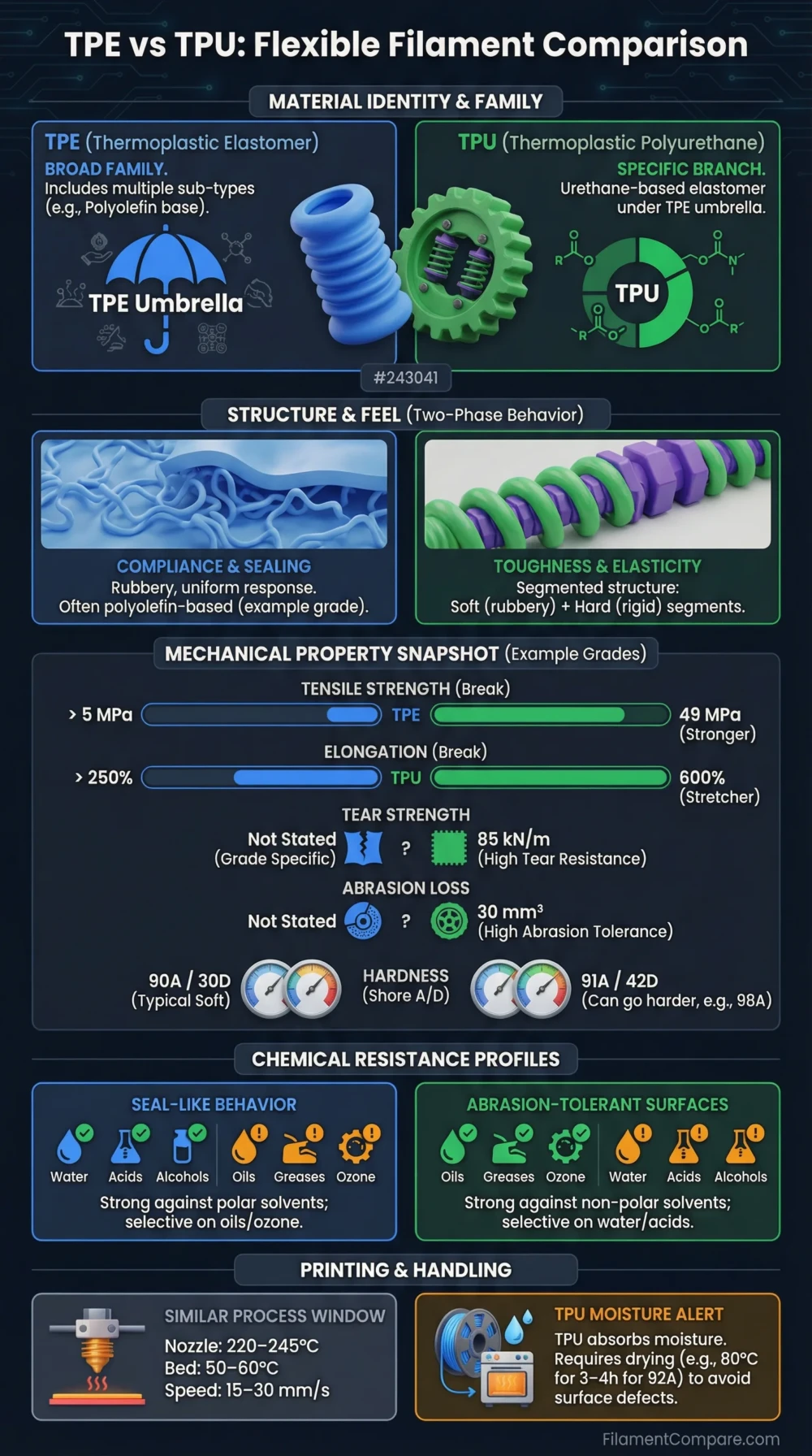
TPE and TPU are both flexible 3D printing materials, but they are not the same choice for every project. TPU is usually the better option for most FDM users because it is easier to print, more widely available, more abrasion resistant, and more consistent across brands. TPE is softer and more rubber-like, but it can be harder to print and often requires slower speeds, better filament control, and more tuning.
If you want a flexible filament for phone cases, protective parts, soft grips, RC tires, seals, hinges, vibration dampers, or wearable parts, the real question is not simply “which one is more flexible?” The better question is: do you need maximum softness, or do you need reliable printing and durable flexible performance?
TPE vs TPU: Quick Answer
Choose TPU if you want the easier, stronger, and more reliable flexible filament. TPU is the better default choice for most users because it has better printability, better abrasion resistance, better layer consistency, and a wider range of hardness options. It is also much easier to find in common Shore hardness ratings such as 95A, 90A, and 85A.
Choose TPE if you need a softer, more rubber-like feel and are willing to print slowly. TPE can feel more elastic and softer than many TPU filaments, but it is usually more difficult to feed through the extruder, more sensitive to printer setup, and less forgiving on Bowden-style machines.
| Category | TPE | TPU | Better Choice |
|---|---|---|---|
| Ease of printing | Difficult to moderate | Moderate to easy for flexible filament | TPU |
| Flexibility | Very flexible, rubber-like | Flexible, varies by Shore hardness | TPE for softness |
| Strength | Good, but highly variable | Very good | TPU |
| Abrasion resistance | Good | Excellent | TPU |
| Elastic recovery | Very good | Very good to excellent | Tie |
| Beginner friendliness | Low | Medium | TPU |
| Bowden printer compatibility | Poor | Possible with harder TPU | TPU |
| Soft-touch feel | More rubber-like | Slightly firmer, depending on grade | TPE |
| Part durability | Good | Excellent | TPU |
| Availability | Less common | Very common | TPU |
What Is TPE?
TPE stands for thermoplastic elastomer. It is a broad family of flexible, rubber-like plastics that can be melted and processed like thermoplastics while behaving elastically after cooling. In 3D printing, TPE usually refers to very soft flexible filaments that bend, stretch, compress, and recover shape more like rubber than rigid plastic.
The important detail is that TPE is not one single material. It is a category. Different TPE filaments can be based on different elastomer chemistries, which means printability, softness, strength, temperature resistance, surface feel, and durability can vary a lot from one brand to another.
TPE is often chosen when the printed part needs a soft, grippy, elastic feel. However, very soft TPE can buckle in the extruder, twist inside the filament path, and jam if the printer is not well prepared for flexible materials.
What Is TPU?
TPU stands for thermoplastic polyurethane. It is technically a type of thermoplastic elastomer, but in 3D printing it is usually treated as its own material category because it is far more common, easier to buy, and more predictable than generic TPE filament.
TPU combines flexibility with high toughness, abrasion resistance, impact resistance, and strong layer bonding. It is commonly used for phone cases, gaskets, protective bumpers, tool grips, flexible mounts, shoe components, RC tires, drone parts, vibration dampers, and mechanical parts that need to bend without snapping.
Most TPU filaments are identified by Shore hardness. A common 95A TPU is flexible but still firm enough to print on many FDM printers. Softer TPU grades such as 85A or 75A feel more rubber-like, but they become harder to print and usually work best with a direct drive extruder.
Main Difference Between TPE and TPU
The main difference is that TPE is a broad flexible material family, while TPU is a specific polyurethane-based flexible material widely used in 3D printing. In practical terms, TPU is usually tougher, more abrasion resistant, easier to print, and more consistent. TPE is often softer and more rubber-like, but it is usually more challenging to print successfully.
| Factor | TPE | TPU |
|---|---|---|
| Material type | General thermoplastic elastomer category | Thermoplastic polyurethane, a specific elastomer type |
| Typical feel | Soft, rubbery, elastic | Flexible, tough, slightly firmer depending on hardness |
| Print behavior | Can buckle and jam easily | More controlled filament feeding, especially 95A TPU |
| Durability | Depends heavily on formulation | Usually very durable |
| Best use case | Very soft rubber-like parts | Functional flexible parts with durability |
Printability: TPU Is Usually Easier
TPU is generally easier to print than TPE because it is often firmer and more consistent as filament. A common 95A TPU can usually be printed on a direct drive printer with moderate tuning. Some Bowden printers can also print harder TPU if the filament path is well constrained and print speed is reduced.
TPE is usually more difficult because softer filament behaves less like a solid rod and more like a rubber cord. Instead of being pushed cleanly into the hotend, it can compress, bend, twist, or escape from small gaps in the extruder path. This makes under-extrusion, inconsistent flow, and jams more likely.
| Printability Factor | TPE | TPU |
|---|---|---|
| Extruder feeding | More difficult | More reliable |
| Direct drive printer | Strongly recommended | Recommended |
| Bowden printer | Not ideal | Possible with harder TPU |
| Speed tolerance | Low | Medium |
| Retraction tolerance | Low | Low to medium |
| Risk of jams | Higher | Lower |
For most users, TPU is the more practical flexible filament. TPE is better treated as a specialty material for users who already understand flexible filament tuning.
Flexibility and Softness
TPE can be softer and more rubber-like than standard TPU, especially when comparing very soft TPE against common 95A TPU. If the goal is a squishy, highly elastic, soft-touch part, TPE may feel closer to rubber.
However, TPU is available in many hardness levels. A 95A TPU feels flexible but firm. An 85A TPU feels softer and more elastic. A 75A TPU can feel much more rubber-like but becomes more difficult to print. This means TPU can cover a wide range of flexibility needs while still offering better durability and availability than many TPE options.
| Hardness / Feel | Typical Material Behavior | Print Difficulty | Best For |
|---|---|---|---|
| 95A TPU | Flexible but firm | Moderate | Phone cases, mounts, protective parts |
| 90A TPU | More flexible and softer | Moderate to hard | Grips, seals, flexible joints |
| 85A TPU | Soft and elastic | Harder | Wearables, soft bumpers, rubber-like parts |
| Soft TPE | Very rubber-like and stretchy | Difficult | Very soft grips, gaskets, elastic parts |
Strength and Durability
TPU usually wins for functional durability. It has excellent toughness, strong impact resistance, good tear resistance, and very strong abrasion resistance. This makes it a better choice for parts that will be handled, bent, rubbed, compressed, dropped, or exposed to repeated movement.
TPE can also be durable, but the result depends heavily on the exact formulation. Some TPE filaments are excellent for soft elastic parts, while others may wear faster, print less consistently, or have weaker layer bonding compared with TPU.
For parts that need to survive repeated flexing, TPU is usually the safer choice. For parts that need maximum softness more than maximum wear resistance, TPE can still make sense.
Abrasion Resistance
TPU has a major advantage in abrasion resistance. This is one of the reasons it is commonly used for protective cases, wheels, tires, flexible feet, wearable parts, and parts that rub against other surfaces. If the part will slide, scrape, roll, flex under load, or experience repeated contact, TPU is usually better.
TPE can provide good abrasion resistance depending on the formulation, but TPU is generally the more reliable option for wear-prone parts.
Elasticity and Shape Recovery
Both TPE and TPU can bend and return to shape, but they may feel different in use. TPE often feels softer and more rubber-like, while TPU often feels springier, tougher, and more resistant to tearing.
For a soft gasket or grip that needs a rubber feel, TPE may be attractive. For a flexible hinge, protective bumper, or part that must bend repeatedly without wearing out, TPU is often the stronger option.
Heat Resistance
Heat resistance depends on the exact filament brand and formulation, but TPU generally performs better than very soft flexible materials in functional printing conditions. Most standard TPU and TPE filaments are not high-temperature engineering materials, so neither should be used near engines, hot enclosures, heated machinery, or parts that stay under load at elevated temperatures unless the filament datasheet specifically supports that use.
For warm indoor use, grips, cases, pads, and general flexible parts, both can work. For more demanding functional use, check the specific filament’s heat deflection temperature, softening behavior, and recommended service temperature before choosing.
Moisture Sensitivity
Both TPE and TPU can absorb moisture, and wet flexible filament can print poorly. Symptoms include popping sounds, bubbles, rough surface texture, stringing, weak layers, and inconsistent extrusion.
TPU is especially known for needing dry storage. TPE can also be moisture-sensitive depending on formulation. For best results, store both materials in a sealed dry box with desiccant and dry the filament before printing if surface quality or extrusion becomes inconsistent.
Recommended Print Settings for TPE and TPU
Settings vary by brand, hardness, printer, nozzle, and extruder type, but the following ranges are a useful starting point for comparison.
| Setting | TPE Starting Range | TPU Starting Range | Notes |
|---|---|---|---|
| Nozzle temperature | 220–240°C | 210–240°C | Follow filament brand recommendations first |
| Bed temperature | 30–60°C | 40–60°C | Some TPU prints well on lower bed heat |
| Print speed | 10–25 mm/s | 20–40 mm/s | Softer materials need slower speeds |
| Retraction | Very low or off | Low | Too much retraction can cause jams |
| Cooling | Low to medium | Medium | Adjust for bridging and layer bonding |
| Extruder type | Direct drive strongly preferred | Direct drive preferred | Harder TPU may work on Bowden |
| Build surface | PEI, textured sheet, glue-assisted surface | PEI, textured sheet, glue-assisted surface | A release layer may prevent over-adhesion |
For both materials, keep the filament path as constrained as possible. Any gap between the drive gear and hotend can let flexible filament buckle, especially with soft TPE or low-Shore TPU.
Direct Drive vs Bowden: Which Works Better?
Direct drive printers are much better for both TPE and TPU. The shorter filament path gives the extruder more control over the soft filament, reducing the risk of compression, buckling, delayed extrusion, and inconsistent flow.
Bowden printers can print some TPU, especially firmer 95A TPU, but they are not ideal for very soft TPU or TPE. The long Bowden tube adds friction and compression, making it harder to control flexible filament accurately.
| Printer Setup | TPE | TPU | Recommendation |
|---|---|---|---|
| Direct drive | Best option | Best option | Recommended for all flexible filaments |
| Short Bowden path | Difficult | Possible with harder TPU | Use slow speeds and low retraction |
| Long Bowden path | Not recommended | Difficult but possible with 95A TPU | Avoid very soft grades |
| Unconstrained extruder path | High jam risk | Jam risk | Upgrade or modify filament path |
Surface Finish and Part Feel
TPE usually gives a softer, more rubber-like surface feel. It can be useful for grips, pads, flexible covers, and parts that need a more elastic touch. However, surface quality can suffer if the filament is wet or the printer struggles to feed it consistently.
TPU often gives a cleaner and more consistent surface finish because it is easier to extrude reliably. It may feel less rubbery than very soft TPE, but it usually produces stronger and more repeatable parts.
Best Use Cases for TPE
TPE is best when softness and rubber-like elasticity are more important than easy printing. It is a good option for users who already have a direct drive printer and are comfortable tuning flexible filament settings.
- Soft grips and handles
- Flexible pads
- Rubber-like covers
- Soft gaskets and seals
- Elastic wearable parts
- Parts that need a softer feel than standard TPU
TPE is not the best first flexible filament for most users. It is better as a specialty material after you already understand how flexible filaments behave.
Best Use Cases for TPU
TPU is the better choice for most practical flexible parts. It provides a strong balance of flexibility, toughness, wear resistance, and printability.
- Phone cases
- Protective bumpers
- RC tires and wheels
- Drone parts
- Vibration dampers
- Flexible hinges
- Tool grips
- Wearable parts
- Non-slip feet
- Functional flexible prototypes
If you are unsure which material to buy, start with 95A TPU. It gives enough flexibility for many projects while staying much easier to print than softer flexible filaments.
TPE vs TPU for Common 3D Printing Projects
| Project Type | Better Material | Reason |
|---|---|---|
| Phone case | TPU | Better durability, impact resistance, and print reliability |
| Soft grip | TPE or soft TPU | TPE feels more rubber-like, soft TPU is easier to control |
| RC tire | TPU | Better abrasion resistance and toughness |
| Gasket | TPE or TPU | Depends on required softness and compression behavior |
| Vibration damper | TPU | Durable and easier to tune by infill and wall thickness |
| Wearable flexible part | TPU | More durable and easier to print consistently |
| Very soft rubber-like part | TPE | Can provide a softer elastic feel |
| Protective bumper | TPU | Excellent impact and abrasion resistance |
| Flexible hinge | TPU | Better fatigue resistance and layer bonding |
| Beginner flexible filament test | TPU | Much easier starting point |
How to Make TPU or TPE Parts More Flexible
Material choice matters, but slicer settings and model design also control flexibility. A 95A TPU part can feel stiff if it has thick walls and high infill. The same material can feel much softer with thinner walls, lower infill, and a flexible geometry.
- Lower infill to increase softness and compressibility.
- Use fewer walls if the part does not need high strength.
- Use flexible patterns such as gyroid or low-density infill for softer behavior.
- Reduce part thickness where bending is needed.
- Choose a lower Shore hardness if the material itself is too firm.
Before switching from TPU to TPE, try adjusting infill, wall count, and geometry. Many users can get the flexibility they need from TPU without moving to a harder-to-print TPE filament.
Common Problems When Printing TPE and TPU
| Problem | Likely Cause | Fix |
|---|---|---|
| Filament jams near extruder | Filament buckling in an open path | Use direct drive, reduce speed, constrain filament path |
| Under-extrusion | Printing too fast or too much friction | Lower speed, increase temperature slightly, check spool drag |
| Stringing | Wet filament or high temperature | Dry filament, reduce temperature, tune retraction carefully |
| Blobs and rough surface | Moisture or inconsistent feeding | Dry filament and reduce speed |
| Poor layer bonding | Temperature too low or cooling too high | Increase nozzle temperature and reduce cooling |
| Part too stiff | Too much infill or too many walls | Reduce infill, wall count, or part thickness |
| Part stuck too strongly to bed | TPU bonding aggressively to surface | Use glue stick or release layer |
Pros and Cons of TPE
TPE Advantages
- Very soft and rubber-like feel
- Excellent flexibility
- Good elastic recovery
- Useful for soft-touch parts
- Good for special flexible applications
TPE Disadvantages
- Harder to print than TPU
- Higher risk of jams and under-extrusion
- Usually needs direct drive
- Less common than TPU
- Performance varies heavily by brand and formulation
Pros and Cons of TPU
TPU Advantages
- Easier to print than most TPE filaments
- Excellent abrasion resistance
- Very good impact resistance
- Strong layer bonding
- Widely available in many hardness levels
- Best default flexible filament for most users
TPU Disadvantages
- Still harder to print than rigid PLA or PETG
- Can string if wet or overheated
- Soft TPU grades need careful tuning
- Can be too firm if using 95A for very soft applications
- May stick too aggressively to some build surfaces
Which One Should Beginners Choose?
Beginners should choose TPU, preferably a harder grade such as 95A TPU. It is still flexible, but it is firm enough to feed more reliably through the extruder. It also has much more community support, more slicer profiles, and more brand options than TPE.
TPE is not impossible to print, but it is a poor first choice for most beginners because it exposes every weakness in the printer’s filament path. If the extruder has gaps, the Bowden tube is long, the spool has drag, or retraction is too aggressive, TPE problems appear quickly.
Final Verdict: TPE or TPU?
TPU is the better choice for most 3D printing users. It offers the best balance of flexibility, toughness, abrasion resistance, printability, and availability. For functional flexible parts, 95A TPU is usually the safest starting point.
TPE is better when you specifically need a softer, more rubber-like material and are prepared for slower, more difficult printing. It can be useful for soft-touch parts, elastic components, and rubber-like prints, but it is less forgiving than TPU.
For most projects, start with TPU. Move to TPE only if standard TPU is too firm and slicer adjustments cannot give the softness you need.
FAQ: TPE vs TPU
Is TPE the same as TPU?
No. TPE is a broad category of thermoplastic elastomers. TPU is thermoplastic polyurethane, which is a specific type of flexible elastomer. In 3D printing, TPU is usually treated separately because it is more common, more durable, and easier to print than many generic TPE filaments.
Is TPU better than TPE?
TPU is better for most users because it is easier to print, more abrasion resistant, more widely available, and more predictable. TPE can be better when the part needs a very soft rubber-like feel.
Which is more flexible, TPE or TPU?
TPE is often softer and more rubber-like than common 95A TPU. However, TPU is available in softer grades such as 85A or 75A, so flexibility depends on Shore hardness, not just the material name.
Can a Bowden printer print TPU or TPE?
A Bowden printer can sometimes print harder TPU, especially 95A TPU, if the speed is low and the filament path is well constrained. TPE is much harder on Bowden printers and is usually not recommended unless the printer is specifically modified for flexible filament.
Is TPU good for phone cases?
Yes. TPU is one of the best FDM materials for phone cases because it is flexible, impact resistant, durable, and easier to print than very soft flexible filaments.
Does TPE need a direct drive extruder?
A direct drive extruder is strongly recommended for TPE. Very soft flexible filament can buckle in long or poorly constrained filament paths, so direct drive gives much better control.
Does TPU absorb moisture?
Yes. TPU can absorb moisture and should be stored dry. Wet TPU can cause stringing, popping, bubbles, rough surfaces, and weaker prints.
Which flexible filament should I buy first?
Buy 95A TPU first. It is flexible enough for many practical parts but firm enough to print more reliably than softer TPU or TPE.
