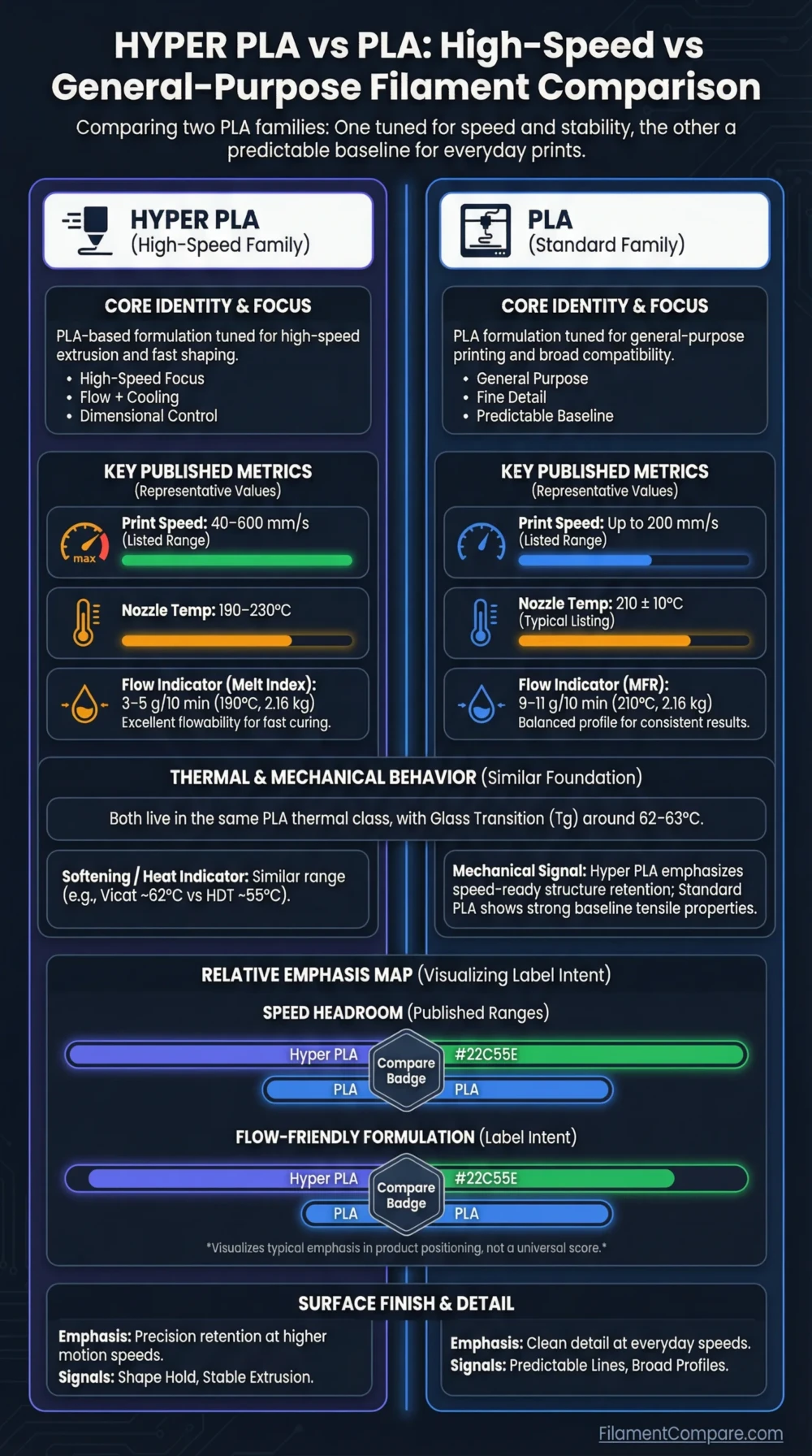
Hyper PLA is a high-speed PLA formulation made for faster FDM printing, while standard PLA is the safer everyday choice for easy, low-warp prints at normal speeds. Both are PLA-family materials, so they share similar heat limits, low enclosure needs, and good detail potential. The main decision is not “which PLA is stronger,” but whether your printer and slicer can use Hyper PLA’s faster flow behavior without losing surface quality or dimensional control.
Choose Hyper PLA if you use a high-speed printer, need faster prototypes, or want PLA-like ease with better flow at higher print speeds.
Choose standard PLA if you want predictable results, broad color availability, lower tuning effort, and clean prints on almost any beginner FDM printer.
Best for High-Speed Printing
Hyper PLA is the better fit when the printer can handle higher acceleration, flow rate, and cooling demand.
Best for Beginners
Standard PLA is easier to tune because most slicers, printers, and build plates already have well-tested PLA profiles.
Better for Fast Prototypes
Hyper PLA can reduce print time on draft parts, fit checks, fixtures, and visual models where speed matters.
Better for Color Choice
Standard PLA usually offers more colors, matte variants, silk finishes, glitter blends, wood-filled options, and specialty appearances.
Better for Tight Tolerances
Standard PLA is often easier to dial in for small holes, threads, snap details, and parts printed at moderate speed.
Better Heat Tolerance
Neither has a clear advantage. Hyper PLA and normal PLA both remain limited by PLA-family softening behavior unless a special annealable grade is used.
Better for Basic Printers
Standard PLA is the safer option for Bowden extruders, older hotends, weaker part cooling, and printers with modest acceleration.
Better for Speed Testing
Hyper PLA is useful for testing flow limits, pressure advance, input shaping, and cooling performance on newer CoreXY and fast bedslinger machines.
| Category | Hyper PLA | Standard PLA | Better Choice |
|---|---|---|---|
| Material Family | High-speed PLA-based filament | Standard polylactic acid filament | Use-case based |
| Print Difficulty | Easy to moderate, depending on speed | Easy | PLA |
| Typical Nozzle Temperature | Usually 190–230°C; some TDS testing uses 220°C[a] | Commonly around 200–215°C, grade-dependent[b] | Similar |
| Typical Bed Temperature | Usually 25–60°C, depending on bed surface[c] | Usually 40–60°C on common PLA profiles[d] | Similar |
| Speed Potential | Designed for faster flow; some Hyper PLA data lists up to 600 mm/s under suitable conditions | Can print fast on tuned printers, but standard profiles are usually slower | Hyper PLA |
| Enclosure Requirement | Usually not needed | Usually not needed | Tie |
| Heat Resistance | PLA-family limit; glass transition is around the low 60°C range in one Hyper PLA RFID TDS | PLA-family limit; HDT values around the mid-to-high 50°C range are common in PLA datasheets | Similar |
| Toughness | Often tuned for better flow and usable mechanical behavior at speed | Stiff and clean, but can be brittle depending on grade | Grade-dependent |
| Stiffness | Moderate to high, formulation-dependent | High for a low-temperature beginner filament | Similar |
| Layer Adhesion | Can be good when temperature and cooling match the speed | Predictable at moderate speeds | Depends on tuning |
| Moisture Sensitivity | Moderate; dry storage still helps | Moderate; less demanding than Nylon, but not moisture-proof | Similar |
| Surface Finish | Clean at tuned speeds; fast printing can show ringing or cooling limits | Clean and detailed at normal speeds | PLA |
| Outdoor Suitability | Limited for long-term UV and heat exposure | Limited for long-term UV and heat exposure | Tie |
| Typical Uses | Fast prototypes, display models, fit checks, draft parts, high-speed printer testing | Models, miniatures, jigs, school projects, decorative parts, low-heat indoor prints | Use-case based |
| Main Limitation | Needs printer cooling, motion control, and slicer tuning to show its speed benefit | Slower for large draft parts and less optimized for very high volumetric flow | Different limits |
This Hyper PLA and PLA comparison uses official product data, technical datasheets, and common FDM printing behavior; real results can shift with brand, color, nozzle size, cooling, moisture level, slicer profile, and print orientation.
Hyper PLA Material Profile
- Polymer type: PLA-based high-speed formulation
- Print difficulty: Easy at normal speed, more tuning-sensitive at very high speed
- Nozzle range: Typically 190–230°C
- Bed range: Typically 25–60°C
- Enclosure: Usually not needed
- Drying need: Store dry; drying helps if popping, stringing, or rough extrusion appears
- Typical behavior: Better flow behavior for fast motion, with cooling becoming more important
- Best use cases: Fast prototypes, visual models, fit-test parts, printer speed calibration
PLA Material Profile
- Polymer type: Standard polylactic acid filament
- Print difficulty: Easy
- Nozzle range: Often around 190–220°C, depending on brand and color
- Bed range: Usually 40–60°C, with some surfaces working lower
- Enclosure: Usually not needed
- Drying need: Helpful after humid storage, but less demanding than hygroscopic engineering filaments
- Typical behavior: Low warp, crisp detail, stiff feel, predictable bed adhesion
- Best use cases: Beginner prints, models, miniatures, indoor parts, low-heat fixtures
Relative Printing Performance
These meters are relative print-use indicators, not lab ratings. Brand, additives, pigment, moisture, nozzle size, part cooling, acceleration, layer height, and slicer settings can change the final print.
Speed Behavior and Flow Control
Hyper PLA’s main purpose is faster printing. It is made to melt, flow, and solidify in a way that suits high-speed FDM machines better than many older PLA profiles. That does not mean every printer can suddenly print cleanly at very high speeds. The hotend must push enough plastic, the extruder must stay consistent, and the part cooling system must freeze small features before the next layer arrives.
Standard PLA can also print faster than many beginner profiles suggest, especially with a modern hotend and tuned input shaping. The difference is that normal PLA is not always optimized for the same high-flow behavior. At fast speeds it may need higher nozzle temperature, wider line tuning, reduced volumetric flow, or more conservative acceleration to avoid under-extrusion and weak layer bonding.
Speed Does Not Come from Filament Alone
A fast filament helps, but the print speed limit is often set by volumetric flow, part cooling, motion system stability, and slicer tuning. If the printer already struggles with ringing, weak cooling, or inconsistent extrusion, Hyper PLA will not remove those limits by itself.
Printability, Tuning, and Surface Quality
Standard PLA is still the easier material for clean first prints. It sticks well to common build plates, warps less than ABS or Nylon, prints without an enclosure, and has a wide slicer profile base. For miniatures, text, logos, small boxes, and decorative prints, standard PLA often gives cleaner surfaces because it is usually printed at calmer speeds.
Hyper PLA can look very clean too, but the tuning window changes when print speed rises. Fast outer walls need enough cooling. Corners need acceleration control. Retraction and pressure advance need testing to control stringing, seams, and small gaps. On a well-tuned fast printer, Hyper PLA can produce good visual parts in far less time. On a basic printer, the advantage may be small.
Hyper PLA Tuning Priorities
- Check maximum volumetric flow before raising speed.
- Use enough nozzle temperature for the chosen speed.
- Keep part cooling high for small details.
- Tune pressure advance or linear advance when available.
- Test outer wall speed separately from infill speed.
PLA Tuning Priorities
- Start with the printer’s default PLA profile.
- Use a temperature tower for color or brand changes.
- Keep bed adhesion simple with PEI, glass, or textured plates.
- Reduce speed for small text, overhangs, and visible walls.
- Dry the spool if stringing appears after humid storage.
Heat Resistance and Shape Retention
Hyper PLA should not be treated as a high-temperature material. It is still part of the PLA family, and its softening behavior remains close to ordinary PLA unless the manufacturer specifically sells it as an annealable or high-heat grade. A Hyper PLA RFID datasheet lists a glass transition temperature of 62°C and a Vicat softening temperature of 62.3°C, which puts it in the same general heat range as many PLA filaments.
Standard PLA is also limited in warm environments. Polymaker’s PolyLite PLA data lists a 61°C glass transition temperature and a 58°C heat deflection temperature at 1.8 MPa. Prusament PLA lists heat deflection temperature values around 55°C under ISO 75 test conditions. These values do not mean every printed part fails at the same temperature, but they explain why PLA-family parts can soften in warm cars, near electronics, or under load in sunlight.
Heat note: For hot car interiors, outdoor brackets, lamp housings, motor mounts, or parts under load near heat, neither Hyper PLA nor standard PLA is the first material to consider. PETG, ASA, ABS, PC blends, or annealable high-heat PLA grades may fit better depending on the printer and part requirement.
Strength, Stiffness, and Layer Adhesion
Standard PLA is known for stiffness and sharp detail, not high impact absorption. It works well for rigid models, jigs, fixtures, housings, and parts that do not need to flex. Its weakness is that some grades can crack instead of bending, especially with thin snap-fit arms or parts loaded across layer lines.
Hyper PLA may show useful mechanical performance, but “stronger” needs context. A fast print with poor cooling or insufficient nozzle temperature can have weaker layer bonding than a slower, well-tuned PLA print. Print orientation, wall count, infill pattern, nozzle temperature, and moisture can matter more than the label on the spool.
For functional parts, compare the actual requirement: stiffness, tensile load, impact resistance, layer adhesion, creep resistance, or heat exposure. Hyper PLA can be a good choice for fast jigs and prototypes. Standard PLA remains a reliable choice for rigid indoor parts where print quality and repeatability matter more than print time.
Printer Requirements and Slicer Profiles
Hyper PLA is most useful on printers with modern motion control and high-flow hotends. CoreXY machines, newer high-speed bedslingers, and printers with input shaping can use more of its speed range. A basic printer with a low-flow hotend may still print Hyper PLA, but the realistic speed gain may be modest.
Standard PLA has better profile coverage. Cura, PrusaSlicer, OrcaSlicer, Bambu Studio, Creality Print, and many manufacturer slicers include PLA presets that work well as a starting point. That matters for beginners because a stable default profile reduces wasted filament and troubleshooting time.
Moisture, Storage, and Spool Handling
PLA is not as moisture-sensitive as Nylon, but wet PLA can still print with stringing, rough walls, tiny bubbles, weak surfaces, or inconsistent extrusion. Hyper PLA should also be stored dry, especially if it is used for fast printing where extrusion stability matters more.
Use a sealed bag or storage box with desiccant after opening. If the spool has been exposed to humid air and the print starts to hiss, pop, or string more than usual, drying can restore more consistent extrusion. Always follow the filament maker’s drying guidance rather than using high temperatures that may deform the spool or soften the filament.
Use Case Recommendations
| Use Case | More Suitable Material | Reason |
|---|---|---|
| Beginner calibration cube | PLA | Default PLA profiles are easy to start with and need less speed tuning. |
| Large visual prototype | Hyper PLA | High-speed flow behavior can reduce print time on bigger non-load-bearing models. |
| Miniatures and small details | PLA | Moderate speed gives cleaner small features, edges, and surface detail. |
| Fit-check bracket | Hyper PLA | Fast iteration is useful when the part may be printed several times. |
| Indoor decorative print | Either | Both can work well; choose by desired color, finish, and print speed. |
| Fast draft enclosure mockup | Hyper PLA | Speed matters more than perfect outer-wall finish for early test models. |
| Tight tolerance mechanism | PLA | Slower, proven PLA profiles are easier to control for holes, pins, and mating surfaces. |
| Warm car interior part | Neither is ideal | Both remain limited by PLA-family heat behavior. |
| School or classroom printing | PLA | Low warp, wide availability, and simple profiles make it easier to manage across many printers. |
| Printer speed benchmarking | Hyper PLA | It is better suited for testing motion speed, flow, and cooling limits. |
| Outdoor sunlight exposure | Neither is preferred | Long-term UV and heat exposure can reduce performance; ASA or UV-stabilized grades are better candidates. |
| Low-cost everyday prints | PLA | Standard PLA is widely available and usually easier to buy in many colors and finishes. |
Where Each Material Fits Better
Choose Hyper PLA When
- You use a high-speed FDM printer.
- You want faster prototypes and fit-test parts.
- Your hotend can maintain enough volumetric flow.
- Your printer has strong part cooling.
- You are willing to tune acceleration, temperature, flow, and pressure advance.
- You print larger models where saved time matters.
Hyper PLA Is Less Suitable When
- Your printer has weak cooling or an older low-flow hotend.
- You need the widest color and finish selection.
- You want the simplest possible beginner workflow.
- The part will sit in heat or direct sun under load.
- You need engineering-grade toughness, creep resistance, or outdoor stability.
Choose PLA When
- You want the easiest material for everyday printing.
- You print on a basic or older FDM printer.
- You care more about clean surfaces than high speed.
- You need many colors, effects, and finish options.
- You print miniatures, decorative objects, signs, models, or indoor fixtures.
- You want predictable profiles across many slicers and printers.
PLA Is Less Suitable When
- You need very fast production of large prototypes.
- The part must handle heat, sunlight, or mechanical load for long periods.
- You need flexible snap-fits or impact-absorbing parts.
- You need chemical resistance beyond mild indoor use.
- You expect the material to replace PETG, ASA, ABS, Nylon, or PC for engineering work.
Common Print Problems
Stringing
Both materials can string if the nozzle is too hot, retraction is off, or the filament has absorbed moisture. Hyper PLA may need extra retraction and pressure advance checks at faster travel speeds.
Under-Extrusion at Speed
This is more common when Hyper PLA is pushed beyond the hotend’s flow capacity. Raise temperature carefully, reduce volumetric speed, or use a larger nozzle if the part allows it.
Soft Corners and Blobs
Fast PLA-family printing can expose cooling limits. Lower outer wall speed, improve part cooling, reduce minimum layer time issues, or print multiple small parts together.
Best Settings Range
For Hyper PLA, start near the manufacturer’s recommended profile instead of copying a normal PLA profile blindly. A common starting range is 190–230°C nozzle temperature and 25–60°C bed temperature, but the right value depends on speed, nozzle diameter, and printer cooling. For high-speed printing, temperature may need to be higher than a slow PLA profile so the material can melt fast enough.
For standard PLA, a stable starting point is often around 200–215°C nozzle temperature and 40–60°C bed temperature, then adjust by brand, color, finish, and part geometry. Slow down outer walls and small details before blaming the filament. Many PLA quality issues come from speed, cooling, or wet filament rather than from the polymer itself.
Material Selection Matrix
Choose Hyper PLA if your main goal is faster PLA-family printing on a printer that can support high flow, strong cooling, and stable motion.
Choose standard PLA if your main goal is reliable, clean, low-warp printing with minimal slicer tuning and broad material availability.
Neither replaces the other. Hyper PLA is a speed-focused PLA variant, while standard PLA remains the more universal everyday filament.
Common Hyper PLA and PLA Questions
Is Hyper PLA the same as PLA?
Hyper PLA is still a PLA-based filament, but it is formulated for faster printing and better flow behavior on suitable printers. It should be treated as a high-speed PLA variant, not as a different engineering plastic.
Is Hyper PLA stronger than regular PLA?
Not automatically. Strength depends on tensile behavior, stiffness, impact resistance, layer adhesion, and print orientation. A slower, well-tuned PLA print can outperform a fast Hyper PLA print if the fast profile is not tuned well.
Can I print Hyper PLA on a normal printer?
Yes, in many cases. You can usually print it at normal PLA-like speeds, but the speed advantage may be limited if the printer has a low-flow hotend, weak cooling, or no motion compensation.
Does Hyper PLA need an enclosure?
Usually no. Like standard PLA, Hyper PLA normally prints without an enclosure. An enclosure can even make PLA-family materials too warm for small details if chamber heat builds up.
Is Hyper PLA better for functional parts?
It can be useful for fast jigs, mockups, and fit checks. For heat, outdoor exposure, repeated flexing, high impact, or long-term load, materials such as PETG, ASA, ABS, Nylon, or PC blends may fit better.
Should beginners buy Hyper PLA or PLA?
Standard PLA is the safer first choice. Hyper PLA makes more sense after the printer is already tuned and the user wants faster printing.
Resources Used
- [a] Hyper-PLA RFID Filament Technical Data Sheet (Used for Hyper PLA material family, glass transition temperature, Vicat softening temperature, recommended nozzle temperature, bed temperature, speed range, and mechanical reference values.)
- [b] PolyLite™ PLA (Used for standard PLA density, glass transition temperature, Vicat softening temperature, heat deflection temperature, mechanical data, and recommended print conditions.)
- [c] Hyper Series PLA 3D Printing Filament – 10x Faster, Precision & Toughness (Used for the product positioning of Hyper PLA as a high-speed PLA filament and for practical printing context.)
- [d] Technical datasheet Prusament PLA by Prusa Polymers (Used for standard PLA print settings, heatbed range, print speed reference, heat deflection temperature, moisture absorption, and printed specimen data.)
