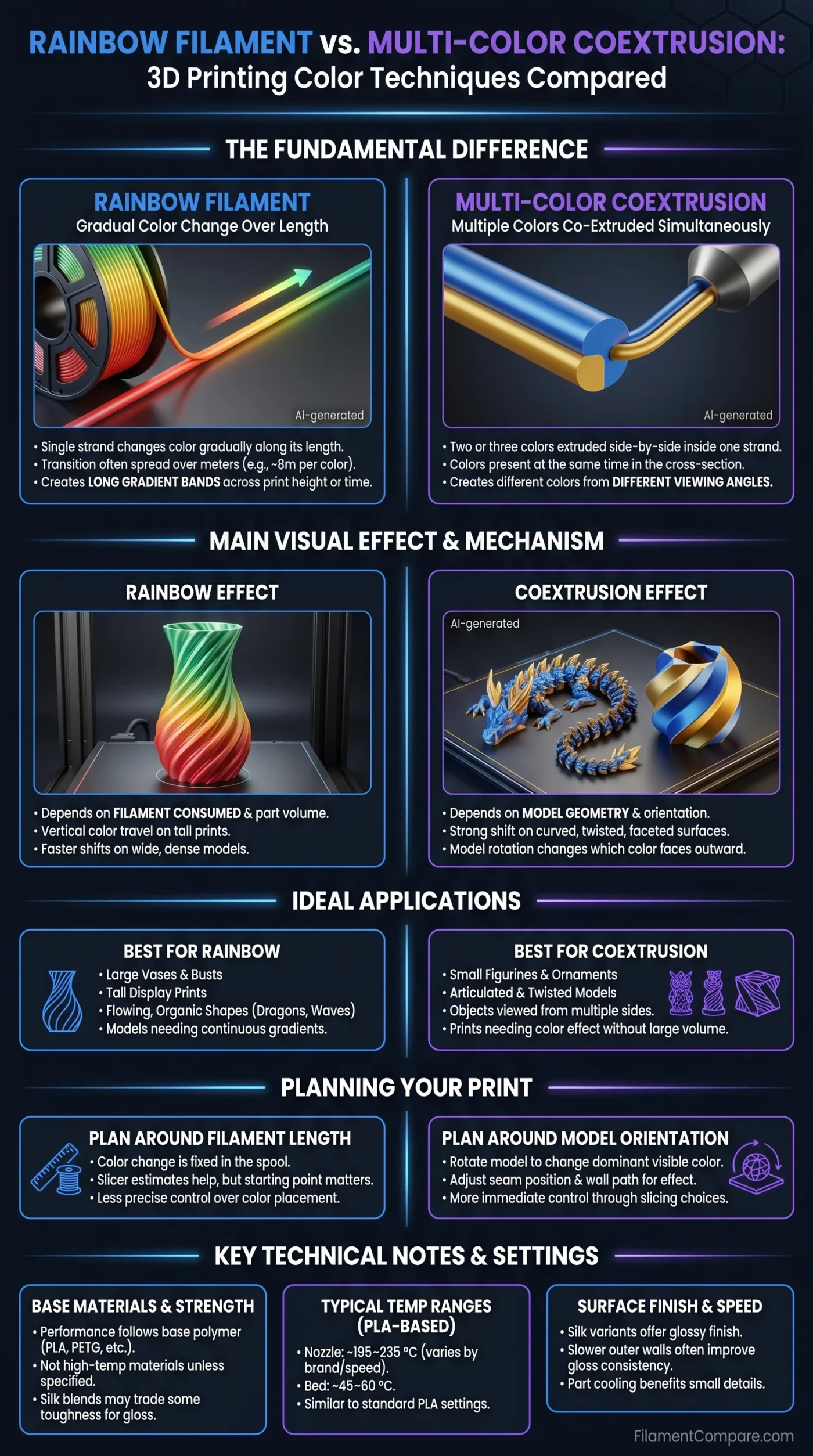
| Comparison Point | Rainbow Filament | Multi-Color Coextrusion |
|---|---|---|
| Color Structure | One filament strand changes color gradually along its length. The color transition is usually spread over meters of filament. | Two or three colors are extruded side by side inside the same 1.75 mm strand, creating a split-color cross-section. |
| Main Visual Effect | Produces long gradient bands, often moving from one color to another across print height or print time. | Produces different colors from different viewing angles, especially on curved, twisted, or faceted models. |
| Typical Materials | Most common in PLA, silk PLA, PLA+, and PETG rainbow blends. | Most common in dual-color silk PLA, tri-color silk PLA, and “magic” PLA-style aesthetic blends. |
| Color Change Distance | Often measured by color cycle length. Some rainbow PLA products list about 8 m per color transition or similar values, depending on the product line.[a] | Color is present at the same time in the filament cross-section, so the model can show two or three tones on the same layer. |
| Best Model Size | Medium to large prints show the gradient more clearly because more filament is consumed. | Small to large prints can show the effect, as the color shift depends more on geometry and nozzle path than total filament used. |
| Layer Direction Effect | Strong. Tall prints often show vertical color travel; wide flat prints may use more filament per layer and shift faster across the model. | Strong, but in another way. The orientation of the seam, wall path, and model rotation changes which color faces outward. |
| Mechanical Behavior | Usually follows the base polymer, such as PLA or PETG. Silk versions may behave differently from standard matte PLA. | Also follows the base polymer, but glossy silk blends may prefer slower outer walls for a cleaner surface. |
| Typical Nozzle Temperature Range | Rainbow PLA and silk rainbow PLA products commonly sit around 195–235 °C, depending on speed and brand settings.[b] | Dual-color silk PLA products can use PLA-like settings; one official product lists 190–230 °C extruder temperature and 45–60 °C bed temperature.[c] |
| Design Control | More predictable when the slicer estimates filament usage and the model consumes enough material to reach the next color. | More controllable through model rotation, outer wall order, seam position, and curved geometry. |
| Best Use Cases | Vases, dragons, busts, decorative containers, spiral models, lampshades, and tall display prints. | Figurines, ornaments, nameplates, articulated models, spiral vases, and objects meant to be viewed from several sides. |
This comparison reads rainbow filament and multi-color coextrusion as color-technique categories, using manufacturer datasheets and trusted support references as anchors; real print behavior still changes with brand formula, slicer path, model volume, nozzle size, and printer tuning.
Rainbow filament and multi-color coextrusion both solve the same problem: they add color without a tool changer, purge tower, painting step, or manual filament swap. The difference is simple. Rainbow filament changes color along the spool. Coextrusion places multiple colors inside one filament strand at the same time. That one manufacturing difference changes almost everything about the final print.
One technique is about time and filament length. The other is about viewing angle. Rainbow filament rewards models that consume enough material to travel through the gradient. Multi-color coextrusion rewards shapes that expose different sides of the strand as the nozzle moves around the model.
How Rainbow Filament Creates Color
Rainbow filament is usually a single thermoplastic base, such as PLA, PLA+, silk PLA, or PETG, with colorant changing gradually along the filament length. The printer does not know it is printing a rainbow filament. It simply melts whatever color reaches the hotend at that moment.
The result depends on filament consumed, not only model height. A tall narrow vase may show slow vertical color movement. A wide model with thick walls, dense infill, and many top layers may move through the same color sequence faster. Two models with the same height can look very different. That catches many users by surprise.
Some rainbow products use shorter color cycles, while others use long transitions. A shorter cycle can show more color change on smaller prints. A long cycle gives softer, slower gradients and may need a larger object to reveal the full color range.
What Controls the Rainbow Effect?
- Color cycle length: shorter cycles show color changes sooner; longer cycles look smoother on large prints.
- Part volume: thicker walls, higher infill, and larger models consume more filament.
- Layer height: lower layer heights use more layers, but not always more material; the model’s volume still matters most.
- Spool starting point: the first visible color depends on where the filament begins on the spool.
- Print order: multiple parts printed one at a time may receive different color sections than parts printed together.
How Multi-Color Coextrusion Creates Color
Multi-color coextrusion is different. Instead of changing color slowly down the spool, it combines two or three colored melt streams into one filament strand. The final filament may look split in half, divided into thirds, or arranged with a dominant color and a secondary color line.
When that strand enters the hotend, the colors melt together only at the boundary area. They do not fully mix into one uniform shade. The nozzle lays down a bead where one side may be gold, the other side blue, and another side pink in tri-color versions. Rotate the printed part, and the color can appear to shift. Geometry matters a lot here.
Dual-color and tri-color silk PLA are common examples. One official dual-color PLA product describes the effect as a model showing different colors from different angles, and also lists PLA-style printing values such as 1.75 mm diameter, 1 kg spool weight, and 190–230 °C extruder temperature.[d]
Useful detail: coextrusion is not the same as automatic multi-material printing. A printer with one nozzle still prints one filament. The color effect comes from the strand’s cross-section, not from the slicer selecting separate colors for separate model regions.
Visual Difference in Real Prints
Rainbow filament is easiest to understand when the model is viewed from bottom to top. The print may start in red, move into orange, then yellow, then green. The exact order depends on the spool. The color transition can feel smooth and layered, especially on continuous vase-mode shapes.
Multi-color coextrusion is more directional. A dragon tail, twisted vase, or rounded character may show one color on the left side and another on the right side. Turn it slightly. The color changes. This makes coextrusion useful for objects that will be handled or seen from multiple angles.
| Model Geometry | Rainbow Filament Result | Coextrusion Result |
|---|---|---|
| Tall Vase | Clear vertical gradient if the print consumes enough filament. | Strong side-to-side color shift, especially in spiral vase mode. |
| Small Figurine | May show only one or two colors if the rainbow cycle is long. | Can show multiple colors even on a small part if curved surfaces face different directions. |
| Flat Nameplate | Color may shift across print time, but the face may not show a dramatic rainbow. | Can show split colors on letters, edges, and bevels; orientation is very noticeable. |
| Wide Bowl | Uses more filament per layer, so the gradient may progress faster. | Outer wall direction and seam placement affect which color dominates the visible surface. |
| Articulated Model | Different segments may land in different gradient zones. | Each segment may show angle-based color changes, making motion more visible. |
Print Settings: Similar Base, Different Priorities
Most rainbow and coextruded color-effect filaments use familiar PLA-style or PETG-style settings. That does not mean every spool prints the same. Pigments, silk additives, gloss modifiers, and brand formulas change flow behavior. The safest technical reading is this: match the base material first, then tune for the surface effect.
Nozzle Temperature
Rainbow PLA and silk PLA often print in the same general temperature zone as ordinary PLA. Product pages commonly list ranges around 190–235 °C. For example, one rainbow PLA line lists different ranges for PLA Rainbow, Transparent PLA Rainbow, and PLA+ Silk Rainbow, with values shifting by material type and speed.[e]
Coextruded silk PLA also sits in a PLA-like range, but the visible finish may improve with controlled outer-wall speed. Slower outer walls can help the glossy surface look smoother and more even. Fast printing can still work on tuned machines, yet the visual effect is often less refined when the outer wall is pushed too hard.
Bed Temperature
For PLA-based rainbow and coextrusion products, common heated-bed ranges sit around 45–60 °C. One official dual-color silk PLA page lists 45–60 °C, while a rainbow filament product page lists 50–60 °C for heated-bed use. That is a practical overlap, not a universal law.
Cooling and Outer Walls
PLA color-effect filaments usually benefit from part cooling, especially for small details, overhangs, and clean corners. Silk finishes can look better when the outer wall has enough time to settle. Too much speed on a shiny filament may reduce gloss consistency. Small change, visible result.
Strength, Heat Resistance, and Surface Finish
The color technique itself is not the main strength category. The base polymer matters more. PLA rainbow should be compared with PLA. PETG rainbow should be compared with PETG. Dual-color silk PLA should be compared with other silk PLA blends, not with engineering materials.
Standard PLA reference data helps set expectations. PolyTerra PLA, for example, lists heat deflection values around 52 °C at 1.8 MPa and 58 °C at 0.45 MPa, using ISO 75 test references.[f] A color-effect PLA part should not be treated as a high-temperature part unless the exact datasheet says so.
Silk PLA blends can trade some practical toughness for gloss and visual depth, depending on formula and print settings. That is not a flaw. It is a material choice. A display model, lamp shade, decorative case, or shelf piece often benefits more from surface quality and color movement than from maximum load capacity.
- For display prints
- Rainbow PLA and coextruded silk PLA are both strong choices when the model is mainly decorative.
- For warm environments
- Check the base polymer and datasheet. Colorful PLA effects do not automatically raise heat resistance.
- For functional clips and brackets
- Use the same judgment used for normal PLA or PETG: layer direction, wall count, infill, and temperature exposure matter more than color style.
- For glossy parts
- Silk versions can give a smoother, shinier surface, especially with slower outer walls and stable cooling.
Control and Predictability
Rainbow filament is less direct when a user wants a specific color on a specific feature. The printer cannot choose the next color. It receives the color that arrives from the spool. Slicer previews may estimate filament length, but the spool’s starting position and transition length still decide much of the result.
Manual color changes are more controlled when the goal is a planned layer boundary. PrusaSlicer, for instance, lets users schedule a filament change at a chosen layer and inserts a color-change command so the printer pauses for the swap.[g] Rainbow filament is different because the transition is already built into the spool.
Coextrusion gives more control through physical orientation. Rotate the model on the build plate, and the dominant visible color can change. Move the seam, change wall order, or alter the outer wall direction, and the color split may land in a new place. It is not pixel-level control, but it is more immediate than waiting for a rainbow spool to reach the next color.
When Rainbow Filament Is the Better Fit
Rainbow filament fits models where the color journey is part of the object. Tall prints, flowing surfaces, and single-piece display models can use the gradient naturally. The best results often come from shapes that do not need exact color placement.
- Vase-mode prints: smooth vertical transitions can look clean and continuous.
- Large decorative models: enough filament is used to reveal more of the spool’s color sequence.
- Organic shapes: dragons, plants, waves, shells, and sculptures handle gradual color movement well.
- Single-object prints: the gradient reads as one connected visual effect.
- Low-intervention color: no filament swap, no purge tower, no multi-material setup.
Rainbow filament is also useful when each print can be slightly different. Start at another point on the spool, scale the model, or change infill, and the color layout changes. For decorative work, that variation can feel natural.
When Multi-Color Coextrusion Is the Better Fit
Multi-color coextrusion fits models that need a color effect even when they are small. Since the colors are present in the filament at the same time, a small figure can still show two or three tones. The print does not need to consume half a spool to reach the next shade.
- Curved characters: faces, tails, wings, and rounded features show angle-based color changes well.
- Twisted vases: rotating surfaces expose different sides of the extruded filament path.
- Desk ornaments: the color shift appears when the viewer moves around the object.
- Lettering and signs: bevels and raised details can catch different color bands.
- Small prints: the effect appears without relying on long filament consumption.
Coextrusion is especially interesting when the model is viewed from many directions. A flat front-only part may not show the full effect. A curved part often does.
Color Planning: Filament Length vs Model Orientation
The biggest planning difference is easy to remember. With rainbow filament, plan around filament length. With coextrusion, plan around model orientation.
| Planning Question | Rainbow Filament | Multi-Color Coextrusion |
|---|---|---|
| Can I place red on one exact detail? | Not reliably without cutting, measuring, or manually managing spool position. | Not as a separate region, but model rotation may make one side show more red. |
| Can a small print show many colors? | Only if the color cycle is short or the print consumes enough material. | Yes, if the geometry exposes multiple sides of the strand. |
| Does infill affect the color? | Yes. More infill uses more filament and can move the print further through the gradient. | Less directly. Outer wall path and orientation affect visible color more. |
| Does rotating the model matter? | Only mildly for the gradient, unless it changes support and material use. | Very much. Rotation can change which color appears on the main face. |
Common Print Artifacts and What They Mean
Color-effect filaments can reveal normal FDM behavior more clearly because the eye notices color changes, gloss changes, and surface direction. A seam that looks minor on matte gray PLA can become more visible on silk coextrusion. A slight under-extrusion band can interrupt a rainbow gradient.
Rainbow Banding
Rainbow banding is usually not a defect. It is the visible transition between color sections. The band can look wider or narrower depending on layer height, model volume, wall count, and the transition length in the filament.
Coextrusion Color Flips
Coextrusion may show sudden color dominance changes when the nozzle path changes direction. Corners, seams, islands, and small features can rotate the visible side of the strand. On some models, that adds character. On precise display pieces, it should be considered during model orientation.
Silk Surface Lines
Silk filaments reflect light more strongly than matte materials. Layer lines, speed changes, and flow variation can be easier to see. Slower outer walls, steady cooling, and consistent extrusion help the surface look calmer.
Material Variants: PLA, Silk PLA, PLA+, and PETG
Rainbow and coextrusion are color techniques, not single materials. The spool label still matters. PLA rainbow is usually easier to print and works well for indoor display parts. Silk PLA rainbow adds gloss and richer reflections. PETG rainbow can offer a different balance of toughness and temperature behavior, but it may need PETG-style tuning.
Coextruded products are often silk PLA because the glossy surface helps the two-color or three-color shift read more clearly. Matte coextrusion can exist, but silk versions are more common in consumer aesthetic filaments.
Simple rule: choose by base polymer first, then by color technique. A rainbow PETG and a dual-color PLA are not direct material equals, even if both are multi-color filaments.
Best Choice by Print Goal
| Print Goal | Better Match | Reason |
|---|---|---|
| Smooth gradient across a tall object | Rainbow Filament | The color changes along the spool, so tall continuous prints can show a natural vertical transition. |
| Two-tone look on a small model | Multi-Color Coextrusion | Multiple colors exist in the strand at the same time, so small parts can still show the effect. |
| Angle-shifting decorative piece | Multi-Color Coextrusion | Curves and rotating surfaces expose different sides of the extruded bead. |
| Large sculpture with changing color zones | Rainbow Filament | Large parts consume enough filament to travel through more of the rainbow cycle. |
| Predictable color on a specific layer | Manual Color Change | A planned layer swap offers more direct color placement than either passive filament technique. |
| Glossy display model | Either, if silk-based | Silk rainbow gives gradient gloss; silk coextrusion gives angle-based gloss. |
Buying Notes Without the Guesswork
The product name can be confusing. “Rainbow,” “gradient,” “magic,” “dual color,” “tri-color,” “coextrusion,” and “silk multicolor” are not always used consistently. Read the product description carefully before buying.
- If the listing says the color changes every certain number of meters, it is likely a rainbow or gradient filament.
- If the filament strand visibly has two or three colors side by side, it is likely coextruded filament.
- If the product says the model changes color when rotated, it is usually a coextrusion-style effect.
- If the product emphasizes bottom-to-top color travel, it is usually a rainbow-style effect.
- If the label says silk, expect a glossy surface and tune the outer wall for finish.
Also check diameter tolerance, recommended temperature, bed range, spool weight, and whether the product is PLA, PETG, or another base material. A pretty spool is still a technical material. The label earns its keep.
The Practical Difference
Rainbow filament is best when the print should look like it traveled through a color sequence. Multi-color coextrusion is best when the print should change as the viewer moves around it. One creates color over distance. The other creates color across the strand.
For large vases, tall sculptures, and flowing single-piece models, rainbow filament often gives the more natural effect. For small ornaments, curved figurines, and objects with many viewing angles, multi-color coextrusion usually shows color sooner and with more side-to-side movement.
Resources Used
- [a] SUNLU official rainbow filament product page, color-change distance and product variants: SUNLU Rainbow Filament
- [b] SUNLU official rainbow filament page, printing temperature and bed temperature ranges: SUNLU PLA & Silk Rainbow Filament
- [c] eSUN official PLA-Silk Magic product page, dual-color PLA settings and material data: eSUN PLA-Silk Magic
- [d] eSUN official PLA-Silk Magic page, angle-based two-color appearance and product notes: eSUN Dual Color PLA Filament
- [e] SUNLU official rainbow filament page, PLA Rainbow, Transparent PLA Rainbow, and PLA+ Silk Rainbow ranges: SUNLU Printing Parameters
- [f] Polymaker official PolyTerra PLA material data, ISO 75 heat deflection values: Polymaker PolyTerra PLA
- [g] Prusa Knowledge Base, slicer-based filament color change behavior: PrusaSlicer Color Change
