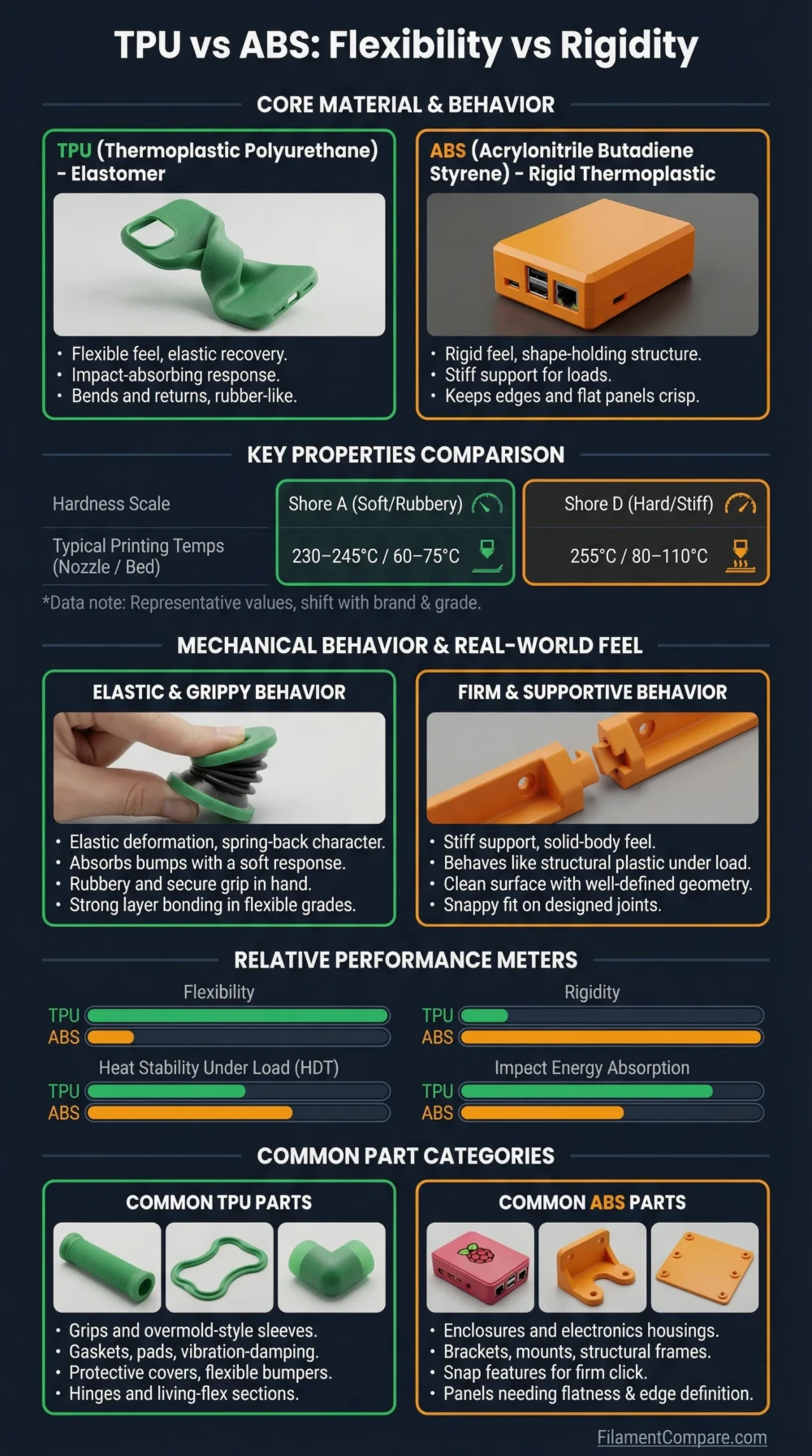
TPU is flexible, elastic, and impact-absorbing, while ABS is rigid, heat-resistant, and better suited to hard functional parts. Choose TPU when the part needs to bend, grip, cushion, seal, or survive repeated impacts. Choose ABS when the part needs a stiffer shape, better heat tolerance, sanding, acetone smoothing, or a more traditional engineering-plastic feel.
Choose TPU for flexible parts, rubber-like surfaces, protective covers, gaskets, vibration pads, soft mounts, and impact-absorbing components.
Choose ABS for rigid housings, brackets, mechanical prototypes, heat-exposed indoor parts, post-processed models, and parts that need better shape retention than flexible materials can offer.
There is no single winner here. TPU and ABS solve different design problems: one bends, the other holds shape.
Best for Flexible Parts
TPU is the natural choice for bendable, rubber-like parts that need elastic recovery.
Better for Rigid Housings
ABS keeps a firm shape better than TPU and works well for hard covers and enclosures.
Better Heat Tolerance
ABS is usually more suitable for warm indoor environments and heat-exposed prototypes.
Better Impact Absorption
TPU can deform under impact instead of cracking, making it useful for bumpers and protective parts.
Better for Post-Processing
ABS can be sanded, glued, and acetone-smoothed more easily than TPU.
Better for Low-Warp Printing
TPU usually warps less than ABS, although it needs slower feeding and careful retraction tuning.
| Property | TPU | ABS | Better Choice |
|---|---|---|---|
| Material Family | Thermoplastic polyurethane, a flexible elastomer | Acrylonitrile butadiene styrene, a rigid amorphous thermoplastic | Use-case based |
| Print Difficulty | Moderate; feeding, speed, and retraction need care | Moderate to hard; enclosure and warp control matter | Depends on printer setup |
| Typical Nozzle Temperature | Usually around 220–235 °C for TPU 95A profiles[a] | Commonly around 240–260 °C for many ABS grades[b] | Brand-dependent |
| Typical Bed Temperature | Cold to mildly heated bed, depending on brand and surface | Usually 90–110 °C for better adhesion and lower warping[c] | TPU for simpler bed heat |
| Enclosure Requirement | Usually not required, but stable airflow helps | Strongly recommended for larger parts | TPU |
| Heat Resistance | Flexible grades vary; not chosen mainly for rigid heat-loaded parts | ABS has higher heat resistance, with UltiMaker ABS reporting HDT at 0.455 MPa near 86.6 °C and glass transition near 100.5 °C[d] | ABS |
| Toughness and Impact Behavior | Excellent impact absorption and elastic deformation | Good impact resistance for a rigid plastic, but less flexible | TPU for impact absorption |
| Stiffness | Low stiffness; bends under load | Higher stiffness; holds hard shapes better | ABS |
| Layer Adhesion | Often very good because flexible materials bond strongly between layers | Can be good, but warping and cooling stress may reduce reliability | TPU |
| Moisture Sensitivity | Moisture-sensitive; dry storage helps reduce bubbling and stringing | Should be kept dry, but feeding behavior is less rubbery | Both need dry storage |
| Surface Finish | Soft, slightly rubbery, sometimes string-prone | Matte to semi-gloss, sandable, acetone-smoothable | ABS for finishing |
| Outdoor Suitability | Varies by formulation; long UV or moisture exposure needs caution | ABS lacks the UV fit of ASA and can age outdoors | Neither is ideal for long UV exposure |
| Typical Uses | Phone cases, seals, bumpers, grips, wheels, soft feet, vibration pads | Enclosures, brackets, automotive-style prototypes, housings, sanded parts | Use-case based |
| Main Limitation | Flexible feeding, slow speed, stringing, low rigidity | Warping, fumes, enclosure need, UV limits | Different limits |
This TPU vs ABS comparison uses manufacturer datasheets and technical printing guides as a baseline, but real results can shift with brand, hardness grade, color, additives, moisture, printer design, slicer settings, and part orientation.
TPU Material Profile
- Polymer type: Thermoplastic polyurethane elastomer.
- Print difficulty: Moderate, mainly because the filament is flexible and can compress in the extruder path.
- Nozzle range: Often around 220–240 °C, depending on hardness and brand.
- Bed range: Cold to 60 °C is common, with surface choice affecting adhesion.
- Enclosure: Usually not required for typical TPU parts.
- Drying need: Useful when the filament strings, bubbles, or prints with rough surfaces.
- Typical behavior: Elastic, grippy, impact-absorbing, slower to print.
- Best use cases: Seals, bumpers, protective covers, soft feet, grips, flexible hinges, vibration isolation.
ABS Material Profile
- Polymer type: Rigid amorphous thermoplastic.
- Print difficulty: Moderate to hard because cooling shrinkage can cause lifting and layer splits.
- Nozzle range: Often around 240–260 °C, with some grades printing higher.
- Bed range: Usually around 90–110 °C for stable adhesion.
- Enclosure: Recommended, especially for tall, flat, or functional parts.
- Drying need: Helpful for consistent extrusion, although enclosure control is usually the larger challenge.
- Typical behavior: Rigid, heat-tolerant, sandable, more warp-prone than TPU.
- Best use cases: Housings, brackets, prototypes, fixtures, covers, acetone-smoothed parts, indoor heat-exposed components.
Relative Printing Performance
These bars are practical printing indicators, not fixed lab ratings. Brand formula, TPU hardness, ABS blend, moisture level, color, additives, wall count, infill, print direction, and slicer setup can all change the final part.
Printability and Tuning Behavior
TPU is often easier than ABS in one area: it does not usually need a heated chamber or a very hot bed. It also tends to resist corner lifting better because flexible materials absorb some internal stress instead of pulling hard against the build plate.
The harder part is filament handling. TPU can buckle, compress, or twist in long Bowden paths. Direct-drive extruders usually give better control, but TPU can still need slower speeds, lower retraction distance, lower retraction speed, and a clean filament path. Softer TPU grades are more tuning-sensitive than firm 95A-style grades.
ABS has the opposite problem. It feeds like a normal rigid filament, but the printed part shrinks as it cools. That shrinkage can lift corners, split tall walls, and pull details out of tolerance. A warm enclosure, clean bed surface, brim, slower cooling, and stable room airflow matter more than raw nozzle temperature.
Ventilation note: ABS should be printed with sensible ventilation and printer placement. Avoid creating cold drafts around the part, because drafts can worsen warping while the print is cooling.
Flexibility, Rigidity, and Part Function
The main design question is simple: should the part bend or stay rigid? TPU is useful when deformation is part of the job. A TPU foot pad can grip a table. A TPU bumper can absorb impact. A TPU gasket can compress between two surfaces. In those jobs, ABS would usually be too stiff.
ABS is better when the part must keep a defined geometry under load. A bracket, cover, electronics housing, tool holder, or mounting plate usually benefits from stiffness. TPU may survive impact well, but it can sag, flex, or creep under continuous load. That makes it less suitable for precision brackets or parts that must keep screw alignment.
Where TPU Feels Right
- Soft contact surfaces
- Protective sleeves and bumpers
- Flexible hinges and straps
- Vibration pads and feet
- Parts that need grip instead of stiffness
Where ABS Feels Right
- Hard covers and cases
- Heat-exposed indoor parts
- Fixtures and mounting blocks
- Parts planned for sanding or smoothing
- Prototypes that need a rigid plastic feel
Heat Resistance and Shape Retention
ABS has the advantage when heat and rigidity are both required. It keeps shape better than TPU in many warm indoor applications, especially when the part is not under heavy mechanical load. That is why ABS is often used for functional prototypes, housings, and workshop parts that need more heat tolerance than PLA-like materials.
TPU can handle flexing and impact, but heat-loaded geometry is not its main strength. A flexible part may soften, deform, or lose dimensional control under warmth even if the material itself does not fail outright. For soft feet, pads, and protective covers, this may not matter. For brackets and fixtures, it often does.
For hotter environments, neither standard TPU nor standard ABS should be treated as a universal answer. High-temperature nylon, PC blends, ASA, or engineering-grade materials may be a better fit depending on UV exposure, load, and temperature.
Moisture, Storage, and Surface Quality
TPU is more likely to show moisture-related symptoms during printing. Wet TPU can string heavily, pop at the nozzle, leave rough surfaces, and reduce consistency. Drying is especially useful when the spool has been open for a while or the print needs clean walls.
ABS also benefits from dry storage, but its most visible surface problems often come from cooling stress, drafts, enclosure temperature, or bed adhesion. A dry ABS spool will not fix a cold enclosure or a lifting corner. In practice, TPU storage is more about moisture control, while ABS success is more about thermal control.
Practical Storage Difference
TPU rewards dry storage and slow extrusion tuning. ABS rewards stable chamber temperature and draft control. Both materials can print badly when stored carelessly, but the failure symptoms are different.
Surface Finish and Post-Processing
TPU surfaces can look clean, but flexible filament often shows stringing, soft edges, and small extrusion marks if retraction and travel settings are not tuned. Sanding TPU is not pleasant because the material flexes and resists cutting. It is better to print TPU close to the final desired shape.
ABS is more forgiving after printing. It can be sanded, drilled, glued, painted, and acetone-smoothed with the right safety setup. This makes ABS more useful for prototypes that need a finished surface or parts that will be fitted, modified, or assembled after printing.
| Use Case | More Suitable Material | Reason |
|---|---|---|
| Flexible phone case | TPU | Needs impact absorption, grip, and elastic recovery. |
| Rigid electronics enclosure | ABS | Holds shape better and is easier to post-process. |
| Soft machine feet | TPU | Reduces vibration and adds surface grip. |
| Heat-exposed indoor bracket | ABS | Better heat resistance and stiffness than TPU. |
| Snap-on protective bumper | TPU | Can flex around the object and absorb knocks. |
| Acetone-smoothed display prototype | ABS | ABS is more suitable for smoothing and finishing workflows. |
| Large flat plate | Usually TPU, if flexible is acceptable | ABS may warp without a controlled enclosure; TPU is not ideal if the plate must stay rigid. |
| Wheel tread or soft roller | TPU | Elasticity and wear behavior are better suited to rolling contact. |
| Mechanical fixture | ABS | Stiffness and screw-holding geometry matter more than flexibility. |
| Outdoor long-term part | Neither as first choice | ASA or UV-stabilized grades are often a better fit for long UV exposure. |
Choose TPU When
- The part must bend, stretch, compress, or recover after impact.
- You need grip, cushioning, vibration damping, or a soft contact surface.
- The design has living hinges, straps, bumpers, seals, or protective edges.
- You want lower warping than ABS and do not need a rigid final shape.
- Your printer has a controlled filament path, preferably direct drive.
TPU Is Less Suitable When
- The part must hold tight tolerances under load.
- You need a hard bracket, fixture, or enclosure wall.
- The part will be sanded, drilled, or smoothed after printing.
- Your extruder struggles with flexible filament feeding.
Choose ABS When
- The part needs a rigid engineering-plastic feel.
- Heat resistance matters more than flexibility.
- You plan to sand, glue, paint, or acetone-smooth the part.
- The print is a housing, cover, fixture, bracket, or mechanical prototype.
- Your printer has a heated bed and an enclosure or warm chamber.
ABS Is Less Suitable When
- You print in an open, drafty room without enclosure control.
- The part has a large flat base and sharp corners.
- You need rubber-like grip, compression, or repeated bending.
- Long outdoor UV exposure is a main requirement.
Choose TPU if the part must flex, absorb impact, grip a surface, cushion vibration, or act like a printed rubber component.
Choose ABS if the part must stay rigid, tolerate more heat, accept post-processing, or work as a hard functional prototype.
For printer reliability, TPU is often easier thermally but harder in filament feeding. ABS is easier to feed but harder to keep dimensionally stable without a warm, controlled print environment.
Common TPU and ABS Questions
Is TPU stronger than ABS?
Only in some strength categories. TPU is better for impact absorption, bending, and tear-resistant flexible parts. ABS is better for stiffness, hard shapes, and heat-resistant rigid components.
Is ABS harder to print than TPU?
ABS is harder thermally because it warps and benefits from an enclosure. TPU is harder mechanically because the filament is flexible and needs careful feeding, speed, and retraction settings.
Can TPU replace ABS for functional parts?
Not when the part needs stiffness. TPU can replace ABS for bumpers, soft mounts, protective covers, and flexible contact parts, but it is not a direct replacement for rigid brackets or housings.
Can ABS replace TPU?
Not for elastic parts. ABS can replace TPU only when flexibility is not required. A rigid cover may work in ABS; a gasket, wheel tread, or soft bumper usually needs TPU or another flexible material.
Which one is better for beginners?
Neither is the easiest beginner filament. TPU can work well if the printer has direct drive and the user prints slowly. ABS is better left until the printer has a heated bed, enclosure control, and good ventilation.
Resources Used
- [a] How to print with UltiMaker TPU 95A (Used for TPU 95A nozzle and bed guidance in the main comparison table.)
- [b] Ultrafuse® ABS (Used for typical ABS nozzle and heated bed ranges.)
- [c] Ultrafuse® ABS (Used for ABS bed temperature and printing condition references.)
- [d] Ultimaker ABS Technical data sheet (Used for ABS heat deflection and glass transition values.)
- Ultimaker TPU 95A Technical data sheet (Used for TPU Shore hardness, flexible material behavior, and application context.)
- ABS | Prusa Knowledge Base (Used for ABS enclosure, warping, ventilation, post-processing, and UV limitation notes.)
- TPU Printing Guide (Used for flexible filament handling, Shore hardness context, and TPU print tuning behavior.)
- Ultrafuse® TPU 95A Technical Data Sheet (Used for TPU drying and storage guidance.)
