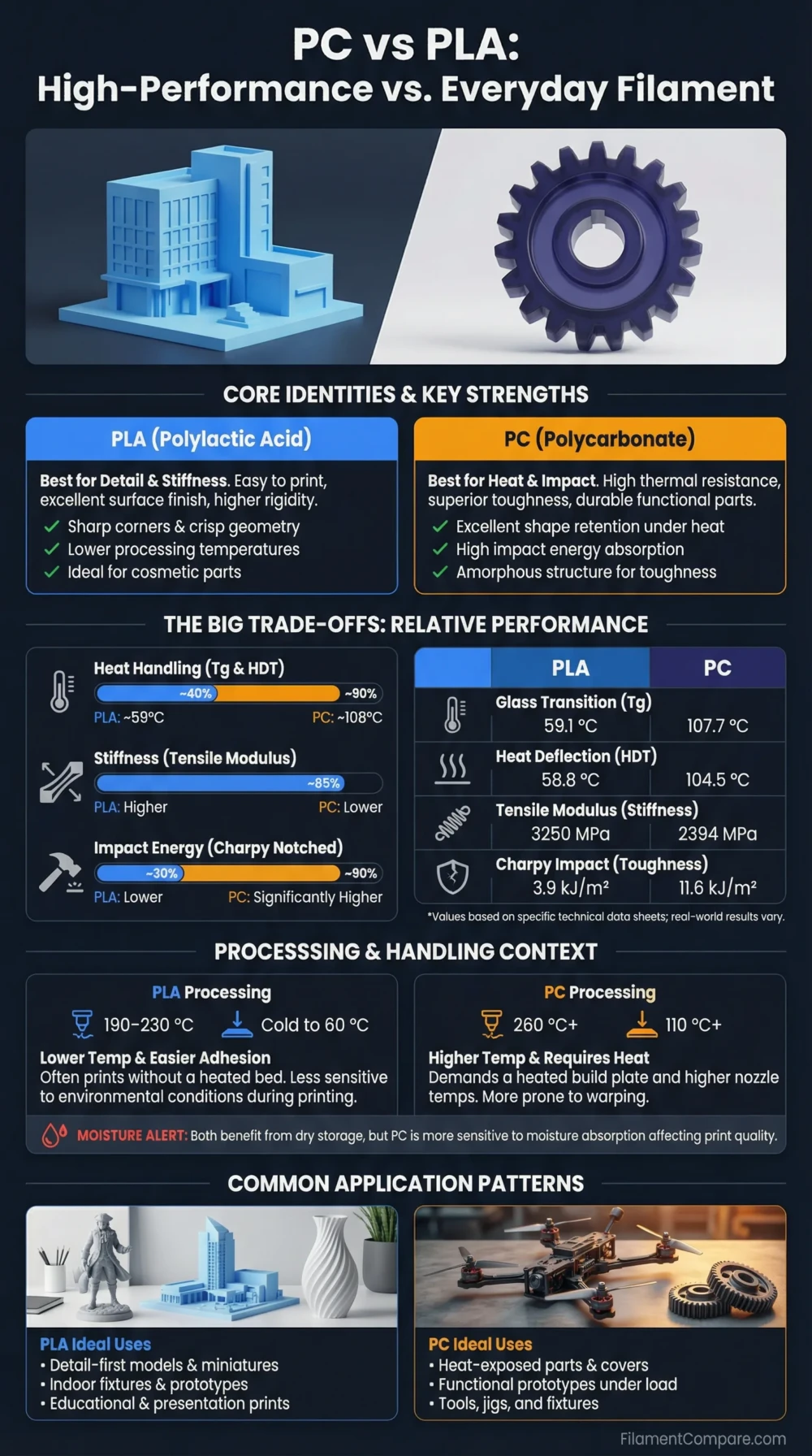
PC is much more heat-resistant and impact-tolerant than PLA, while PLA is easier to print, cleaner on open-frame printers, and better for fast visual models. PLA fits simple prototypes, display parts, and beginner workflows; PC fits demanding functional parts where toughness, higher service temperature, and load-bearing behavior matter more than convenience. The practical choice depends less on “strength” as one word and more on heat, stiffness, impact resistance, printer capability, and moisture control.
Choose PLA for easy printing, sharp detail, low warp, low printer stress, and fast prototypes that will stay away from heat and heavy mechanical load.
Choose PC for stronger functional parts, higher heat tolerance, impact resistance, and engineering prints where the printer can handle high nozzle temperature, high bed temperature, enclosure control, and drying.
Best for Beginners
PLA prints with less tuning, lower temperatures, and fewer enclosure demands.
Better for Heat Exposure
PC keeps its shape better in warm environments than standard PLA.
Better for Impact Loads
PC is usually the stronger choice for parts that may be dropped, flexed, or stressed.
Better for Fine Visual Prints
PLA offers clean detail, easy cooling, and smooth surfaces on most FDM printers.
Better for Open Printers
PLA is far more forgiving without an enclosure.
Better for Mechanical Fixtures
PC is usually more suitable for brackets, clamps, jigs, and load-bearing parts.
| Category | PC Filament | PLA Filament | Better Choice |
|---|---|---|---|
| Material Family | Polycarbonate engineering thermoplastic | Polylactic acid thermoplastic polyester, often made from renewable feedstocks | Depends on purpose |
| Print Difficulty | High; tuning-sensitive | Low; beginner-friendly | PLA |
| Typical Nozzle Temperature | Usually about 260–300°C, depending on grade[a] | Usually about 200–220°C; Prusament PLA lists 210 ± 10°C[b] | PLA for printer compatibility |
| Typical Bed Temperature | Usually about 90–115°C, grade-dependent | Usually about 40–60°C | PLA |
| Enclosure Requirement | Strongly recommended; helps reduce warp and layer stress | Usually not needed | PLA |
| Heat Resistance | Much higher; Ultimaker PC lists printed HDT around 104.5°C at 0.455 MPa[c] | Lower; PLA glass transition is commonly around 55–60°C in technical data | PC |
| Toughness | High; better impact and load tolerance when printed well | Stiff but more brittle under impact | PC |
| Stiffness | Good, with better toughness than PLA | High stiffness, but lower heat and impact tolerance | Use-case based |
| Layer Adhesion | Can be strong, but depends heavily on heat, enclosure, and dryness | Easy to bond between layers, but less heat-tolerant | Depends on print setup |
| Moisture Sensitivity | High; drying is strongly advised | Moderate; still benefits from dry storage | PLA |
| Surface Finish | Functional, slightly more tuning-dependent | Clean, sharp, and easy to make visually neat | PLA |
| Outdoor Suitability | Better than PLA for warmth, but UV stability depends on formulation | Less suitable for continuous outdoor heat and UV exposure | PC for heat, not always UV |
| Typical Uses | Jigs, fixtures, brackets, housings, tooling, protective parts | Prototypes, models, organizers, educational prints, display parts | Depends on part requirement |
| Main Limitation | Needs capable printer, dry filament, enclosure, and adhesion control | Lower heat resistance and lower impact tolerance | Different limits |
The PC and PLA comparison above is based on manufacturer technical data and established FDM printing behavior; real results still change with brand, color, additives, moisture level, slicer profile, print orientation, and part geometry.
PC Material Profile
- Polymer type: Polycarbonate engineering thermoplastic
- Print difficulty: High
- Nozzle range: Typically around 260–300°C
- Bed range: Usually around 90–115°C
- Enclosure: Strongly recommended
- Drying need: High; dry before critical prints
- Typical behavior: Tough, heat-tolerant, warp-sensitive if printed too cold or exposed to drafts
- Best use cases: Functional parts, brackets, fixtures, housings, and warmer environments
PLA Material Profile
- Polymer type: Polylactic acid thermoplastic polyester
- Print difficulty: Low
- Nozzle range: Typically around 200–220°C
- Bed range: Usually around 40–60°C
- Enclosure: Usually not required
- Drying need: Moderate; dry storage still helps surface quality
- Typical behavior: Stiff, clean-printing, low-warp, but heat-sensitive
- Best use cases: Visual models, prototypes, educational prints, desk parts, and low-stress components
Relative Printing Performance
These meters are relative FDM-use indicators, not fixed laboratory ratings. Brand formulation, drying, print orientation, wall count, infill, chamber temperature, cooling, and slicer settings can shift the result.
Printability and Printer Requirements
PLA is the easier material by a wide margin. It prints at lower temperatures, bonds to common PEI beds easily, cools quickly, and usually needs no enclosure. A basic Cartesian or bedslinger printer can produce good PLA parts with only minor tuning.
PC asks more from the machine. The hotend must safely reach high temperatures, the bed must stay hot, and the print area should be enclosed to reduce thermal contraction. Without stable chamber warmth, PC may warp, split between layers, or lift from the build plate. This does not make PC unsuitable; it makes it printer-dependent.
For PC, do not treat the filament label alone as enough information. Check the spool’s recommended nozzle range, bed range, drying instructions, and build surface guidance before using a profile from another brand.
Heat Resistance and Shape Retention
Heat is one of the clearest differences between PC and PLA. Standard PLA can soften near warm-car, sunny-window, or appliance-adjacent conditions. It may not melt, but it can creep, bend, or lose dimensional accuracy when loaded near its glass transition range.
PC is a better fit when the part must hold shape under moderate warmth. Manufacturer data for PC filaments often lists heat deflection values above standard PLA, with some PC grades around the 100°C range or higher depending on test load and formulation. That makes PC more suitable for brackets, housings, and fixtures exposed to heat, but it is still not a universal high-temperature material.
Practical Heat Rule
Use PLA for room-temperature parts. Use PC when warmth, load, and dimensional retention matter together. For very hot environments, verify the exact grade’s HDT or Vicat value instead of relying on the material name.
Mechanical Behavior: Stiffness, Toughness, and Creep
PLA feels rigid and can show high stiffness in light-duty parts. That stiffness is useful for display stands, calibration pieces, prototype housings, and models where the part should not flex much. The tradeoff is impact behavior: PLA can crack more easily when dropped or bent sharply.
PC is usually tougher. A well-printed PC part can absorb impact and mechanical stress better than PLA. It is often the better choice for clips, load-bearing housings, drill guides, tool organizers, workshop jigs, and parts that may see repeated handling. PC also handles creep under warmth better than standard PLA, although wall thickness, print orientation, and layer bonding still matter.
Moisture, Drying, and Storage
PC should be treated as a drying-required filament. Moisture can cause popping, surface defects, weak layer bonding, stringing, and inconsistent extrusion. For functional PC parts, drying before printing is not just a cosmetic step.
PLA is more forgiving, but it is not immune to moisture. Wet PLA can become brittle on the spool, string more, and leave a rougher surface. For casual prints, dry storage may be enough. For clean visual parts, dried PLA gives more consistent results.
Surface Finish and Dimensional Accuracy
PLA usually wins on surface quality. It cools well, bridges easily, preserves edges, and prints with low shrinkage. This makes it more reliable for miniatures, decorative parts, architectural models, product mockups, and dimensionally simple prototypes.
PC can produce strong and clean parts, but it is less forgiving. Corners, large flat sections, and tall parts need better thermal control. If the chamber is too cool or the first layer is not secure, PC can lift or deform. For tight tolerances, PC often needs printer-specific calibration rather than a generic profile.
Build Plate and Adhesion Behavior
PLA adheres well to common build surfaces such as smooth PEI, textured PEI, glass with a suitable interface, and many flexible plates. It is also easy to remove after cooling, which lowers the risk of damaging the part or bed.
PC needs stronger adhesion and more careful release control. Depending on the surface, glue stick or a dedicated adhesion layer may be used both to improve hold and to protect the build plate. PC can bond aggressively to some surfaces, so bed guidance from the printer or filament maker matters.
| Use Case | More Suitable Material | Reason |
|---|---|---|
| Beginner calibration prints | PLA | Lower temperature, low warp, and simple bed adhesion. |
| Visual prototypes | PLA | Clean surfaces, sharp detail, and easy repeatability. |
| Functional brackets | PC | Better toughness and higher heat tolerance. |
| Workshop jigs | PC | Handles mechanical stress and repeated use better when printed well. |
| Miniatures and display models | PLA | Good detail and easier cooling on small features. |
| Warm indoor housings | PC | Better shape retention under moderate warmth. |
| Large flat prints | PLA | Lower shrinkage and less warping. |
| Clips and snap-fit parts | PC | Better impact tolerance and less brittle behavior than standard PLA. |
| Low-cost prototyping | PLA | Cheaper, faster, and easier to print successfully. |
| Outdoor test parts | PC, with caution | Better heat fit than PLA, but UV stability depends on the exact grade. |
Choose PC When
- The part needs higher heat resistance than PLA can provide.
- Impact resistance matters more than surface perfection.
- The printer has an all-metal hotend, hot bed, and enclosure.
- The filament can be dried and stored properly.
- The part is a jig, fixture, housing, bracket, or tool-side component.
PC Is Less Suitable When
- The printer cannot safely reach the required nozzle temperature.
- The printer is open-frame and exposed to drafts.
- You need a fast, low-cost visual model.
- You cannot dry the filament before demanding prints.
Choose PLA When
- You want the easiest path to a successful print.
- The part is decorative, educational, or a room-temperature prototype.
- Sharp detail and clean surface finish matter.
- You are printing on a basic or open-frame printer.
- You want lower cost and faster iteration.
PLA Is Less Suitable When
- The part may sit in heat or direct sun.
- The part must absorb impact or repeated stress.
- The design uses thin snap-fit features under load.
- The print needs long-term dimensional stability under warmth.
Choose PLA if your priority is easy printing, low warp, clean visual quality, low cost, and fast prototyping on almost any FDM printer.
Choose PC if your priority is heat resistance, toughness, impact tolerance, and functional use, and your printer can support the higher temperature and enclosure needs.
Neither material replaces the other. PLA is the practical everyday filament; PC is the more demanding engineering option for parts that need more thermal and mechanical margin.
Common PC and PLA Questions
Is PC stronger than PLA?
PC is usually tougher and more impact-resistant than PLA, especially for functional parts. PLA can be stiff, but it is more likely to crack under sudden impact or heat-assisted stress.
Can I print PC on a normal PLA printer?
Only if the printer can safely reach the required nozzle and bed temperatures. For reliable PC printing, an all-metal hotend, heated bed, enclosure, dry filament, and suitable build surface are usually needed.
Does PLA melt in a hot car?
PLA does not need to fully melt to fail. It can soften, creep, or deform when exposed to high interior temperatures, especially if the part is under load.
Is PC good for outdoor parts?
PC is better than PLA for heat exposure, but outdoor performance also depends on UV stability, color, additives, and part design. For long UV exposure, ASA or a UV-stabilized grade may be a better fit.
Which material is better for prototypes?
PLA is better for most early prototypes because it prints quickly and easily. PC is better when the prototype must behave closer to a functional, heat-resistant end-use part.
Resources Used
- [a] Bambu Lab PC Technical Data Sheet (Used for PC print temperature range, bed temperature guidance, drying behavior, and heat deflection reference values.)
- [b] Technical datasheet – Prusament PLA by Prusa Polymers (Used for PLA nozzle temperature, heatbed range, material identification, and typical PLA glass transition data.)
- [c] Ultimaker PC Technical Data Sheet (Used for PC HDT, Vicat softening temperature, glass transition data, and general PC performance behavior.)
- [d] Prusa Knowledge Base: PLA (Used for general PLA printing behavior, recommended settings, and suitability notes for common FDM use.)
