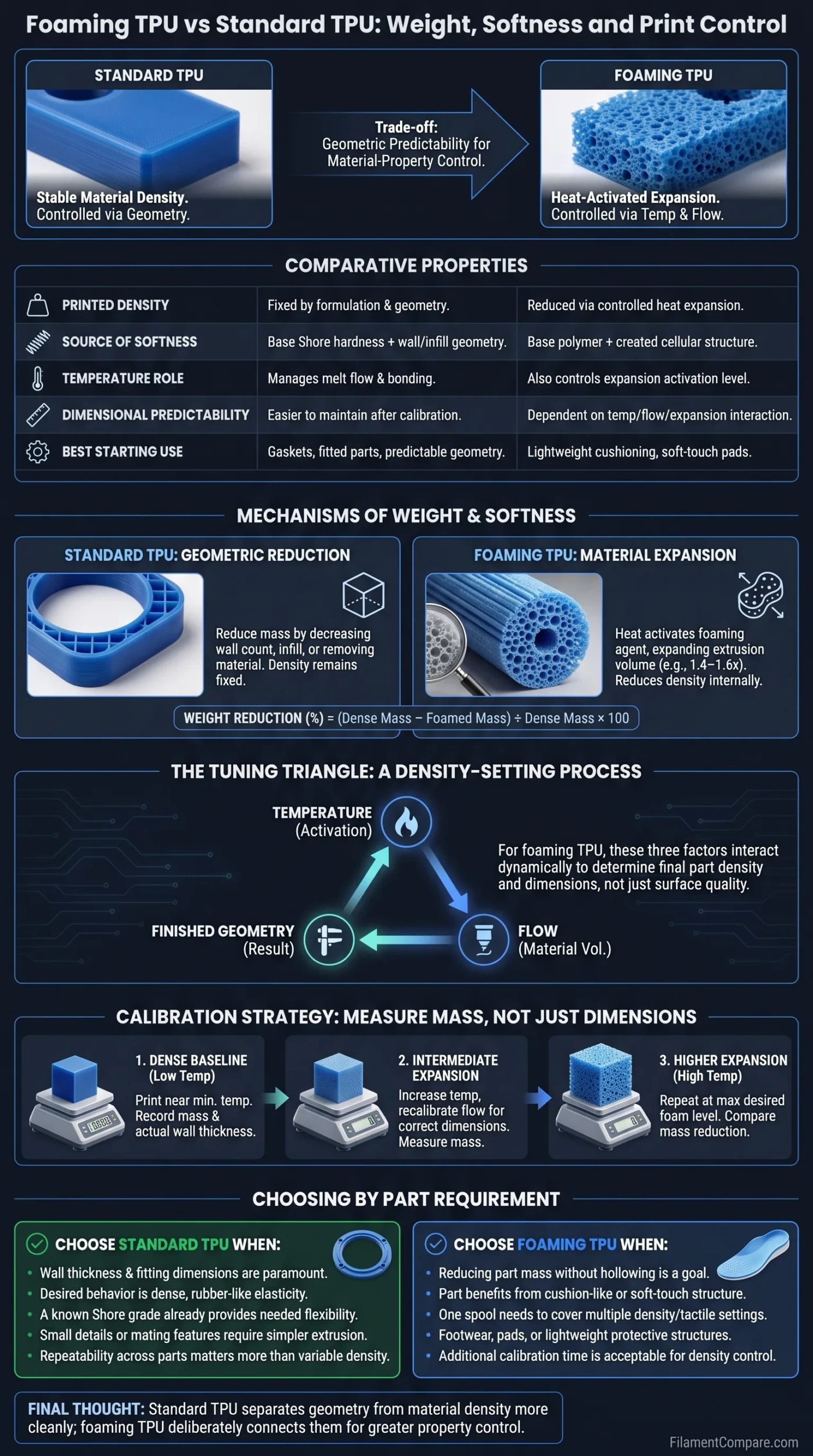
Foaming TPU and standard TPU can begin with similar flexible-polymer behavior, but they do not give the designer the same kind of control. Standard TPU keeps material density relatively stable, while foaming TPU can use heat-activated expansion to change part weight, apparent softness and extrusion volume during printing. Choose standard TPU when predictable geometry matters most; choose foaming TPU when reducing density or tuning cushioning is part of the design requirement.
What the Choice Changes
Standard TPU is the easier starting point for controlled wall thickness, mating dimensions, small features and repeatable rubber-like parts. Foaming TPU is more useful when the same spool needs to produce lighter, softer or more compressible parts by changing how much the extrusion expands.
That extra material control comes with a trade-off: temperature and flow no longer affect only melt behavior. They can also alter the printed material’s density and effective extrusion width, so a profile that produces a good-looking part is not necessarily the profile that produces the intended weight or softness.
| Decision Point | Standard TPU | Foaming TPU |
|---|---|---|
| Printed density | Primarily determined by the TPU formulation and part geometry. | Can be deliberately reduced through controlled foaming, depending on the formulation. |
| Part weight | Reduced mainly through thinner walls, lower infill or less material. | Can also be reduced by lowering the density of the extruded TPU itself. |
| Source of softness | Base Shore hardness plus wall thickness, infill and geometry. | Base polymer behavior plus a cellular structure created during foaming. |
| Temperature role | Mainly manages melt flow, bonding, surface behavior and extrusion consistency. | Can additionally control how strongly the foaming system activates. |
| Flow role | Mainly an extrusion calibration setting. | Can become part of density and expansion calibration. |
| Dimensional predictability | Usually easier to maintain after normal extrusion calibration. | More dependent on the interaction between temperature, flow and actual bead expansion. |
| Surface character | Usually denser and more rubber-like, depending on grade and settings. | Can develop a softer, matte or foam-like surface as expansion rises. |
| Stringing control | Still sensitive to TPU grade, temperature and extrusion path. | Active foaming can make ooze and stringing more difficult to separate from density tuning. |
| Profile transferability | Printer-specific tuning is still needed, but density is not normally the target variable. | A copied profile may produce a different density, softness or line width on another machine. |
| Best starting use | Gaskets, fitted flexible parts, detailed components and predictable elastic geometry. | Lightweight cushioning, soft-touch parts, footwear components, pads and density-tuned flexible structures. |
| Main limitation | Changing softness or weight usually requires another Shore grade or a geometry change. | Greater material-property control requires more calibration of the finished extrusion. |
Foaming TPU Reduces Weight Inside the Material, Not Just Inside the Model
With standard TPU, the easiest ways to reduce mass are geometric: decrease wall count, reduce infill, shorten the part or remove material from areas that do not need it. The density of the printed TPU itself remains comparatively fixed for a given formulation and processing condition.
Foaming TPU adds another route. A heat-activated foaming system expands the extrusion and creates a lower-density cellular structure. colorFabb states that varioShore TPU begins expanding between roughly 200°C and 250°C, reaching about 1.4–1.6 times its original volume under active foaming conditions. Its documentation describes lower flow rates around 60–70% as one way to compensate for that expansion.[a]
This changes what a fair weight comparison looks like. Printing standard TPU and foaming TPU at identical slicer flow settings does not necessarily produce equivalent geometry. If the foaming extrusion expands after leaving the nozzle, it may create a wider or fuller bead even though less raw filament mass is being delivered.
Compare finished geometry, not commanded flow. For a meaningful weight test, calibrate both materials so the finished parts have comparable outer dimensions and wall geometry, then compare their measured mass. Otherwise, part of the apparent weight difference may simply come from one sample being over- or under-extruded.
Foam density and infill percentage should also be treated as separate design tools. A low-infill standard TPU part contains relatively large internal voids defined by the slicer. A heavily filled foaming TPU part can instead contain many small cells throughout the extruded material. Two parts can therefore reach a similar total mass while responding differently to local compression, bending and surface pressure.
Standard TPU + Reduced Infill
- Weight reduction occurs mainly at the part-architecture level.
- Outer walls can remain dense TPU.
- Large internal voids determine much of the compressive behavior.
- Useful when shell geometry matters more than uniform low density.
Foaming TPU + Controlled Expansion
- Weight can be reduced inside the extrusion itself.
- Walls and infill can both use lower-density material.
- Cellular structure changes how the printed bead compresses.
- Useful when low mass and cushioning need to coexist in the same region.
A Softer Foamed Part Is Not the Same as Printing a Lower-Shore TPU
Softness in a printed TPU part comes from several sources that are easy to combine into one number. Shore hardness describes the material response measured under a defined hardness test, while the flexibility felt in a printed object also depends on wall thickness, infill, feature size, orientation and the way the part is loaded.
Foaming introduces another variable: cellular compressibility. A dense low-Shore TPU and a higher-Shore TPU printed into a foamed structure may both feel soft when squeezed, yet they do not need to deform or rebound in the same way. One derives more of its softness from the elastomer formulation; the other can derive additional compliance from microscopic voids in the extruded material.
Current commercial products show how wide that adjustment can be without making it a universal rule for all foaming TPU. Recreus lists Filaflex Foamy as an 82A material whose printed hardness can be adjusted down toward 60A; at 245–250°C and 60–70% flow, the manufacturer reports approximately 1.4–1.6 times volume expansion.[b] Its separate Filaflex 95 Foamy formulation starts at 95A and is specified as adjustable down toward 70A.[c]
Do not translate a foamed Shore figure directly into “the same as a standard TPU of that Shore hardness.” The measured hardness may move into a similar range, but density, cellular structure, compression response and surface character can still be different.
| Part Requirement | Low-Shore Standard TPU | Foamed Higher-Shore TPU |
|---|---|---|
| How softness is created | Primarily through the elastomer formulation. | Through the TPU formulation plus controlled cellular expansion. |
| Density | Relatively stable for the selected grade. | Can be reduced as foaming increases. |
| Compression feel | More dependent on dense rubber-like deformation and geometry. | Can become more cushion-like as cellular structure develops. |
| Weight tuning | Mostly requires geometry or infill changes. | Can also be adjusted through material expansion. |
| Dimensional tuning | Soft feedstock can itself become difficult to push accurately. | Feedstock may be firmer before the nozzle, but expansion must be calibrated after extrusion. |
| When it fits better | When dense elastomer behavior is wanted without intentional foaming. | When low density and cushioning are part of the same design target. |
This distinction also prevents an unnecessary material change. If the only goal is greater bendability and low part weight is irrelevant, choosing a genuinely softer standard TPU may be simpler than introducing an active foaming process. Foaming becomes more compelling when weight, density and tactile response need to be tuned together.
Temperature and Flow Become Density Controls
Standard TPU still needs temperature calibration, but the objective is normally familiar: achieve steady extrusion, adequate layer bonding and acceptable surface quality without excessive ooze. With foaming TPU, nozzle temperature can change the structure of the deposited material itself.
That means a temperature adjustment made to solve one printing issue may alter another physical property. Lowering temperature to reduce stringing can also reduce foaming. Raising temperature to create a lighter, softer structure can increase expansion and require a different flow setting to preserve wall dimensions.
colorFabb’s current varioShore TPU 95A printer settings illustrate how broad the processing window can be: the manufacturer lists an advised print-temperature range of 190–250°C and an advised print speed of 20–30 mm/s.[d] The wide temperature range is useful because different regions of that range can correspond to different levels of foaming rather than simply “too cold” and “hot enough.”
Flow should therefore be interpreted in context. colorFabb’s foaming support documentation discusses roughly 60–70% flow when compensating for active expansion, while its January 2026 varioShore tutorial gives 90–100% as a general flow starting point that can be adjusted for the printer and desired texture.[e]
There is no universal “foaming TPU flow percentage.” A value intended to maximize expansion, a value intended to establish stable baseline extrusion and a value calibrated for a particular slicer or printer can all be different. Use the filament manufacturer’s profile as a starting condition, then verify actual wall width and part mass.
The useful mental model is a three-way interaction:
- Temperature influences how strongly the foaming system activates.
- Flow controls how much raw material enters the extrusion while expansion changes the final deposited volume.
- Finished bead geometry shows whether the combination produces the intended wall width rather than merely a visually acceptable surface.
For standard TPU, calibrated flow can often remain a mostly geometric setting. For foaming TPU, it can become part of a density-setting process.
Expansion Trades Some Geometric Predictability for Material-Property Control
A slicer may command a particular line width, but foaming occurs after material is heated and pushed through the nozzle. The final bead can therefore depend on nozzle diameter, layer height, temperature, flow, print speed and how strongly that specific formulation expands.
This matters most around features where small dimensional errors are visible or functional: narrow slots, gasket channels, holes, snap interfaces, thin walls and parts that must mate with rigid components. Standard TPU is not dimensionally effortless, but once extrusion is stable it does not have an intentionally changing foam ratio added to the calibration problem.
Foaming TPU provides a different kind of control. Instead of only choosing geometry and Shore grade, it allows the printer settings to influence density, tactile feel and material use. The exchange is that geometric control and material-property control become more tightly coupled.
Standard TPU Gives More Direct Geometric Control
- More predictable relationship between commanded flow and deposited material volume.
- Easier starting point for fitted flexible components.
- Density does not intentionally change as part of the normal temperature strategy.
- Changing Shore hardness usually means selecting another material grade.
Foaming TPU Gives More Material-State Control
- Density can be adjusted without changing the CAD volume.
- The same spool may cover a wider range of tactile responses.
- Lower raw-material throughput can still create a full extrusion bead after expansion.
- Wall dimensions need to be checked at the chosen foam level.
Stringing exposes the same interaction. Recreus states in its Filaflex 95 Foamy printing guidance that stringing is more pronounced than with standard TPU because of the material’s foaming behavior. Its recommendations include managing travel speed, retraction and temperature while also checking actual line width when expansion is excessive.[f]
The difficulty is that reducing temperature to control ooze may also reduce the desired foam level. Retraction, travel strategy and drying therefore become useful ways to improve stringing without relying entirely on a temperature change that shifts density.
Intentional foam and moisture damage are not the same thing. Moist TPU can crackle during extrusion and produce uneven lines, pores, roughness or an unexpectedly matte surface. Recreus documents these effects in flexible filament, including reduced surface definition when moisture is present.[g] A porous-looking print should not automatically be treated as successful foaming.
Extruder layout should also be treated as grade-specific rather than as a rule attached to the word “foaming.” colorFabb states that its varioShore base TPU is about 92A and works with most standard Bowden and direct-drive extruder arrangements,[h] while very soft conventional TPUs can demand a more constrained filament path. The feed behavior before the nozzle and the softness of the finished foamed part are separate issues.
Calibrate the Finished Part Instead of Copying a Foam Profile
A normal temperature tower is useful for visual defects, but foaming TPU benefits from a test that also measures what the material became. The most informative calibration records temperature, flow, finished mass and actual extrusion dimensions together.
A Three-State Foam Calibration
- Dense or low-foam baseline: print a small repeatable specimen near the manufacturer’s low-foaming region. Record mass and actual wall thickness.
- Intermediate expansion: increase activation within the manufacturer’s permitted settings and recalibrate flow until the specimen returns to the intended dimensions.
- Higher expansion: repeat the process at the desired lightweight setting, again measuring mass rather than judging softness only by touch.
The result is a printer-specific map of temperature → flow → finished width → finished mass. That is more useful for repeat production than storing only the temperature that made the softest sample.
Mass is particularly useful because it gives a simple density proxy when the test specimens use the same geometry. If a dense calibration specimen weighs 20 g and its dimensionally matched foamed version weighs 13 g, the measured reduction is 35%. The calculation is:
Weight reduction (%) = (dense specimen mass − foamed specimen mass) ÷ dense specimen mass × 100
This measurement does not claim the filament itself became exactly 35% less dense throughout every internal feature. It tells you that, for that specific print geometry and calibrated profile, the finished part used 35% less mass.
| Observed Result | What to Check First | Why It Matters |
|---|---|---|
| Part is lighter but walls are oversized | Measure actual bead width and reduce the excess expansion rather than accepting the weight result alone. | The test is not geometrically equivalent to the standard TPU sample. |
| Part is soft but not much lighter | Check whether geometry, infill or wall flexibility is producing the softness instead of a large density reduction. | Soft feel does not prove strong foaming. |
| Surface suddenly becomes rough or porous | Check filament moisture before treating the appearance as intentional foam texture. | Wet TPU can imitate some visual symptoms of foaming. |
| Stringing rises at the lightest setting | Tune travel and retraction before making a large temperature reduction. | Temperature changes can alter both stringing and foam density. |
| Holes or slots print too small | Check actual wall expansion at the selected flow and temperature. | Extra bead width can consume dimensional clearance. |
| Another printer gives a different foam result | Repeat the mass-and-wall calibration on that machine. | Hotend behavior, extrusion path and real nozzle temperature can shift the result. |
This approach also makes production changes easier to detect. If a later print has the same outer dimensions but noticeably greater mass, the foam state or material throughput has changed even if the surface still looks acceptable.
Choosing by Part Requirement
The Better Fit by Priority
Choose foaming TPU when:
- reducing part mass without simply hollowing the model is a design objective;
- the part benefits from a cushion-like or soft-touch structure;
- one spool needs to cover multiple density or tactile settings;
- footwear components, pads, grips or lightweight protective structures can benefit from cellular TPU;
- additional calibration time is acceptable in exchange for density control.
Choose standard TPU when:
- wall thickness and fitting dimensions matter more than minimum weight;
- the desired behavior is dense, rubber-like elasticity rather than foam-like compression;
- a known Shore grade already provides the needed flexibility;
- small details, gasket channels or mating features need a simpler extrusion relationship;
- repeatability across many parts matters more than changing density from one spool.
Either can work when: the part’s flexibility comes mostly from geometry. Thin walls, compliant structures and low infill can make even relatively firm TPU parts bend easily, so foaming may add little value unless weight or compressibility also matters.
Neither choice removes the need for TPU-specific tuning. Feed-path support, moisture control, slicer settings and the formulation itself still affect print behavior. “Standard TPU” covers many Shore grades, and “foaming TPU” covers formulations with different activation windows and expansion behavior.
The practical distinction is not simply that foaming TPU is lighter and standard TPU is heavier. Standard TPU separates geometry from material density more cleanly; foaming TPU deliberately connects them. That connection is useful when the printed object’s mass, cushioning and tactile response deserve as much control as its dimensions.
Technical Sources and Documentation
- [a] VarioShore TPU – Helpcenter (Used for colorFabb’s expansion range, low-flow foaming guidance and varioShore processing behavior.)
- [b] Flexible Filaflex Foamy filament (Used for the 82A-to-60A hardness range and manufacturer-reported foaming conditions.)
- [c] Flexible Filaflex 95 Foamy filament (Used for the 95A-to-70A adjustable hardness information.)
- [d] varioShore TPU 95A Printer Settings – Helpcenter (Used for the current manufacturer print-temperature and speed ranges.)
- [e] TUTORIAL | Print with VarioShore TPU (Used to distinguish a general flow starting point from low-flow active-foaming settings.)
- [f] Flexible Filaflex 95 Foamy filament (Used for the manufacturer’s foaming-specific stringing, retraction and expansion troubleshooting guidance.)
- [g] Moisture vs. Flexible Filaments: How to Protect and Dry Your TPU (Used for moisture-related crackling, uneven extrusion, porosity and surface-finish effects.)
- [h] VarioShore TPU – Helpcenter (Used for the manufacturer’s statement that its base 92A TPU works with most standard Bowden and direct-drive extruder setups.)
