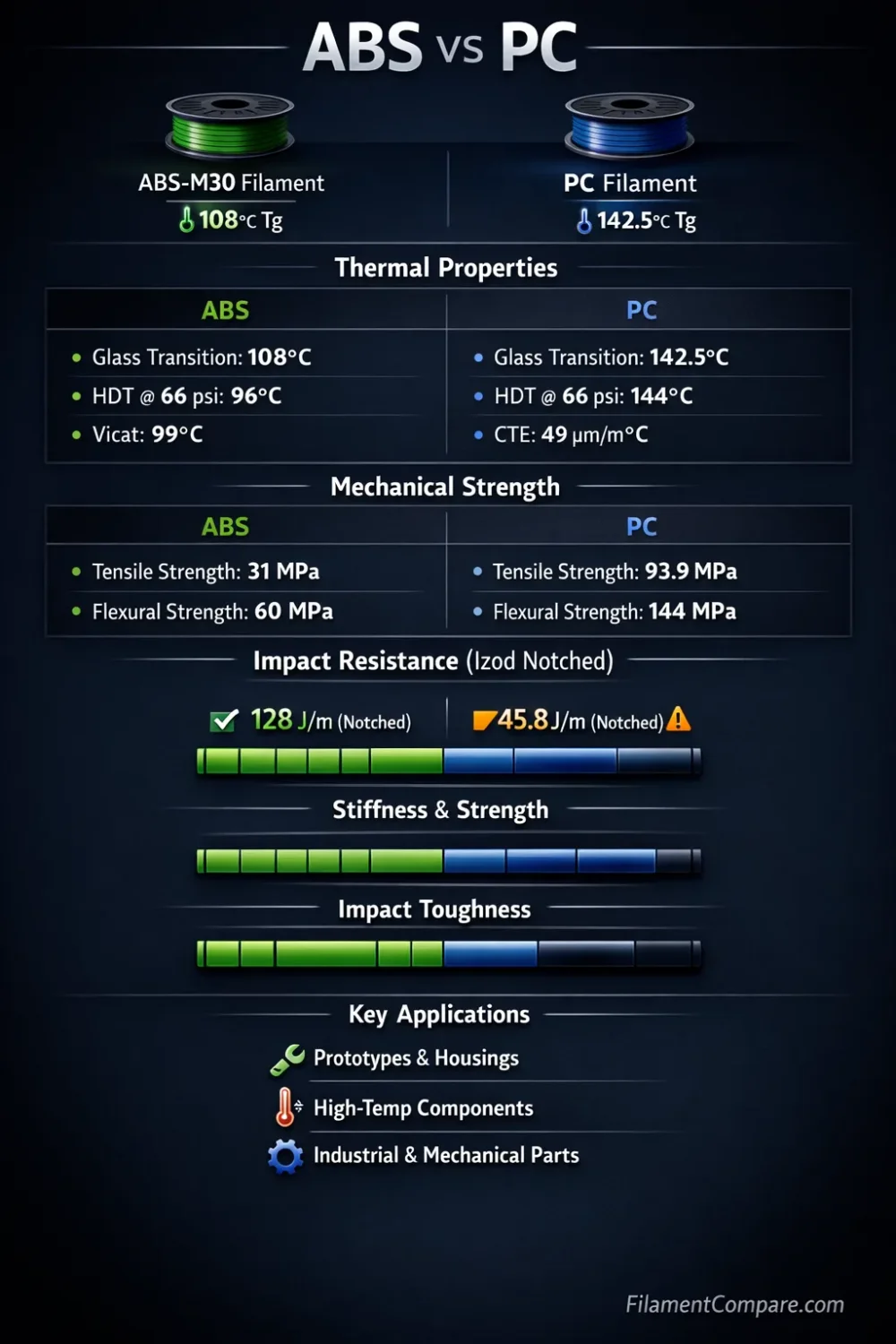
ABS is the more accessible engineering filament, while PC is aimed at parts that need higher heat retention and greater load capacity. Both materials shrink as they cool and usually need an enclosure, but PC demands a hotter, drier, and more controlled workflow. Choose ABS for cost-aware functional prints and easier finishing; choose PC when the part requirement justifies the added printer capability and tuning time.
Direct Material Verdict
Choose ABS for housings, brackets, prototypes, workshop fixtures, and parts that need a durable surface at a lower material cost. It is still an enclosure material, yet it is usually easier to source, tune, sand, bond, paint, and acetone-smooth.
Choose PC for hot-service fixtures, stiff mechanical components, protective covers, tooling, and parts that must retain shape under loads or temperatures that would push standard ABS too far. A high-temperature hotend, a hot bed, dry filament, and stable chamber conditions are normally part of the process.
Better for a First Engineering Filament
ABS — the learning curve is lower than PC when the printer already has an enclosure.
Better Heat Retention
PC — suitable grades usually keep stiffness and shape at higher temperatures.
Better for Large Functional Prototypes
ABS — still warp-prone, but generally less demanding than unmodified PC.
Better for High-Load Fixtures
PC — often offers higher tensile capacity and better performance in warm service.
Better for Sanding and Painting
ABS — easier to smooth, fill, glue, prime, and refinish.
Better for Translucent Parts
PC — natural and clear grades can transmit light, though FFF layer lines prevent glass-like clarity.
Better for a Limited Budget
ABS — usually costs less and works on more enclosed mid-temperature printers.
Better Dimensional Retention in Heat
PC — once printed correctly, it is usually the safer choice for warmer operating conditions.
| Decision Area | ABS | PC | Better Fit |
|---|---|---|---|
| Material Family | Acrylonitrile butadiene styrene | Polycarbonate or a print-modified PC formulation | Different engineering thermoplastics |
| Print Difficulty | Intermediate to advanced | Advanced | ABS |
| Typical Nozzle Temperature | About 235–265°C, brand-dependent | About 250–310°C, grade-dependent | Printer compatibility decides |
| Typical Bed Temperature | About 90–110°C | About 90–120°C | Both need a hot bed |
| Enclosure Need | Strongly recommended | Normally required; a heated chamber is helpful for larger parts | ABS is less demanding |
| Heat Resistance | Good for many workshop and indoor functional parts | Usually higher, with wide differences between PC grades | PC |
| Tensile Load Capacity | Moderate to good, depending on formulation and orientation | Often higher in comparable unfilled grades | PC |
| Impact Behavior | Tough and forgiving in many housings and prototypes | Can be very tough, but test results vary sharply by formulation | Check the exact datasheet |
| Layer Adhesion | Good with a warm chamber and low drafts | Potentially strong, but moisture and chamber temperature have a larger effect | Process-dependent |
| Warping | High on large or flat geometry | High to very high for many grades | ABS |
| Moisture Sensitivity | Moderate; dry storage improves consistency | High; drying is often needed before demanding prints | ABS |
| Surface Finish | Smooth, paint-friendly, and acetone-compatible | Clean and hard, but less convenient for solvent finishing | ABS for finishing |
| Outdoor Suitability | Limited for long UV exposure unless stabilized | Grade-dependent; use a UV-stabilized grade for exposed service | Neither by name alone |
| Typical Uses | Housings, prototypes, brackets, jigs, toys, interior parts | Tooling, hot-service fixtures, protective parts, stiff mechanical components | Use-case based |
| Main Limitation | Warping, odor, and lower service-temperature margin | High print temperature, moisture control, chamber demand, and cost | Different constraints |
| Better Choice | Accessible functional printing and easy post-processing | Higher heat and load requirements | Depends on the part requirement |
This ABS and PC comparison uses manufacturer datasheets and official material guidance to describe broad trends; actual behavior changes with resin grade, color, additives, moisture, geometry, print direction, chamber conditions, and slicer settings.
ABS and PC Material Profiles
ABS Workflow Profile
- Polymer type: amorphous terpolymer
- Print difficulty: intermediate to advanced
- Nozzle range: commonly 235–265°C
- Bed range: commonly 90–110°C
- Enclosure: strongly recommended
- Drying need: useful when the spool shows popping, rough extrusion, or weak layers
- Typical behavior: shrinks during cooling, sands cleanly, and accepts acetone smoothing
- Best use cases: housings, brackets, prototypes, fixtures, painted parts, and moderate-heat indoor components
PC Workflow Profile
- Polymer type: amorphous engineering thermoplastic, often modified for FFF
- Print difficulty: advanced
- Nozzle range: commonly 250–310°C
- Bed range: commonly 90–120°C
- Enclosure: normally required; warm chamber air helps reduce cracking
- Drying need: commonly needed before long or mechanically demanding prints
- Typical behavior: high thermal contraction, strong bed grip on some surfaces, and good shape retention after a successful print
- Best use cases: tooling, warm-service fixtures, load-bearing brackets, guards, covers, and stiff engineering parts
Relative Printing and Part Performance
ABS
PC
The meters are relative printing-use indicators rather than fixed laboratory ratings. Brand chemistry, modifiers, pigment, water content, layer direction, wall count, infill, cooling, and test method can move the result in either direction.
Printing Window and Hardware Demands
ABS can run on many enclosed printers with an all-metal or suitably rated hotend, a bed near 100°C, and good draft control. Prusa lists 255°C at the nozzle and 100°C at the bed as a starting point for its ABS guidance, with the bed adjusted across an 80–110°C range according to part size[a]. That does not make ABS easy, but it places the material within reach of more hobby and prosumer machines.
PC shifts the hardware requirement upward. Prusa’s PC guidance uses 275°C at the nozzle, 110°C for the first bed layer, and 115°C afterward[b]. Other PC formulations may ask for temperatures above that level, so the printer manufacturer’s hotend rating matters more than a generic material label.
Check the complete filament path. A nozzle capable of reaching the target temperature is not enough. The heater, thermistor, heatbreak, extruder materials, build surface, enclosure electronics, and firmware limits must all be approved for the intended temperature.
Both materials benefit from a stable enclosure, a brim on broad footprints, rounded corners, and reduced drafts. PC is less forgiving of chamber swings. A tall PC part may look secure near the bed and still split higher up if the chamber loses heat or the filament carries moisture.
Build-surface preparation also has two jobs: keeping the first layer attached and preventing excessive bonding. Some PC grades grip PEI or coated plates strongly enough to damage the surface during removal. A manufacturer-approved adhesive can act as a release layer (not only as glue), which is an easy detail to miss when moving from ABS.
Heat, Load, and Layer Direction
PC usually earns its place when the printed part must stay stiff in warmth. In UltiMaker’s printed-sample data, its PC grade records an HDT of 104.5°C at 0.455 MPa and a Vicat value of 114.7°C[c]. These numbers describe one formulation and test setup; they are not universal service limits for every PC spool.
Standard ABS has a smaller thermal margin. UltiMaker states that its ABS grade is not intended for printed-part exposure above 87°C and notes that long UV exposure can reduce part properties[d]. A different ABS grade may test higher or lower, especially after formulation changes or heat treatment.
Heat resistance is not the same as load-bearing service temperature. A bracket carrying weight can deform below a datasheet softening value, particularly when the load is constant, the walls are thin, or the force opens the layer lines. PC gives more headroom, but it is still a thermoplastic and can creep over time.
Print direction can outweigh the resin choice. FFF parts are normally weaker between layers than along continuous roads, and UltiMaker’s ABS data shows a clear drop in upright tensile and flexural results compared with flat or side orientations. The same manufacturer’s printed-sample notes explain that Z-direction results reflect interlayer adhesion. This is why a part can have good material properties yet fail when its main load peels layers apart. For a loaded hook, hinge mount, clamp, or screw boss, rotate the part so the main force does not peel layers apart.
Why the Material Name Is Not Enough
A same-brand example shows why impact claims need context. Polymaker’s PolyLite ABS lists a typical X–Y tensile strength of 33.3 MPa, a Charpy impact value of 12.6 kJ/m², a glass transition value of 101°C, and an 80°C drying recommendation for eight hours[e].
The company’s PolyLite PC lists 62.7 MPa tensile strength, 3.4 kJ/m² Charpy impact, a 113°C glass transition value, and the same 80°C/eight-hour drying schedule[f]. In that pair, PC leads tensile and thermal values while ABS leads the listed impact test. Geometry, notching, test standard, conditioning, and formulation decide what “tougher” means.
Moisture, Surface Finish, and Post-Processing
ABS can absorb enough moisture to create rough walls, bubbles, popping, and reduced layer quality, but PC usually reacts sooner and more severely. A PC spool that looks dry may still produce a cloudy surface, fine strings, weak seams, or inconsistent extrusion during a long print. Dry storage is useful for both; active drying is more often part of the normal PC workflow.
Drying temperatures must come from the spool manufacturer. A household oven can overshoot its setting, soften the filament, deform the spool, or expose food equipment to process residue. A controlled filament dryer or a purpose-approved drying oven is the safer route.
ABS is easier to finish after printing. It sands predictably, accepts filler-primer well, and can be chemically smoothed with acetone when the work area, container, and ventilation are suitable. Chemical smoothing changes dimensions and can soften small features, so it is not a neutral cosmetic step.
PC can be sanded, machined, tapped, or painted, but solvent treatment is more grade-sensitive. Mechanical fastening, threaded inserts, and manufacturer-approved adhesives are often more repeatable than experimenting with general-purpose solvents. Transparent PC filament should be treated as light-transmitting rather than optically clear; walls, infill, moisture, and surface texture scatter light.
Large Parts, Fits, and Long-Term Service
For a small bracket, ABS and a printable PC blend may both hold tolerances well after calibration. The gap grows with part size. Long flat edges, sharp internal corners, thick-to-thin transitions, and dense infill create stress as the print cools. ABS commonly lifts at corners; PC can lift, crack, or delaminate farther from the bed.
Design changes can be more effective than adding adhesive. Use generous corner radii, even wall thickness, ribs instead of solid blocks, moderate infill, and local mouse ears or a brim. Place critical bores away from high-shrink corners, then finish them with drilling or reaming when the tolerance matters.
ABS is often the practical choice for a painted enclosure or a fixture that will be replaced as the design evolves. PC makes more sense when replacement is difficult, the part runs warm, or a higher tensile margin is needed. Neither should be selected for prolonged sunlight, chemical contact, electrical insulation, flame behavior, or food contact using the polymer name alone. Those jobs require a grade-level declaration and an application-specific review.
Filled variants are separate materials. ABS-CF, ABS-GF, PC-CF, and PC-GF usually warp less and feel stiffer, but they can lose ductility, need a wear-resistant nozzle, and produce different layer behavior from unfilled ABS or PC.
Use-Case Recommendations
| Use Case | More Suitable Material | Reason |
|---|---|---|
| Enclosed electronics housing | ABS | Lower cost, good finish, easy drilling, and straightforward painting. |
| Fixture near a warm machine | PC | Usually offers more stiffness and shape retention as temperature rises. |
| Large cosplay or prop component | ABS | Easier sanding, filling, bonding, and surface smoothing. |
| High-load mounting bracket | PC | Often provides a higher tensile margin when printed dry and oriented correctly. |
| Prototype that will be revised often | ABS | Lower spool cost and less demanding machine setup. |
| Protective translucent cover | PC | Natural or clear grades can transmit light and offer good stiffness. |
| Painted consumer-product mockup | ABS | Good surface preparation and finishing options. |
| Warm-air duct or test adapter | PC | Higher thermal margin, provided the grade and load are checked. |
| Large flat machine panel | ABS | Both are difficult, but ABS is usually easier to tune than standard PC. |
| Tight-tolerance jig | Depends | ABS is easier to calibrate; PC retains shape better in heat after printing. |
| Outdoor bracket | Neither by default | Consider ASA or a documented UV-stabilized PC grade for long exposure. |
| Carbon-fiber reinforced part | Grade-dependent | Compare the exact ABS-CF and PC-CF datasheets and use a wear-resistant nozzle. |
Where Each Material Fits Better
Choose ABS When
- The printer reaches ABS temperatures but not the chosen PC grade’s range.
- The part needs sanding, filling, painting, gluing, or acetone smoothing.
- Material cost matters across repeated prototypes or medium production runs.
- The operating temperature is moderate and confirmed for the selected grade.
- A large enclosure or housing must be printed with manageable tuning effort.
ABS Is Less Suitable When
- The part carries load near the upper temperature limit of the grade.
- Long outdoor exposure is expected without UV stabilization.
- The printer is open to room drafts or placed in an occupied area without suitable ventilation.
- The design has long flat spans and cannot tolerate corner lift or shrink compensation.
Choose PC When
- The part needs more thermal margin than standard ABS can provide.
- Higher tensile performance or stiffness in warm service is required.
- The printer has a suitably rated hotend, hot bed, enclosure, and compatible build surface.
- The spool can be dried and kept dry throughout a long print.
- The added material and process cost is justified by the service requirement.
PC Is Less Suitable When
- The hotend, build plate, or enclosure is not approved for the required temperatures.
- The part is large and the chamber cannot maintain a stable warm environment.
- Fast iteration, easy finishing, or low spool cost is the main priority.
- The material will be printed directly from humid storage without drying.
Material Selection Matrix
Choose ABS if the job is a functional indoor part, enclosure, bracket, prototype, or finished model that benefits from lower cost and easier post-processing. A controlled enclosure and ventilation are still part of a reliable setup.
Choose PC if the part must carry more load, retain shape at a higher temperature, or serve as a durable fixture where ABS has too little thermal margin. Use a specific PC datasheet to confirm the result rather than relying on the polymer name.
Use neither by default when the design needs documented UV life, flame classification, electrical compliance, food-contact approval, or resistance to a named chemical. Select a certified grade for that condition.
ABS and PC overlap, but one does not replace the other. ABS is the more practical production and prototyping material for many enclosed printers; PC is the higher-demand option for parts whose heat and load requirements justify a stricter process.
Common ABS and PC Questions
Is PC always stronger than ABS?
No. PC often has higher tensile strength and better thermal retention, but impact strength, layer adhesion, and break behavior depend on the exact grade, specimen, moisture level, and print direction.
Can ABS and PC print on an open-frame printer?
Small parts may succeed in a very stable room, but repeatable results normally require an enclosure. PC has the stronger need for warm, draft-free chamber conditions.
Does PC need a hardened nozzle?
Unfilled PC usually does not require one for abrasion control. PC-CF, PC-GF, and other fiber-filled grades normally need a wear-resistant nozzle. The nozzle must also be rated for the required temperature.
Which material is easier to glue and paint?
ABS is generally easier. It sands well, accepts common finishing systems, and has established solvent-bonding options. PC bonding is more sensitive to the grade and adhesive chemistry.
Can PC replace ABS for every hot part?
No. The load, exposure time, wall thickness, chamber history, and PC formulation still matter. For temperatures beyond printable PC grades, another polymer family or a non-printed material may be needed.
Technical References
- [a] ABS | Prusa Knowledge Base (Used for ABS starting temperatures, enclosure behavior, warping, and finishing guidance.)
- [b] Polycarbonate (PC) – Prusa Knowledge Base (Used for PC starting temperatures, build-surface guidance, and the higher print-difficulty assessment.)
- [c] Ultimaker PC Technical data sheet (Used for printed-sample HDT, Vicat, glass-transition, density, and test-condition context.)
- [d] Ultimaker ABS Technical data sheet (Used for the grade-specific temperature limitation, UV note, print-orientation discussion, and printed mechanical-property context.)
- [e] PolyLite™ ABS (Used for the same-brand ABS tensile, impact, thermal, and drying example.)
- [f] PolyLite™ PC (Used for the same-brand PC tensile, impact, thermal, and drying example.)
