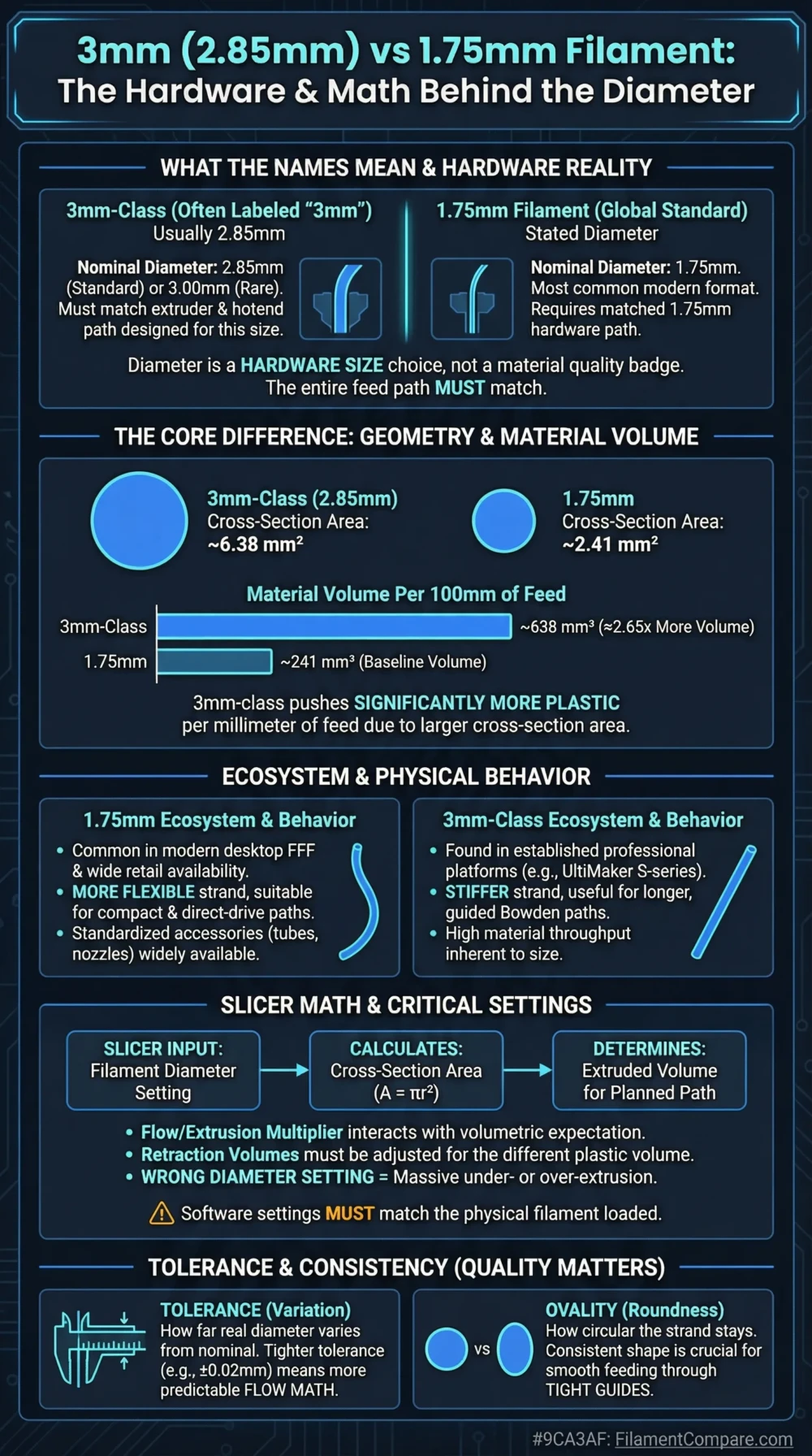
1.75 mm filament is the practical default for most modern desktop printers, while “3 mm” usually refers to the 2.85 mm standard used by a smaller but active printer ecosystem. Diameter alone does not make PLA, PETG, nylon, or another polymer stronger; it changes hardware compatibility, feed geometry, spool length, and extrusion behavior. The safest choice is the diameter your printer was designed to accept.
Choose 1.75 mm for most new desktop printers, compact direct-drive extruders, broad material availability, easier replacement-part sourcing, and a wider choice of specialty formulations.
Choose 2.85 mm when your printer, feeder, Bowden tube, hotend, and slicer profile are built around that diameter. It remains a sensible format for compatible UltiMaker machines and other purpose-built 2.85 mm systems.
Do not select filament diameter as though it were a material property. PLA at 1.75 mm and PLA at 2.85 mm can have similar finished-part properties when the formulations and print conditions match.
Best Choice by Printer and Workflow
Most New Desktop Printers
1.75 mm
It matches the feeder and hotend architecture used by most current hobby and prosumer machines.
Existing 2.85 mm Machine
2.85 mm
Staying with the native diameter avoids changing the feeder, filament path, hotend parts, sensors, and slicer configuration.
Broad Material Selection
1.75 mm
More brands, colors, composite grades, flexible materials, support filaments, and small spool options are commonly offered in this size.
Long Bowden Feed Path
2.85 mm when the system is designed for it
The thicker filament has greater column stiffness, which can help resist buckling during a long push through a matched Bowden path.
Compact Direct Drive
1.75 mm
Smaller filament paths and compact drive systems are widely available, making this diameter suitable for lightweight modern toolheads.
Lowest Conversion Risk
Use the printer’s native diameter
A diameter change is a hardware conversion, not a simple filament-profile adjustment.
Fine Extrusion Response
1.75 mm
It requires more linear filament movement for the same deposited volume, giving the drive system a wider motion range for small flow changes.
Legacy UltiMaker Workflow
2.85 mm
Compatible feeders, print cores, material profiles, and accessories are already arranged around this diameter.
1.75 mm and 3 mm Filament Comparison
| Comparison Point | 1.75 mm Filament | 3 mm / 2.85 mm Filament | Decision Effect |
|---|---|---|---|
| Nominal diameter | 1.75 mm | Usually 2.85 mm; some older stock may be labeled or manufactured as 3.00 mm | Measure uncertain stock before loading it |
| Status in the desktop market | More common across current consumer printers | Used by selected professional, legacy, and UltiMaker-oriented systems | 1.75 mm usually offers easier sourcing[a] |
| Material family | Diameter standard, not a polymer family | Diameter standard, not a polymer family | Either size may contain PLA, PETG, TPU, nylon, ABS, ASA, or another formulation |
| Printer compatibility | Requires a 1.75 mm feeder and filament path | Requires a 2.85 mm or confirmed 3.00 mm system | Not normally interchangeable |
| Cross-sectional area | About 2.41 mm² | About 6.38 mm² at 2.85 mm | 2.85 mm has about 2.65 times the cross-sectional area |
| Linear feed for equal volume | Moves about 2.65 times farther than 2.85 mm | Needs less linear travel for the same polymer volume | Slicer diameter and extrusion calibration must match |
| Typical nozzle temperature | Set by the polymer and grade | Set by the polymer and grade | Filament diameter does not define printing temperature |
| Typical bed temperature | Set by the polymer, plate, and adhesive system | Set by the polymer, plate, and adhesive system | No automatic temperature advantage |
| Enclosure need | Material-dependent | Material-dependent | ABS, ASA, PC, and nylon behavior matters more than diameter |
| Drying need | Material-dependent | Material-dependent | Moisture sensitivity comes from the polymer and additives |
| Hotend parts | Diameter-specific heatbreak, nozzle inlet, tube, and fittings may be required | Diameter-specific heatbreak, nozzle inlet, tube, and fittings may be required | Changing only the slicer value is not enough |
| Flexible filament behavior | Works well in constrained direct-drive paths | Greater column stiffness can suit a long matched Bowden path | Path clearance and feeder design remain decisive |
| Detail and layer height | Controlled mainly by nozzle diameter, motion accuracy, flow tuning, and layer settings | Controlled by the same printer variables | 1.75 mm is not automatically higher resolution |
| Availability | Usually wider brand, color, and grade selection | Narrower selection, though active product lines remain available | Check long-term supply before standardizing a print farm |
| Main limitation | Less column stiffness in long, loosely constrained feed paths | Fewer printer choices and fewer material variants in many markets | The better option depends on the complete extrusion system |
| Better general choice | Most new desktop-printer purchases | Machines already engineered for 2.85 mm | Use native hardware compatibility as the first filter |
This 1.75 mm and 3 mm assessment draws on manufacturer datasheets, official hardware documentation, and printer support material; the findings describe general diameter trends, while actual behavior can change with brand, nominal tolerance, polymer grade, color, additives, moisture, extruder design, and print settings.
Diameter Profiles
1.75 mm Filament Profile
- Type: Filament diameter standard
- Market position: Common modern desktop format
- Print difficulty: Low when used in a native 1.75 mm printer
- Nozzle temperature: Determined by polymer and formulation
- Bed temperature: Determined by polymer and build surface
- Enclosure: Material-dependent
- Drying: Material-dependent
- Feed behavior: More linear movement for each cubic millimeter extruded
- Typical hardware: Compact direct-drive or Bowden extruders with a tightly constrained 1.75 mm path
- Best fit: New hobby printers, prosumer machines, material experimentation, replacement-part availability, and mixed-brand workflows
3 mm / 2.85 mm Filament Profile
- Type: Filament diameter standard
- Market position: Selected professional and legacy format
- Print difficulty: Low when used in a matched 2.85 mm system
- Nozzle temperature: Determined by polymer and formulation
- Bed temperature: Determined by polymer and build surface
- Enclosure: Material-dependent
- Drying: Material-dependent
- Feed behavior: Lower linear travel for the same extruded volume
- Typical hardware: Larger filament channels, matching feeder gears, Bowden components, heatbreaks, and print cores
- Best fit: UltiMaker S-series workflows, compatible professional systems, and maintained legacy machines
Relative Workflow Scores
The meter values are relative workflow indicators rather than laboratory ratings. Brand tolerance, actual diameter, feeder geometry, tube clearance, polymer stiffness, additives, moisture, print speed, retraction, pressure compensation, and slicer calibration can change the outcome.
Why “3 mm” Usually Means 2.85 mm
The two labels are often treated as interchangeable, but they are not mathematically identical. In much of the FFF printer market, “3 mm filament” is the familiar name for a 2.85 mm nominal product. Prusa’s filament-diameter documentation also distinguishes 1.75 mm from 2.85 mm while noting that 2.85 mm is commonly called 3 mm.
Do not rely on the product title when dealing with an old spool, a welding rod, an industrial feedstock, or filament from an unknown supplier. A true 3.00 mm strand has a cross-sectional area of about 7.07 mm², compared with about 6.38 mm² for 2.85 mm. That difference is large enough to cause high friction or a jam in a closely fitted 2.85 mm tube, heatbreak, or nozzle inlet.
Before loading uncertain “3 mm” stock: measure several points with calipers, rotate the filament between readings, and compare the highest measurement with the printer manufacturer’s accepted diameter and tolerance. A spool that averages near 3.00 mm should not be assumed to fit a 2.85 mm system.
Feed Geometry and Extrusion Motion
Filament diameter changes how much material is contained in each millimeter of strand. Using the circular area formula A = π(d/2)², 1.75 mm filament has an area of about 2.41 mm², while 2.85 mm filament has an area of about 6.38 mm².
This means 2.85 mm filament contains about 2.65 times more material per millimeter of length. To deliver the same melt volume, a 1.75 mm feeder must move roughly 2.65 times farther. For example, a volumetric demand of 24 mm³ requires about 10 mm of 1.75 mm filament but only about 3.8 mm of 2.85 mm filament (before flow compensation).
The difference affects commanded E-axis movement, retraction behavior, pressure compensation, and how a slicer converts model volume into filament length. It does not mean that 2.85 mm automatically prints faster. Maximum output is usually restricted by the hotend’s melt capacity, nozzle geometry, heater performance, polymer, and target temperature.
What the Area Difference Changes
For equal material density and spool mass, a 1.75 mm spool contains about 2.65 times the filament length of a 2.85 mm spool. The usable polymer mass remains the same; only the strand geometry and length change.
Print Detail Comes from the Nozzle, Not the Spool Diameter
A common assumption is that 1.75 mm filament must create finer layers because the incoming strand is thinner. The filament is melted before leaving the nozzle, so the nozzle opening, extrusion width, layer height, motion system, cooling, and flow control have a more direct effect on visible detail.
A correctly configured 2.85 mm printer with a 0.4 mm nozzle can use similar extrusion widths and layer heights to a correctly configured 1.75 mm printer with a 0.4 mm nozzle. Prusa’s nozzle-profile documentation ties layer-height limits and extrusion-width settings to nozzle diameter rather than the incoming filament diameter[f].
There can still be a control difference at the feeder. Because 1.75 mm filament travels farther for the same deposited volume, each small volumetric correction corresponds to more linear motor movement. Modern geared extruders and stepper control make both diameters usable, so this advantage should not be treated as a guarantee of smoother walls or sharper corners.
Hardware Compatibility Is Diameter-Specific
The filament must be guided from the spool to the melt zone with controlled clearance. A complete extrusion path may include a spool guide, runout sensor, feeder inlet, drive gears, idler, Bowden tube, couplings, heatbreak, nozzle inlet, and automatic material station. Several of these parts are manufactured for one diameter.
E3D lists separate 1.75 mm and 2.85 mm V6 nozzle versions[b], and its V6 heatbreak range also provides diameter-specific variants[c]. Even related Bowden hardware differs: E3D documents different PTFE tube outside diameters for fittings used with 1.75 mm and 2.85 mm filament paths[d].
A larger channel is not automatically suitable for smaller filament. Excess clearance can let a flexible strand fold beside the drive gear, bend at the heatbreak entrance, or move laterally during repeated retractions. A smaller channel presents the opposite problem: 2.85 mm or 3.00 mm filament may not enter it at all.
What a Diameter Conversion Requires
Changing the filament-diameter field in a slicer only changes the volume-to-length calculation. It does not resize the physical path. A reliable conversion may require several coordinated hardware and firmware changes.
| Component | Why It Matters | Likely Action |
|---|---|---|
| Feeder body | The filament channel and idler position must constrain the selected diameter | Replace or use the manufacturer’s conversion version |
| Drive gear | Tooth profile and groove position affect grip and centering | Check diameter rating and alignment |
| Bowden tube | Inside clearance must permit movement without excessive lateral space | Install a correctly sized tube |
| Tube fittings | The fitting must accept the selected tube dimensions | Replace couplings when required |
| Runout sensor | The sensing channel or lever may be diameter-specific | Verify reliable triggering |
| Heatbreak | The cold-side bore guides filament into the melt zone | Use a diameter-matched heatbreak |
| Nozzle | The internal inlet geometry may differ even when the outlet is 0.4 mm | Use a nozzle approved for the filament diameter |
| Extruder calibration | The feeder must deliver the commanded linear movement | Recheck rotation distance, steps per millimeter, or equivalent calibration |
| Slicer filament diameter | The slicer converts required volume into filament length | Enter the measured or specified nominal diameter |
| Retraction and pressure control | Old values may represent a different displaced volume | Retune retraction and pressure advance |
| Material profiles | Existing profiles may reference the original feeder and hotend response | Create and test diameter-specific profiles |
| Multi-material equipment | Every feeder, buffer, tube, and print head must agree on diameter | Confirm the full system rather than one extruder |
A conversion should not begin unless replacement parts are available for the exact printer and hotend. Improvised drilling or oversized tubing can create unsupported gaps that are especially troublesome with TPU, TPE, and other soft filaments.
Bowden Paths and Flexible Filament
A thicker filament resists bending more strongly than a thinner strand of the same formulation. This can help 2.85 mm filament transmit pushing force through a long Bowden system, provided the feeder, tube, couplings, and hotend are all designed for it.
UltiMaker has described 2.85 mm filament as offering more control during travel through its Bowden arrangement, with the effect becoming more noticeable for flexible materials. The same manufacturer notes that 1.75 mm has practical advantages in short direct-drive paths and small extrusion movements[e].
This does not make all 2.85 mm TPU easier than all 1.75 mm TPU. Shore hardness, melt behavior, surface friction, feed speed, retraction, gear pressure, tube clearance, and the unsupported distance between the drive gear and hotend can outweigh the diameter difference. A tightly constrained 1.75 mm direct-drive extruder can handle flexible filament very well.
Material Availability and Long-Term Ownership
Availability is one of the clearest differences for a new buyer. 1.75 mm is widely used across current consumer platforms, which tends to produce more choices in color, spool size, recycled grades, matte blends, silk blends, carbon-fiber composites, glass-fiber composites, high-speed formulations, support materials, and flexible hardness levels.
Prusa identifies 1.75 mm as the more common worldwide diameter and configures its FFF printers around that size. This does not mean that 2.85 mm has disappeared. UltiMaker continues to document 2.85 mm materials and print-core combinations for supported systems[g].
For an individual machine, local supply matters more than a global count. A workshop with dependable 2.85 mm suppliers, validated profiles, stocked print cores, and several compatible machines may gain little from conversion. A new print farm choosing a shared standard will usually find 1.75 mm easier to expand across multiple printer brands.
Use-Case Recommendations
| Use Case | More Suitable Choice | Reason |
|---|---|---|
| Buying a first desktop printer | 1.75 mm | Wider printer selection, material availability, and replacement-part support |
| Using a stock Prusa, Bambu Lab, Creality, or similar 1.75 mm machine | 1.75 mm | The complete extrusion path and factory profiles already match it |
| Using a compatible UltiMaker S-series machine | 2.85 mm | The feeder, Bowden path, print cores, and material profiles are designed around it |
| Printing TPU through a long native 2.85 mm Bowden system | 2.85 mm | Greater strand stiffness can improve force transmission through the matched path |
| Printing TPU with a constrained direct-drive toolhead | 1.75 mm | Short, closely guided paths are widely available and reduce buckling space |
| Testing many specialty filament brands | 1.75 mm | More grades and spool choices are commonly stocked |
| Maintaining a reliable legacy 2.85 mm printer | 2.85 mm | Native operation is usually simpler than a full extrusion-system rebuild |
| Loading an old spool marked only “3 mm” | Measure first | It may be 2.85 mm nominal or closer to true 3.00 mm |
| High-flow printing with a large nozzle | No automatic diameter winner | Hotend melt capacity, nozzle geometry, heater power, and polymer control output |
| Seeking finer layers or miniature detail | Either native diameter | Nozzle size, layer height, cooling, and motion tuning matter more |
| Standardizing a mixed-brand print farm | Usually 1.75 mm | It is easier to share inventory across current printer models |
| Running dual extrusion with soluble support | Match the machine | Both build and support materials must fit the same feeder and print-head system |
Where Each Diameter Fits Better
Choose 1.75 mm When
- You are buying a modern consumer or prosumer desktop printer.
- You want the widest practical choice of materials, colors, and brands.
- Your printer uses a compact direct-drive extruder.
- You need easy access to hotends, sensors, gears, tubes, and replacement parts.
- You operate several printer brands and want one shared spool standard.
- You regularly test specialty, composite, recycled, decorative, or flexible grades.
- You are rebuilding a legacy printer and have confirmed that a complete 1.75 mm conversion kit is available.
1.75 mm Is Less Suitable When
- Your printer is a stock 2.85 mm model with no supported conversion path.
- A long Bowden route has wide unsupported gaps that allow soft filament to buckle.
- Your validated production process already depends on 2.85 mm materials and print cores.
- Changing diameter would disrupt qualified profiles, spare-part inventory, or multi-material equipment.
Choose 2.85 mm When
- Your printer manufacturer specifies 2.85 mm filament.
- The entire feeder, Bowden route, hotend, and sensor system is matched to it.
- You already have dependable suppliers for the required polymers and colors.
- You use an UltiMaker workflow with supported 2.85 mm materials and print cores.
- You print flexible materials through a long Bowden path engineered for the thicker strand.
- You maintain legacy equipment whose performance and profiles are already validated.
2.85 mm Is Less Suitable When
- You are choosing a new general-purpose desktop ecosystem from scratch.
- You need uncommon colors, experimental blends, or a wide range of composite grades.
- Local suppliers rarely stock the diameter you need.
- You want to share spools across several current 1.75 mm printers.
- The product is labeled only as “3 mm” and its actual dimensions are unknown.
Material Selection Matrix
Choose 1.75 mm if you are purchasing a new desktop printer, want broad filament availability, prefer compact direct-drive hardware, or need easier access to replacement extrusion parts.
Choose 2.85 mm if your existing printer and its complete material-handling system were built for 2.85 mm, especially when validated Bowden, dual-extrusion, print-core, or material-station workflows are already in place.
Keep the native diameter if the printer is working reliably. Moving from one diameter to the other rarely improves part strength, heat resistance, bed adhesion, or chemical resistance because those properties come mainly from the polymer, formulation, print orientation, layer bonding, moisture condition, and processing profile.
For most new buyers, 1.75 mm is the more practical ecosystem choice. For a properly supported 2.85 mm printer, the native thicker format remains technically valid and does not need replacement merely because 1.75 mm is more common.
Common 3 mm and 1.75 mm Questions
Can I Use 1.75 mm Filament in a 3 mm Printer?
Not reliably without a proper conversion. The smaller filament may move sideways in the feeder, miss the drive-gear groove, buckle in an oversized gap, or enter the hotend at an unstable angle. A conversion normally needs diameter-matched feeder, tube, heatbreak, nozzle, sensor, calibration, and slicer settings.
Can I Put 3 mm Filament in a 1.75 mm Hotend?
No. The filament is physically larger than the intended path. Forcing it can damage the feeder, tube fittings, sensor, or hotend components.
Is 3 mm Filament Actually 3.00 mm?
Often the commercial label refers to 2.85 mm nominal filament, but this should not be assumed for old or unfamiliar stock. Check the manufacturer specification and measure the strand before use.
Does 1.75 mm Filament Produce Better Detail?
Not automatically. Nozzle diameter, layer height, extrusion width, motion accuracy, cooling, polymer flow, and slicer tuning control detail more directly. Both filament diameters can produce fine prints in a correctly configured machine.
Which Diameter Makes Stronger Parts?
Neither diameter is inherently stronger after extrusion. Compare the polymer formulation, tensile behavior, stiffness, toughness, impact resistance, layer adhesion, print orientation, wall count, temperature, and moisture condition instead.
Can a Slicer Setting Convert the Printer?
No. The slicer value corrects the mathematical volume calculation, but it cannot resize the feeder channel, drive gear, Bowden tube, fittings, heatbreak, nozzle inlet, or runout sensor.
Is 2.85 mm Filament Obsolete?
No. It has a smaller market footprint, but current compatible machines, materials, print cores, and support documentation remain available. Its value depends on whether the surrounding printer ecosystem supports it.
Technical References
- [a] 1.75 mm – Glossary | Prusa Knowledge Base (Used for the distinction between 1.75 mm and 2.85 mm, the common “3 mm” naming convention, and the wider use of 1.75 mm filament.)
- [b] E3D Classics Support: V6 Nozzle (Confirms that V6 nozzles are supplied as separate 1.75 mm and 2.85 mm versions, supporting the hardware-compatibility section.)
- [c] E3D V6 HeatBreak (Used to verify that the cold-side filament guide and heatbreak are offered in diameter-specific variants.)
- [d] Embedded Bowden Coupling Clip for Metal (Documents different PTFE tube outside diameters for fittings associated with 1.75 mm and 2.85 mm filament systems.)
- [e] Ultimaker Schooling – 3D printing (Used for UltiMaker’s explanation of 2.85 mm behavior in a long Bowden system and the practical role of 1.75 mm in short direct-drive paths.)
- [f] Creating profiles for different nozzles | Prusa Knowledge Base (Supports the distinction between filament diameter and nozzle-controlled settings such as layer-height limits and extrusion width.)
- [g] Material and print core compatibility (Used to confirm the continued role of 2.85 mm materials within supported UltiMaker material and print-core combinations.)
