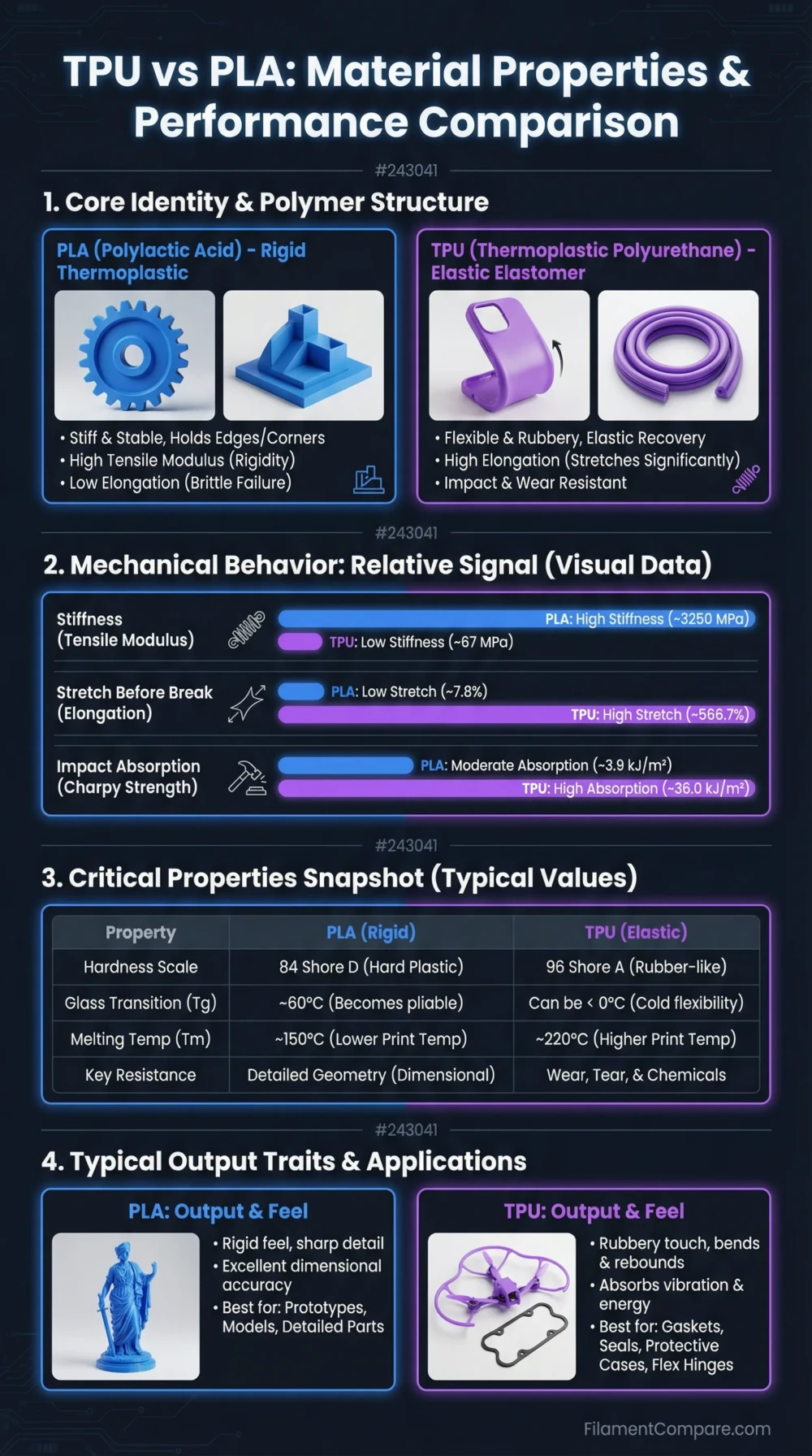
PLA is stiff, easy to print, and better for clean visual parts, while TPU is flexible, impact-absorbing, and better for parts that need to bend instead of crack. PLA is usually the safer first material for beginners; TPU asks more from the printer’s extruder, filament path, and slicer settings. The right choice depends less on raw “strength” and more on whether the part should stay rigid or deform under load.
Choose PLA for decorative models, prototypes, educational prints, dimensional accuracy, low-warp printing, and sharp surface detail. Choose TPU for gaskets, grips, protective cases, bumpers, flexible hinges, vibration damping, and parts that need repeated bending.
There is no single overall winner here. PLA and TPU solve different part problems: PLA holds shape, while TPU absorbs movement.
Best for Beginners
PLA prints with lower tuning effort, less feed-path sensitivity, and wide printer support.
Better for Flexible Parts
TPU bends, stretches, and compresses far better than PLA.
Better for Sharp Detail
PLA usually gives cleaner corners, crisper text, and neater small features.
Better for Impact Absorption
TPU is the better fit when the part needs to cushion drops, vibration, or repeated contact.
Better for Tight Tolerances
PLA is easier to control for rigid brackets, gauges, jigs, and fit-check prototypes.
Better for Wear and Grip
TPU is often used for soft feet, sleeves, tool grips, and parts that need friction.
| Property | TPU | PLA | Better Choice |
|---|---|---|---|
| Material Family | Thermoplastic polyurethane elastomer | Polylactic acid thermoplastic polyester | Use-case based |
| Print Difficulty | Moderate to advanced, especially with very soft grades | Easy on most FDM printers | PLA |
| Typical Nozzle Temperature | Usually around 220–250°C, grade-dependent | Often around 200–220°C; Prusament PLA lists 210 ± 10°C[a] | Depends on printer |
| Typical Bed Temperature | Often around 40–75°C, depending on hardness and brand | Usually around 40–60°C for many PLA grades[b] | PLA |
| Enclosure Requirement | Usually not required, but stable ambient conditions help | Usually not required | Similar |
| Heat Resistance | Better shape recovery than PLA in some flexible uses, but grade-dependent | Softens earlier in warm environments; standard PLA has a glass transition near 60°C in many datasheets[c] | Neither for high heat |
| Toughness | High impact absorption and tear resistance in many 95A-type grades | Rigid but can crack under impact or bending load | TPU |
| Stiffness | Low; designed to flex | High; holds geometry well | PLA |
| Layer Adhesion | Often strong, but stringing and over-extrusion can affect surface quality | Generally reliable and easy to tune | Part-dependent |
| Moisture Sensitivity | More sensitive; dry filament matters for clean extrusion | Less sensitive than TPU, though old or wet PLA can still print worse | PLA |
| Surface Finish | Soft, slightly rubber-like, often less crisp | Clean, smooth, and crisp on well-tuned printers | PLA |
| Outdoor Suitability | Usable for mild outdoor flex parts with the right grade, but long UV exposure can still matter | Less suitable for warm or long-term outdoor parts | Grade-dependent |
| Typical Uses | Phone cases, gaskets, bumpers, seals, grips, soft feet, protective sleeves | Models, prototypes, miniatures, organizers, fixtures, educational parts | Use-case based |
| Main Limitation | Feeding, stringing, slow speed, moisture, and flexible-part tuning | Low heat tolerance and limited bending durability | Different limits |
This TPU and PLA comparison is based on manufacturer datasheets, material guides, and common FDM printing behavior; real results can shift with brand, hardness grade, color, additives, moisture level, slicer settings, and part orientation.
TPU Material Profile
- Polymer type: Thermoplastic polyurethane elastomer
- Print difficulty: Moderate; softer grades are more feed-sensitive
- Nozzle range: Usually about 220–250°C, brand-dependent
- Bed range: Commonly 40–75°C, depending on part size and surface
- Enclosure: Usually not needed for standard flexible prints
- Drying need: More important than with PLA; wet TPU can string and bubble
- Typical behavior: Flexible, tough, grippy, and slower to print
- Best use cases: Bumpers, seals, cases, soft mounts, grips, anti-slip feet
PLA Material Profile
- Polymer type: Bio-based thermoplastic polyester in many commercial formulations
- Print difficulty: Easy; suitable for most entry-level FDM printers
- Nozzle range: Usually about 200–220°C, grade-dependent
- Bed range: Commonly 40–60°C, with some printers using no heated bed
- Enclosure: Usually not needed
- Drying need: Lower than TPU, but dry storage still improves consistency
- Typical behavior: Stiff, accurate, low-warp, and visually clean
- Best use cases: Display models, prototypes, miniatures, organizers, jigs, learning prints
Relative Printing Performance
These bars are practical print-use indicators, not fixed lab ratings. Brand, additives, color, Shore hardness, filament dryness, print orientation, and slicer choices can change the final part behavior.
Printability and Tuning
PLA is one of the easiest FDM materials to print because it is stiff as a filament, feeds cleanly through most extruders, sticks to many common build surfaces, and does not usually need an enclosure. It is forgiving enough for fast setup prints, school projects, calibration models, and visual prototypes.
TPU is different before it even reaches the nozzle. The filament is soft, so it can compress, buckle, or bunch up in weak feed paths. Direct-drive extruders usually handle TPU better than long Bowden systems, especially with softer grades such as 85A or 90A. A 95A TPU is still flexible, but it is normally easier to feed than very soft TPU.
For TPU, slower speed is not only about surface quality. It gives the extruder more control over a springy filament. Retraction often needs to be reduced, travel moves should be tuned carefully, and dry filament matters because moisture can turn clean TPU into a stringy print with rougher walls.
Printer Setup Difference
PLA can often be printed with a basic stock profile. TPU usually benefits from a direct-drive extruder, low-to-moderate speed, short retractions, good spool path control, and a dry spool. The harder the TPU grade, the closer it feels to normal filament feeding; the softer the grade, the more careful the setup needs to be.
Rigidity, Flexibility, and Part Strength
PLA is strong in the sense that it is stiff and holds a designed shape well. That makes it useful for fixtures, display parts, brackets with light loading, dimension checks, and prototypes where the part should not bend. Its limitation is that stiffness can become brittleness under impact, snap-fit stress, or repeated flexing.
TPU is strong in a different way. It is not chosen for rigid load-bearing geometry; it is chosen because it can deform and recover. A TPU bumper can absorb a hit, a TPU gasket can compress against a surface, and a TPU grip can add friction. For repeated bending, TPU is usually far more suitable than PLA.
This is why “which is stronger?” is the wrong first question. For stiffness, flatness, and clean geometry, PLA wins. For toughness, flex life, soft contact, and impact absorption, TPU is the better material.
Heat Resistance and Shape Retention
PLA is not the right material for warm environments where the part must keep its shape under load. Many standard PLA datasheets place the glass transition area around 60°C, which explains why thin PLA parts can soften or creep in hot rooms, sun-exposed spaces, or near warm electronics.
TPU can tolerate bending and compression better, but that does not make it a high-temperature engineering filament. Flexible grades can still soften, creep, or lose shape under heat and load. For car interiors, high-temperature brackets, lamp housings, or parts near motors, neither standard PLA nor common TPU should be treated as a safe default. PETG, ASA, PC, PA, or heat-rated specialty grades may fit better, depending on the application.
Heat note: TPU is not simply “heat-proof PLA.” It is more flexible and tougher, but high warmth plus mechanical load can still deform the part. Use datasheets for the exact filament grade when heat is part of the design requirement.
Surface Finish and Detail
PLA is usually the better choice for clean-looking prints. It handles small text, fine edges, decorative models, miniatures, and low-layer-height prints well. Matte, silk, tough, high-speed, and filled PLA variants can change the finish, but standard PLA remains one of the easiest materials for neat visual output.
TPU can print good surfaces, but the part will rarely feel as crisp as PLA. Soft filament pressure, slower extrusion response, retraction limits, and stringing can make tiny details less sharp. TPU also bends during handling, so thin decorative features may not look or feel as precise as the same geometry printed in PLA.
Moisture, Storage, and Spool Handling
TPU is more sensitive to moisture than PLA in daily printing. Wet TPU can cause popping, rough extrusion, extra stringing, duller surfaces, and weaker-looking walls. For repeatable results, TPU should be stored in a sealed container with desiccant and dried according to the filament maker’s temperature guidance.
PLA also benefits from dry storage, especially when the spool is old or the room is humid. Still, PLA is generally less demanding. For casual users, that storage difference matters: PLA can sit around longer with fewer visible problems, while TPU often rewards careful spool handling.
Outdoor and Wear Behavior
PLA is not a strong pick for long-term outdoor use. Sunlight, heat, and weather exposure can reduce reliability, especially for thin or loaded parts. It can work for short-term outdoor markers, garden labels, and non-critical pieces, but it should not be treated as a weather-focused material.
TPU can be useful outdoors when the job is grip, cushioning, or soft contact, but the exact grade matters. Long UV exposure, constant moisture, oils, and abrasion should be checked against the filament supplier’s data. For outdoor structural parts, ASA or UV-stabilized materials may be a better starting point.
| Use Case | More Suitable Material | Reason |
|---|---|---|
| Beginner calibration prints | PLA | Feeds easily, prints at moderate temperatures, and needs less tuning. |
| Display models | PLA | Better detail, sharper corners, and more finish options. |
| Phone cases | TPU | Flexible walls and impact absorption fit the part function. |
| Soft machine feet | TPU | Good grip, vibration damping, and compression behavior. |
| Dimension-check prototypes | PLA | Rigid geometry makes measurements easier to trust. |
| Gaskets and seals | TPU | Compression and flexibility are needed for surface contact. |
| Miniatures | PLA | Small details usually print cleaner than with flexible filament. |
| Protective bumpers | TPU | Absorbs knocks better than a stiff PLA part. |
| Large flat prints | PLA | Low warping and easy bed adhesion make it simpler. |
| Snap-fit prototypes | Depends | PLA works for rigid fit checks; TPU works when the snap must flex repeatedly. |
| Hot environment parts | Neither standard grade | Both need careful grade selection; heat-rated materials may be better. |
| Anti-slip grips | TPU | The rubber-like feel and friction are useful here. |
Choose TPU When
- The part must bend, compress, or stretch.
- You need impact absorption or soft contact.
- The print should act like a grip, bumper, seal, gasket, sleeve, or foot.
- You can slow the print down and tune retraction carefully.
- Your printer has a well-constrained filament path, preferably direct drive.
TPU Is Less Suitable When
- You need sharp tiny text or very crisp decorative detail.
- The part must stay rigid under load.
- Your printer has a long or poorly constrained Bowden path.
- You need fast production with minimal tuning.
- The filament cannot be kept dry.
Choose PLA When
- You want the easiest route to a clean print.
- The part should be stiff, accurate, and visually neat.
- You are printing models, miniatures, prototypes, organizers, or light-use fixtures.
- You need reliable bed adhesion without an enclosure.
- You want broad color and finish options.
PLA Is Less Suitable When
- The part needs repeated flexing.
- The print will face impact, compression, or soft-contact wear.
- The part will sit in a warm environment under load.
- Long outdoor exposure is expected.
- You need a rubber-like feel or vibration damping.
Best Settings Range
Settings vary by printer and filament brand, but the practical starting points are different enough to matter.
PLA Starting Point
- Nozzle: about 200–220°C
- Bed: about 40–60°C
- Cooling: usually high
- Speed: moderate to fast
- Retraction: normal profile usually works
TPU Starting Point
- Nozzle: about 220–250°C
- Bed: about 40–75°C
- Cooling: moderate, brand-dependent
- Speed: slow to moderate
- Retraction: shorter and lower than PLA in many profiles
Shared Setup Notes
- Use the filament maker’s profile when available.
- Dry old or stringy spools before judging print quality.
- Test with a small part before printing a full batch.
- Do not copy settings across brands without a test print.
Choose PLA if you want easy printing, crisp detail, low warping, and rigid parts that hold their shape in normal indoor conditions.
Choose TPU if the part needs flexibility, grip, impact absorption, compression, or repeated bending. TPU is the better functional choice for soft parts, but it is also more tuning-sensitive.
For a typical printer owner, PLA is the everyday material. TPU is the material to use when the design specifically needs flexible behavior.
Common TPU and PLA Questions
Is TPU stronger than PLA?
TPU is tougher and better at absorbing impact, but PLA is stiffer and better at holding a precise shape. TPU is stronger for bending and cushioning; PLA is stronger for rigid geometry and clean dimensional control.
Can a beginner print TPU?
Yes, but PLA is the easier first material. Beginners can print TPU more successfully with a direct-drive extruder, dry filament, slower speeds, and a TPU profile designed for their printer.
Does TPU need an enclosure?
Standard TPU usually does not need an enclosure. A stable room, dry spool, and controlled feed path matter more for most TPU prints.
Is PLA or TPU better for phone cases?
TPU is better for phone cases because it can flex around the device and absorb impact. PLA is too rigid for most protective case designs and may crack at thin clips or corners.
Can PLA and TPU be used in the same project?
Yes, but not always in one print. Many makers print rigid PLA parts and separate TPU pads, feet, bumpers, or sleeves, then assemble them. Multi-material printing with TPU can be harder because flexible filament feeding and purge behavior need more control.
Which one is better for outdoor prints?
Neither standard PLA nor common TPU is the best default for long outdoor exposure. TPU may suit flexible outdoor contact parts if the grade allows it, while PLA is usually less suitable for heat and sun. For long-term outdoor parts, ASA or UV-stabilized grades are often a better starting point.
Resources Used
- [a] Technical datasheet – Prusament PLA by Prusa Polymers (Used for PLA print temperature guidance and baseline PLA printing settings in the main comparison table.)
- [b] Filament Material Guide – Prusa Knowledge Base (Used for practical PLA and flexible-material printing behavior, including common bed and printer setup expectations.)
- [c] Ultimaker Tough PLA Technical data sheet (Used for PLA-family thermal reference values such as glass transition and heat-related behavior.)
- TPU 95A – Technical data sheet (Used for TPU 95A material behavior, Shore hardness context, elongation, and flexible-part application notes.)
- Flexible materials – Prusa Knowledge Base (Used for practical TPU printing ranges, difficulty notes, and bed temperature guidance.)
- TPU Printing Guide – Bambu Lab Wiki (Used for TPU feeding and printer compatibility considerations, especially flexible-filament handling.)
